Google One Tap
Descope supports adding Google One Tap to your application through FedCM using the Descope SDKs. The Descope SDKs come with a pre-wrapped FedCM component, which you can easily use to adapt Google One Tap login within your application. This guide will cover configuring your custom Google provider and implementing code within your application to utilize One Tap. This guide also covers running post-authenticated flows after a user has successfully authenticated via Google One Tap.
Note
Google One Tap requires you to have your own Google Provider configured with the Implicit grant type
enabled within Descope's configuration. The Google Provider Configuration
section below covers this configuration.
For a live demo, check out OneTap.guru and our video on adding Google One Tap to your application.
What is Google One Tap?
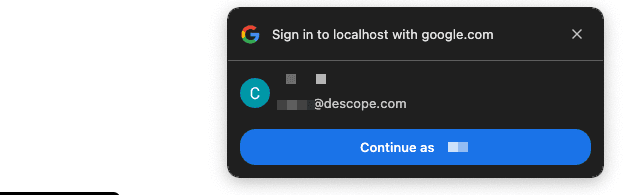
Google One Tap is a sign-in feature that allows users to log into websites or apps with just one click without remembering or entering passwords. It simplifies authentication using a secure token-based process linked to the user's Google account. This feature can be embedded into websites and apps, offering a seamless, fast login experience that reduces user friction. It's designed to improve user convenience and security by eliminating the need for repeated credential entry. Additionally, it helps businesses increase user sign-ups and engagement by minimizing barriers to entry.
Supported Browsers
Currently Google One Tap is supported on Chrome, Edge, Firefox, and Safari; however, this support is independent of Descope. To view supported One Tap browsers, see Google's Documentation
FedCM vs non-FedCM
With FedCM (Federated Credential Management), Google One Tap relies on the browser to provide user session information, and without FedCM, One Tap uses Google's Javascript library, relying on mechanisms like cookies. FedCM is supported by Chromium-based browsers, while all major browsers support the non-FedCM version. You can specify whether or not to utilize FedCM in your implementation through our customization options.
Google Provider Configuration
Google One Tap requires you to have your own Google Provider configured with the Implicit grant type
enabled within Descope's configuration. We have a thorough guide on configuring your own Google OAuth
provider here; however, the below will
expand on this configuration.
Authorized JS Origins and Redirect URIs
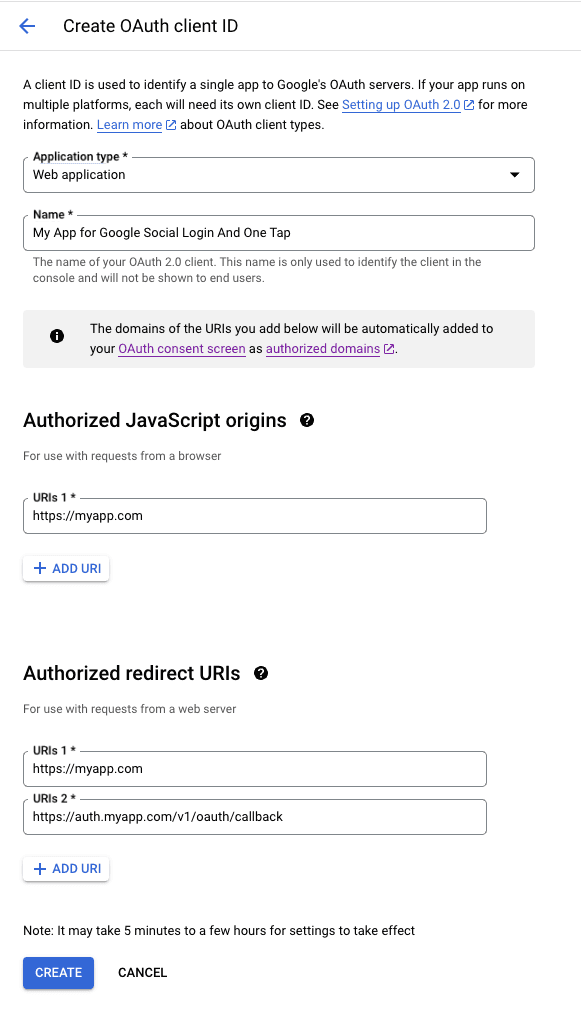
When it comes to Google One Tap and configuring your Google Client's javascript Origins and Redirect URIs, you need to ensure that you properly configure them to allow Google to allow the required bidirectional traffic for One Tap.
Per our Google Provider Configuration Guide,
we cover that you must include your application URL within the Authorized Javascript origins, which is
still applicable for One Tap. Within that guide, we also cover the Authorized redirect URIs, which
would be something like https://api.descope.com/v1/oauth/callback or your custom
domain https://auth.myapp.com/v1/oauth/callback; however, when it comes to Google One Tap, the redirect
URI will go back to your application before any further redirects to Descope's callback.
This means that when configuring your Google API Credentials for the Google provider, you'll need to
include your application URL within the Authorized redirect URIs. Below is an example assuming that
your application is on myapp.com and has a custom custom domain configured.
Implicit Grant Type
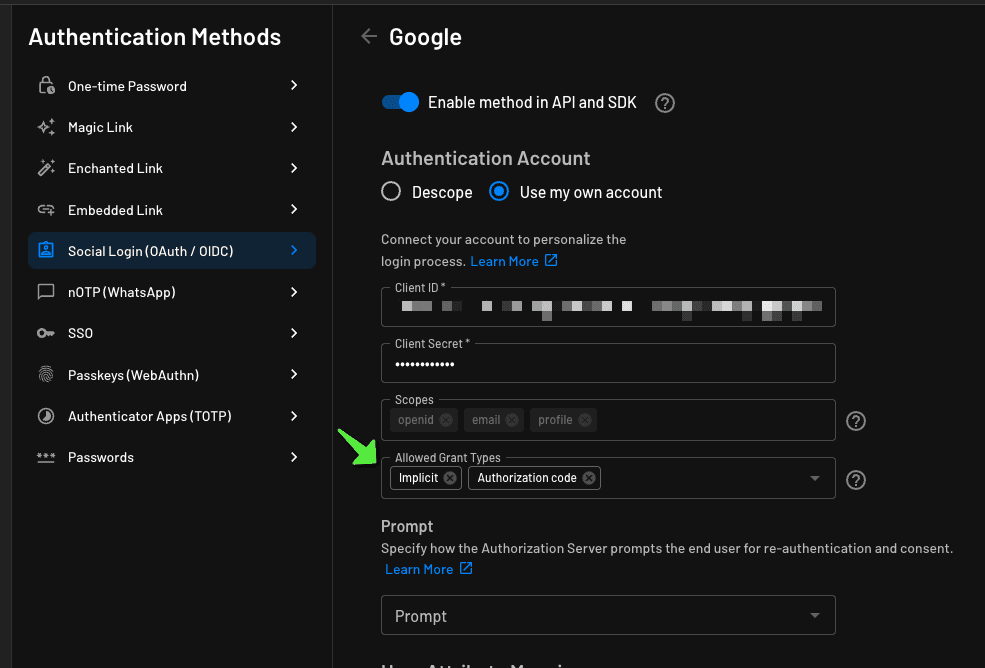
Now that you have successfully configured your Google OAuth Provider to be compatible with Google One
Tap, you will also need to make a change within the Google OAuth provider within the Descope console by
going to the OAuth Configuration page,
selecting Google, then adding the additional grant type of Implicit, and saving the configuration. An
example of this configuration can be seen below.
Implementing One Tap Component
You can implement Google One Tap easily with the Descope client SDKs.
Use the sdk.fedcm.onetap.requestAuthentication method for standard One Tap implementation.
To incorporate a post-authentication flow, use sdk.fedcm.onetap.requestExchangeCode, which returns an OAuth exchange code instead of a JWT response, allowing you to redirect to a flow before fully authenticating the user.
See our Post-Authentication section below for more details.
Customization
Customize the One Tap Component by passing in the following optional props in OneTapConfig:
auto_select: boolean on whether the user is automatically signed inprompt_parent_id: ID of the prompt parent container, used to set location of the One Tap promptcancel_on_tap_outside: boolean on whether to cancel the One Tap prompt if the user taps elsewhere on the page. Default is truecontext: modifies wording on the One Tap prompt. Context can be "signin", "signup," or "use". Default is "signin"intermediate_iframe_close_callback: callback function to handle the intermediate iframe close eventitp_support: boolean on whether to support Intelligent Tracking Protection (ITP). Default is falselogin_hint: String to skip account selection if the application knows which user should be signed inhd: allowed domain that the user can sign in withuse_fedcm_for_prompt: boolean on whether to use FedCM for the prompt. Default is false
import { BrowserRouter as Router, Routes, Route, Link } from 'react-router-dom';
import { useNavigate } from "react-router-dom";
import Home from './pages/Home';
import Dashboard from './pages/Dashboard';
import { Navigate } from 'react-router-dom';
import { Descope, AuthProvider, useDescope, useSession } from '@descope/react-sdk';
import React, { useEffect, useCallback } from 'react';
let oneTapInitialized = false;
const OneTapComp = () => {
const sdk = useDescope();
const { isAuthenticated, isSessionLoading } = useSession();
const navigate = useNavigate(); // Moved inside the component
const OneTapConfig = {};
// OneTapConfig: {
// auto_select: boolean;
// prompt_parent_id: string;
// cancel_on_tap_outside: boolean;
// context: "signup" | "signin" | "use" | undefined;
// intermediate_iframe_close_callback: any;
// itp_support: boolean;
// login_hint: string;
// hd: string;
// use_fedcm_for_prompt?: boolean;
// }
const startOneTap = useCallback(async () => {
if (oneTapInitialized) return;
await sdk.fedcm.onetap.requestAuthentication({provider: 'google', oneTapConfig: OneTapConfig});
oneTapInitialized = true;
navigate("/dashboard");
}, [sdk, router]);
// sdk.fedcm.onetap.requestAuthentication(options?: {
// provider?: string;
// oneTapConfig?: OneTapConfig;
// loginOptions?: LoginOptions;
// onSkipped?: (reason?: string) => void;
// onDismissed?: (reason?: string) => void;
// onFailed?: (error: Error) => void;
// onAuthenticated?: (response: JWTResponse) => void;
// })
useEffect(() => {
if (!isAuthenticated && !isSessionLoading) {
startOneTap();
}
}, [isAuthenticated, isSessionLoading, startOneTap]);
return null; // Render null or any necessary UI
};
function App() {
const projectId = "__ProjectID__";
return (
<AuthProvider projectId={projectId}> {/* optional for custom domain baseUrl="https://auth.myapp.com"*/}
<OneTapComp />
</AuthProvider>
);
}
export default App;'use client'
import { useDescope, useSession } from "@descope/nextjs-sdk/client";
import { useRouter } from 'next/navigation'
import { useEffect } from "react";
let oneTapInitialized = false;
const OneTapComp = () => {
const oneTap = true;
const sdk = useDescope();
const router = useRouter();
const { isAuthenticated, isSessionLoading } = useSession();
const OneTapConfig: = {};
// OneTapConfig: {
// auto_select: boolean;
// prompt_parent_id: string;
// cancel_on_tap_outside: boolean;
// context: "signup" | "signin" | "use" | undefined;
// intermediate_iframe_close_callback: any;
// itp_support: boolean;
// login_hint: string;
// hd: string;
// use_fedcm_for_prompt?: boolean;
// }
const startOneTap = async () => {
if (oneTapInitialized) return;
const res: any = await sdk.fedcm.onetap.requestAuthentication({provider: 'google', oneTapConfig: OneTapConfig});
oneTapInitialized = true;
router.push("/dashboard")
};
// sdk.fedcm.onetap.requestAuthentication(options?: {
// provider?: string;
// oneTapConfig?: OneTapConfig;
// loginOptions?: LoginOptions;
// onSkipped?: (reason?: string) => void;
// onDismissed?: (reason?: string) => void;
// onFailed?: (error: Error) => void;
// onAuthenticated?: (response: JWTResponse) => void;
// })
useEffect(() => {
if (oneTap && !isAuthenticated && !isSessionLoading) {
startOneTap();
}
}, [isAuthenticated, isSessionLoading]);
// Return some JSX here. For example, return null if there's nothing to render:
return null;
};
export default OneTapComp// Create a one-tap.service.ts file within your Angular application.
import { Injectable } from '@angular/core';
import Descope from '@descope/web-js-sdk';
import { environment } from '../environments/environment';
@Injectable({
providedIn: 'root'
})
export class OneTapService {
private sdk: any;
private oneTapInitialized: boolean = false;
constructor() {
const projectId = environment.descopeProjectId;
this.sdk = Descope({ projectId: projectId, persistTokens: true, autoRefresh: true });
}
const OneTapConfig = {};
// OneTapConfig: {
// auto_select: boolean;
// prompt_parent_id: string;
// cancel_on_tap_outside: boolean;
// context: "signup" | "signin" | "use" | undefined;
// intermediate_iframe_close_callback: any;
// itp_support: boolean;
// login_hint: string;
// hd: string;
// use_fedcm_for_prompt?: boolean;
// }
// Method to display Google One Tap
async displayOneTap(): Promise<void> {
if (this.oneTapInitialized) return;
try {
const resp = await this.sdk.fedcm.onetap.requestAuthentication({provider: 'google', oneTapConfig: OneTapConfig});
console.log("One Tap response:", resp);
// Redirect on success
window.location.replace("/dashboard");
this.oneTapInitialized = true;
} catch (error) {
console.error("Failed to display One Tap:", error);
}
// this.sdk.fedcm.onetap.requestAuthentication(options?: {
// provider?: string;
// oneTapConfig?: OneTapConfig;
// loginOptions?: LoginOptions;
// onSkipped?: (reason?: string) => void;
// onDismissed?: (reason?: string) => void;
// onFailed?: (error: Error) => void;
// onAuthenticated?: (response: JWTResponse) => void;
// })
}
// Method to check if the user is authenticated
isAuthenticated(): boolean {
const sessionToken = this.sdk.getSessionToken();
if (sessionToken) {
return !this.sdk.isJwtExpired(sessionToken);
}
return false;
}
// Method to check if One Tap has been initialized
isOneTapInitialized(): boolean {
return this.oneTapInitialized;
}
}
// Wrap your Angular application with the one tap service within your app.component.ts
import { Component, OnInit } from '@angular/core';
import { OneTapService } from './one-tap.service';
import { Router } from '@angular/router';
@Component({
selector: 'app-root',
templateUrl: './app.component.html',
styleUrls: ['./app.component.css']
})
export class AppComponent implements OnInit {
constructor(private oneTapService: OneTapService, private router: Router) {}
async ngOnInit(): Promise<void> {
// Check if the user is authenticated
const isAuthenticated = this.oneTapService.isAuthenticated();
if (!isAuthenticated) {
// If the user is not authenticated and One Tap is not initialized, show One Tap
if (!this.oneTapService.isOneTapInitialized()) {
await this.oneTapService.displayOneTap();
}
} else {
// If user is authenticated, only redirect to dashboard if not already there
if (this.router.url !== '/dashboard') {
this.router.navigate(['/dashboard']); // Use Angular router for navigation
}
}
}
}<template>
<div>
<h1>Log In with Descope Flows</h1>
<div id="container"></div>
</div>
</template>
<script>
import { onMounted } from 'vue';
import Descope from '@descope/web-js-sdk';
export default {
setup() {
let oneTapInitialized = false;
const projectId = "__ProjectID__";
const sdk = Descope({ projectId: projectId, persistTokens: true, autoRefresh: true });
const OneTapConfig = {};
// OneTapConfig {
// auto_select: boolean;
// prompt_parent_id: string;
// cancel_on_tap_outside: boolean;
// context: "signup" | "signin" | "use" | undefined;
// intermediate_iframe_close_callback: any;
// itp_support: boolean;
// login_hint: string;
// hd: string;
// use_fedcm_for_prompt?: boolean;
// }
const displayOneTap = async () => {
if (oneTapInitialized) return;
try {
const resp = await sdk.fedcm.onetap.requestAuthentication({provider: 'google', oneTapConfig: OneTapConfig});
console.log("One Tap response:", resp);
// Redirect on success
window.location.replace("/dashboard");
oneTapInitialized = true;
} catch (error) {
console.error("Failed to display One Tap:", error);
}
// sdk.fedcm.onetap.requestAuthentication(options?: {
// provider?: string;
// oneTapConfig?: OneTapConfig;
// loginOptions?: LoginOptions;
// onSkipped?: (reason?: string) => void;
// onDismissed?: (reason?: string) => void;
// onFailed?: (error: Error) => void;
// onAuthenticated?: (response: JWTResponse) => void;
// })
};
const checkSessionToken = () => {
const sessionToken = sdk.getSessionToken();
if (sessionToken) {
return !sdk.isJwtExpired(sessionToken);
}
return false;
};
onMounted(() => {
const validToken = checkSessionToken();
if (!validToken) {
// Show Google One Tap if no valid session token
displayOneTap();
} else {
// Redirect to dashboard if token is valid
window.location.replace("/dashboard");
}
});
}
};
</script><!DOCTYPE html>
<html lang="en">
<head>
<meta charset="UTF-8">
<meta name="viewport" content="width=device-width, initial-scale=1.0">
<title>Log In With Descope Flows</title>
<!-- Load Descope Web Component and SDK -->
<script src="https://descopecdn.com/npm/@descope/web-component@x.x.x/dist/index.js"></script>
<script src="https://descopecdn.com/npm/@descope/web-js-sdk@x.x.x/dist/index.umd.js"></script>
<script type="text/javascript">
document.addEventListener("DOMContentLoaded", function () {
const projectId = "__ProjectID__";
if (!projectId) {
console.error("Project ID is not defined!");
return;
}
// Initialize the Descope SDK
const sdk = Descope({ projectId: projectId, persistTokens: true, autoRefresh: true });
const OneTapConfig = {};
// OneTapConfig {
// auto_select: boolean;
// prompt_parent_id: string;
// cancel_on_tap_outside: boolean;
// context: "signup" | "signin" | "use" | undefined;
// intermediate_iframe_close_callback: any;
// itp_support: boolean;
// login_hint: string;
// hd: string;
// use_fedcm_for_prompt?: boolean;
// }
// Function to display Google One Tap
async function displayOneTap() {
try {
const resp = await sdk.fedcm.onetap.requestAuthentication({provider: 'google', oneTapConfig: OneTapConfig});
console.log("One Tap response:", resp);
// Redirect on successful One Tap response
window.location.replace("./dashboard.html");
} catch (error) {
console.error("Failed to display One Tap:", error);
}
}
// sdk.fedcm.onetap.requestAuthentication(options?: {
// provider?: string;
// oneTapConfig?: OneTapConfig;
// loginOptions?: LoginOptions;
// onSkipped?: (reason?: string) => void;
// onDismissed?: (reason?: string) => void;
// onFailed?: (error: Error) => void;
// onAuthenticated?: (response: JWTResponse) => void;
// })
// Check session token validity
let notValidToken = true;
const sessionToken = sdk.getSessionToken();
if (sessionToken) {
notValidToken = sdk.isJwtExpired(sessionToken);
console.log("Token validity:", notValidToken);
}
// If no session or token is invalid, display Descope flows and one tap
if (!sessionToken || notValidToken) {
// Inject Descope Web Component into the container
const container = document.getElementById('container');
container.innerHTML = `<descope-wc project-id="${projectId}" flow-id="sign-up-or-in"></descope-wc>`;
// Attach event listeners for success and error
const wcElement = document.querySelector('descope-wc');
wcElement.addEventListener('success', (e) => {
console.log("Login success:", e.detail.user);
sdk.refresh();
window.location.replace("./dashboard.html");
});
wcElement.addEventListener('error', (err) => {
console.error("Login error:", err);
});
// Show Google One Tap
displayOneTap();
} else {
// If session token is valid, redirect to logged-in page
window.location.replace("./dashboard.html");
}
});
</script>
</head>
<body>
<h1>Log In With Descope Flows</h1>
<p id="container"></p>
<br>
<button onclick="location.href = './index.html';" id="home" class="float-left submit-button">Home</button>
</body>
</html>FedCM Helper Functions
If you are using FedCM, you can utilize additional functions to track user behavior:
isLoggedIn(): returns boolean on the logged in state of the userisSupported(): returns boolean on whether the current browser supports FedCMonSkip(): fired when the One Tap prompt is skipped
const startOneTap = useCallback(async () => {
if (oneTapInitialized) return;
await sdk.fedcm.onetap.requestAuthentication({
provider: 'google',
oneTapConfig: {use_fedcm_for_prompt: true},
loginOptions: {},
onSkipped: () => {console.log("One-Tap sign-in was skipped");}
});
const isLoggedIn = await sdk.fedcm.isLoggedIn();
const isSupported = await sdk.fedcm.isSupported();
if (isLoggedIn && isSupported) {
console.log("One Tap prompt was actually shown.");
}
oneTapInitialized = true;
navigate("/dashboard");
}, [sdk, router]); const startOneTap = async () => {
if (oneTapInitialized) return;
const res: any = await sdk.fedcm.onetap.requestAuthentication({
provider: 'google',
oneTapConfig: {use_fedcm_for_prompt: true},
loginOptions: {},
onSkipped: () => {console.log("One-Tap sign-in was skipped");}
});
const isLoggedIn = await sdk.fedcm.isLoggedIn();
const isSupported =
if (isLoggedIn && isSupported) {
console.log("One Tap prompt was actually shown.");
}
oneTapInitialized = true;
router.push("/dashboard")
}; try {
const resp = await this.sdk.fedcm.onetap.requestAuthentication({
provider: 'google',
oneTapConfig: {use_fedcm_for_prompt: true},
loginOptions: {},
onSkipped: () => {console.log("One-Tap sign-in was skipped");}
});
console.log("One Tap response:", resp);
const isLoggedIn = await sdk.fedcm.isLoggedIn();
const isSupported = await sdk.fedcm.isSupported();
if (isLoggedIn && isSupported) {
console.log("One Tap prompt was actually shown.");
}
// Redirect on success
window.location.replace("/dashboard");
this.oneTapInitialized = true;
} catch (error) {
console.error("Failed to display One Tap:", error);
} try {
const resp = await sdk.fedcm.onetap.requestAuthentication({
provider: 'google',
oneTapConfig: {use_fedcm_for_prompt: true},
loginOptions: {},
onSkipped: () => {console.log("One-Tap sign-in was skipped");}
});
const isLoggedIn = await sdk.fedcm.isLoggedIn();
const isSupported = await sdk.fedcm.isSupported();
if (isLoggedIn && isSupported) {
console.log("One Tap prompt was actually shown.");
}
console.log("One Tap response:", resp);
// Redirect on success
window.location.replace("/dashboard");
oneTapInitialized = true;
} catch (error) {
console.error("Failed to display One Tap:", error);
} // Function to display Google One Tap
async function displayOneTap() {
try {
const resp = await sdk.fedcm.onetap.requestAuthentication({
provider: 'google',
oneTapConfig: {use_fedcm_for_prompt: true},
loginOptions: {},
onSkipped: () => {console.log("One-Tap sign-in was skipped");}
});
const isLoggedIn = await sdk.fedcm.isLoggedIn();
const isSupported = await sdk.fedcm.isSupported();
if (isLoggedIn && isSupported) {
console.log("One Tap prompt was actually shown.");
}
console.log("One Tap response:", resp);
// Redirect on successful One Tap response
window.location.replace("./dashboard.html");
} catch (error) {
console.error("Failed to display One Tap:", error);
}
}Non-FedCM Helper Functions
If you are not using FedCM, you can utilize these functions:
onSkip(reason): fired when the One Tap prompt is skippedonDismissed(reason): fired when the One Tap prompt is dismissed
const startOneTap = useCallback(async () => {
if (oneTapInitialized) return;
await sdk.fedcm.onetap.requestAuthentication({
provider: 'google',
oneTapConfig: {use_fedcm_for_prompt: false},
loginOptions: {},
onSkipped: (skipped_reason) => {console.log("One Tap sign-in was skipped. Reason:", skipped_reason);},
onDismissed: (dismissed_reason) => {console.log("One Tap sign-in was dismissed. Reason:", dismissed_reason);}
});
oneTapInitialized = true;
navigate("/dashboard");
}, [sdk, router]); const startOneTap = async () => {
if (oneTapInitialized) return;
const res: any = await sdk.fedcm.onetap.requestAuthentication({
provider: 'google',
oneTapConfig: {use_fedcm_for_prompt: false},
loginOptions: {},
onSkipped: (skipped_reason) => {console.log("One Tap sign-in was skipped. Reason:", skipped_reason);},
onDismissed: (dismissed_reason) => {console.log("One Tap sign-in was dismissed. Reason:", dismissed_reason);}
});
oneTapInitialized = true;
router.push("/dashboard")
}; try {
const resp = await this.sdk.fedcm.onetap.requestAuthentication({
provider: 'google',
oneTapConfig: {use_fedcm_for_prompt: false},
loginOptions: {},
onSkipped: (skipped_reason) => {console.log("One Tap sign-in was skipped. Reason:", skipped_reason);},
onDismissed: (dismissed_reason) => {console.log("One Tap sign-in was dismissed. Reason:", dismissed_reason);}
});
console.log("One Tap response:", resp);
// Redirect on success
window.location.replace("/dashboard");
this.oneTapInitialized = true;
} catch (error) {
console.error("Failed to display One Tap:", error);
} try {
const resp = await sdk.fedcm.onetap.requestAuthentication({
provider: 'google',
oneTapConfig: {use_fedcm_for_prompt: false},
loginOptions: {},
onSkipped: (skipped_reason) => {console.log("One Tap sign-in was skipped. Reason:", skipped_reason);},
onDismissed: (dismissed_reason) => {console.log("One Tap sign-in was dismissed. Reason:", dismissed_reason);}
});
console.log("One Tap response:", resp);
// Redirect on success
window.location.replace("/dashboard");
oneTapInitialized = true;
} catch (error) {
console.error("Failed to display One Tap:", error);
} // Function to display Google One Tap
async function displayOneTap() {
try {
const resp = await sdk.fedcm.onetap.requestAuthentication({
provider: 'google',
oneTapConfig: {use_fedcm_for_prompt: false},
loginOptions: {},
onSkipped: (skipped_reason) => {console.log("One Tap sign-in was skipped. Reason:", skipped_reason);},
onDismissed: (dismissed_reason) => {console.log("One Tap sign-in was dismissed. Reason:", dismissed_reason);}
});
console.log("One Tap response:", resp);
// Redirect on successful One Tap response
window.location.replace("./dashboard.html");
} catch (error) {
console.error("Failed to display One Tap:", error);
}
}Example Applications
To see the experience of OneTap, check out OneTap.guru.
Descope has added Google One Tap examples within various sample applications listed below.
Post Authentication Flows with One Tap
In some cases, you may want to run a post-authentication flow after Google One Tap, such as gathering additional user data, running connectors for just-in-time migration, or calling your API on user sign-up.
The React code snippet below shows how to use a flow in a modal after One Tap authentication.
The key is using the requestExchangeCode method for partial authentication, which allows you to authenticate the user after the flow completes.
import { BrowserRouter as Router, Routes, Route, Link } from 'react-router-dom';
import { useNavigate } from "react-router-dom";
import Home from './pages/Home';
import Dashboard from './pages/Dashboard';
import { Navigate } from 'react-router-dom';
import { Descope, AuthProvider, useDescope, useSession } from '@descope/react-sdk';
import React, { useEffect, useCallback } from 'react';
let oneTapInitialized = false;
const OneTapComp = () => {
const sdk = useDescope();
const { isAuthenticated, isSessionLoading } = useSession();
const navigate = useNavigate(); // Moved inside the component
const OneTapConfig = {};
// OneTapConfig {
// auto_select: boolean;
// prompt_parent_id: string;
// cancel_on_tap_outside: boolean;
// context: "signup" | "signin" | "use" | undefined;
// intermediate_iframe_close_callback: any;
// itp_support: boolean;
// login_hint: string;
// hd: string;
// use_fedcm_for_prompt?: boolean;
// }
const startOneTap = useCallback(async () => {
if (oneTapInitialized) return;
await sdk.fedcm.onetap.requestExchangeCode({
'google',
OneTapConfig,
onCodeReceived: (code) => {
window.location.href = `FLOW_REDIRECT_URL/login?code=${code}`;
}
});
oneTapInitialized = true;
}, [sdk, router]);
// sdk.fedcm.onetap.requestExchangeCode(options?: {
// provider?: string;
// oneTapConfig?: OneTapConfig;
// loginOptions?: LoginOptions;
// onSkipped?: (reason?: string) => void;
// onDismissed?: (reason?: string) => void;
// onFailed?: (error: Error) => void;
// onCodeReceived?: (code: string) => void;
// })
useEffect(() => {
if (!isAuthenticated && !isSessionLoading) {
startOneTap();
}
}, [isAuthenticated, isSessionLoading, startOneTap]);
return null; // Render null or any necessary UI
};
function App() {
const projectId = "__ProjectID__";
return (
<AuthProvider projectId={projectId}> {/* optional for custom domain baseUrl="https://auth.myapp.com"*/}
<OneTapComp />
</AuthProvider>
);
}
export default App;Example Post One Tap Flow
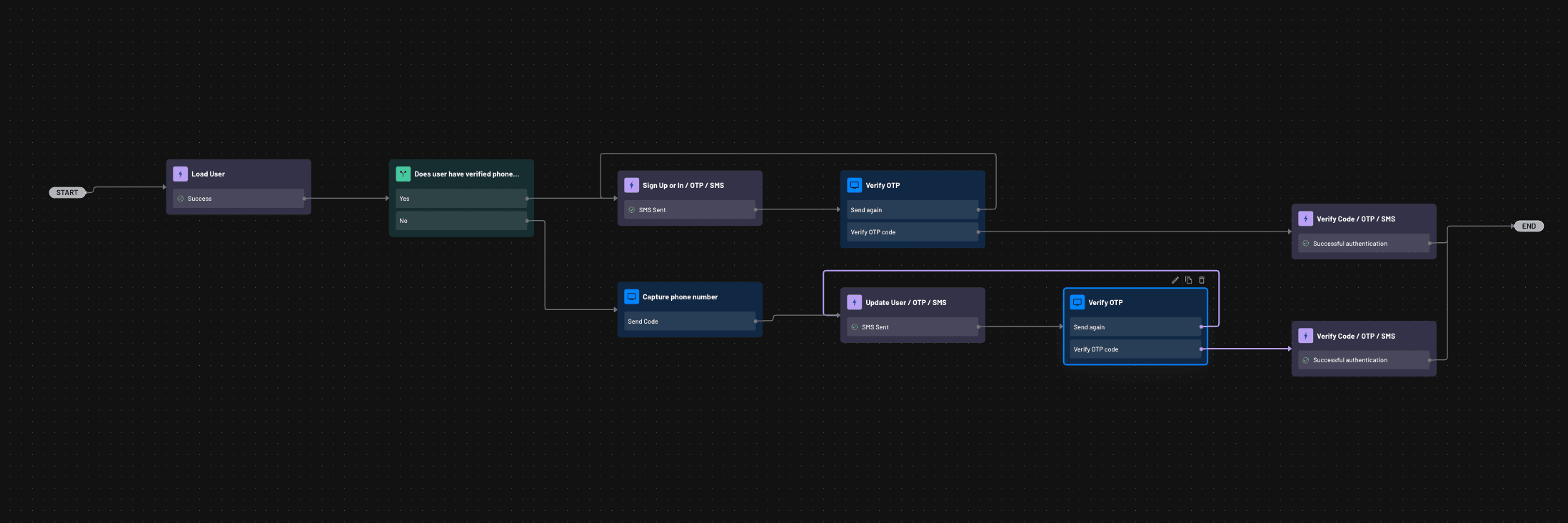
When implementing the post-one-tap authentication flow, you must use the Load User action to get
the current user's details. Below is an example of how you would utilize the Load User action within
a post-one-tap authentication flow.