Descope Engine
Note
This is currently only available to FedRAMP customers. The Connectors → Engines page in the Descope Console must be enabled by Descope for your company.
If you do not see the Engines page, contact the Descope CS team before proceeding.
The Descope Engine is a lightweight, deployable Docker image that allows Descope Connectors to reach resources that are not accessible from the public internet — for example, an internal HTTP API behind your firewall or a private database.
In order to use Descope Connectors against private resources, you must deploy and run this Engine within your own environment. Descope does not run the Engine for you in Descope's cloud.
How It Works
- You create an Engine in the Descope Console and copy its Engine ID and Engine Key.
- You run the Engine container in your network with those credentials. It opens a single outbound TLS connection to Descope (
descope.fedstart.com:443) — no inbound ports. - When a flow invokes a connector assigned to that Engine, Descope sends the command over the open connection. The Engine executes it locally (for example, calling an internal API) and returns the result.
On startup, the Engine opens a long-lived bidirectional gRPC stream to Descope over TLS, sends a Hello message with ENGINE_ID and ENGINE_SECRET, and sends periodic heartbeats. HTTP/2 keepalive PINGs keep the connection alive through proxies. No inbound ports are opened in your network.
Supported Connectors on the Engine
These are a list of the connectors that are supported with the Descope Engine.
| Connector | Status | Notes |
|---|---|---|
| HTTP (Generic HTTP) | Supported | Primary use case — internal APIs behind your firewall. |
| AWS S3 | Supported | Private or GovCloud buckets from your network. |
| AWS SES | Not validated | Contact Descope before use. |
| Not validated | Contact Descope before use. | |
| SMS (Twilio, Mitto, etc.) | Not supported in Gov / FedRAMP | Commercial SMS providers are generally not Gov-compliant. |
| Email (SendGrid, SMTP, etc.) | Not supported in Gov / FedRAMP | Commercial email providers are generally not Gov-compliant. |
Gov egress for messaging
If your organization identifies a Gov-compliant SMS or email provider that must be reachable from the Engine, share provider details and endpoints with Descope for evaluation.
Quick Start
- Create the Engine in the Descope Console and copy your Engine ID and Engine Key.
- Set up and deploy the container — pull the image, configure your
.envwith those credentials, and run it. - Test the connection and assign connectors.
Step 1: Create the Engine in Descope
Create an Engine in the Descope Console and copy its credentials:
- Open the Descope Console. Go to Connectors → Engines.
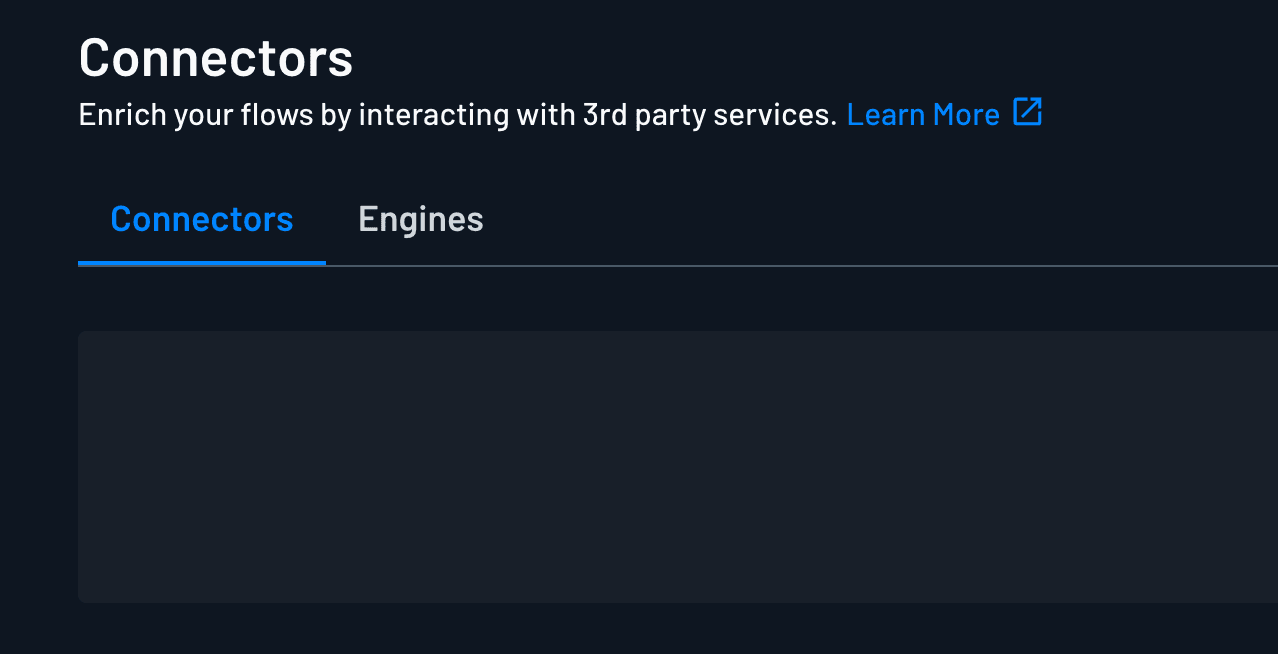
- Create a new engine, or select an existing one if previously created.
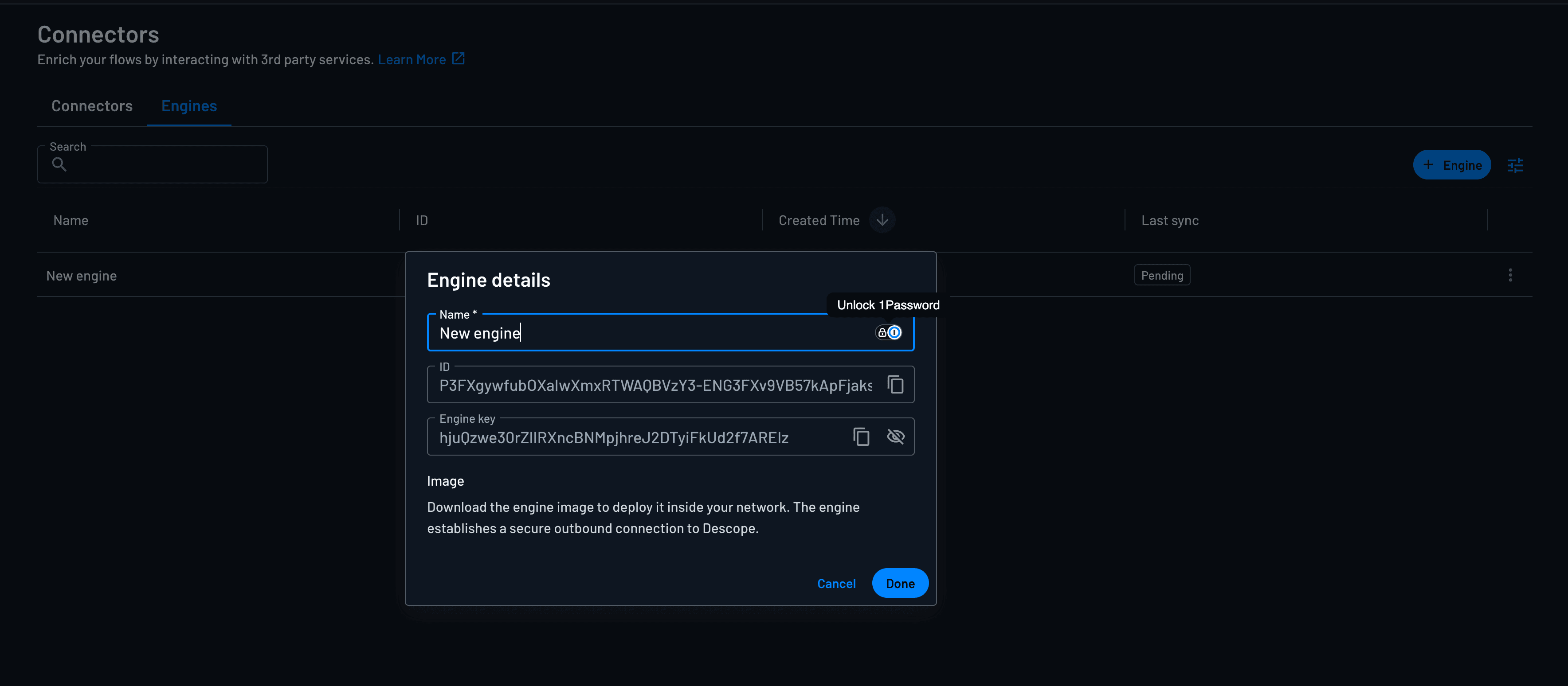
- Once created, you will need to copy the ID and Engine key from the Engine settings.
| Console (Connectors → Engines → Edit) | .env variable |
|---|---|
| ID | ENGINE_ID |
| Engine key | ENGINE_SECRET |
You will use these values when you configure and deploy the container in the next step.
Step 2: Set Up and Deploy the Engine
Configure and run
Before deploying, confirm your network allows the outbound connections described in Networking & Security.
Create an .env file with your credentials from Step 1:
# Required — from Connectors → Engines → Edit
ENGINE_ID=your-engine-id-here
ENGINE_SECRET=your-engine-key-here

# Descope Engine gRPC endpoint (FedRAMP / Gov)
SERVER_ADDRESS=descope.fedstart.com:443
USE_SSL=true
To modify the container image and change environment settings, you can review the Configuration reference section.
Pull the Engine image from Docker Hub (descope/engine) or GitHub Container Registry (ghcr.io/descope/engine):
docker run -it --env-file .env descope/engineFor high availability, run the same image on multiple hosts or pods using the same ENGINE_ID and ENGINE_SECRET. See the Reconnect and high availability docs for more information.
Step 3: Associating the Connector with the Engine
Note
The list of available connectors that work with the Engine are listed in the Supported Connectors on the Engine section.
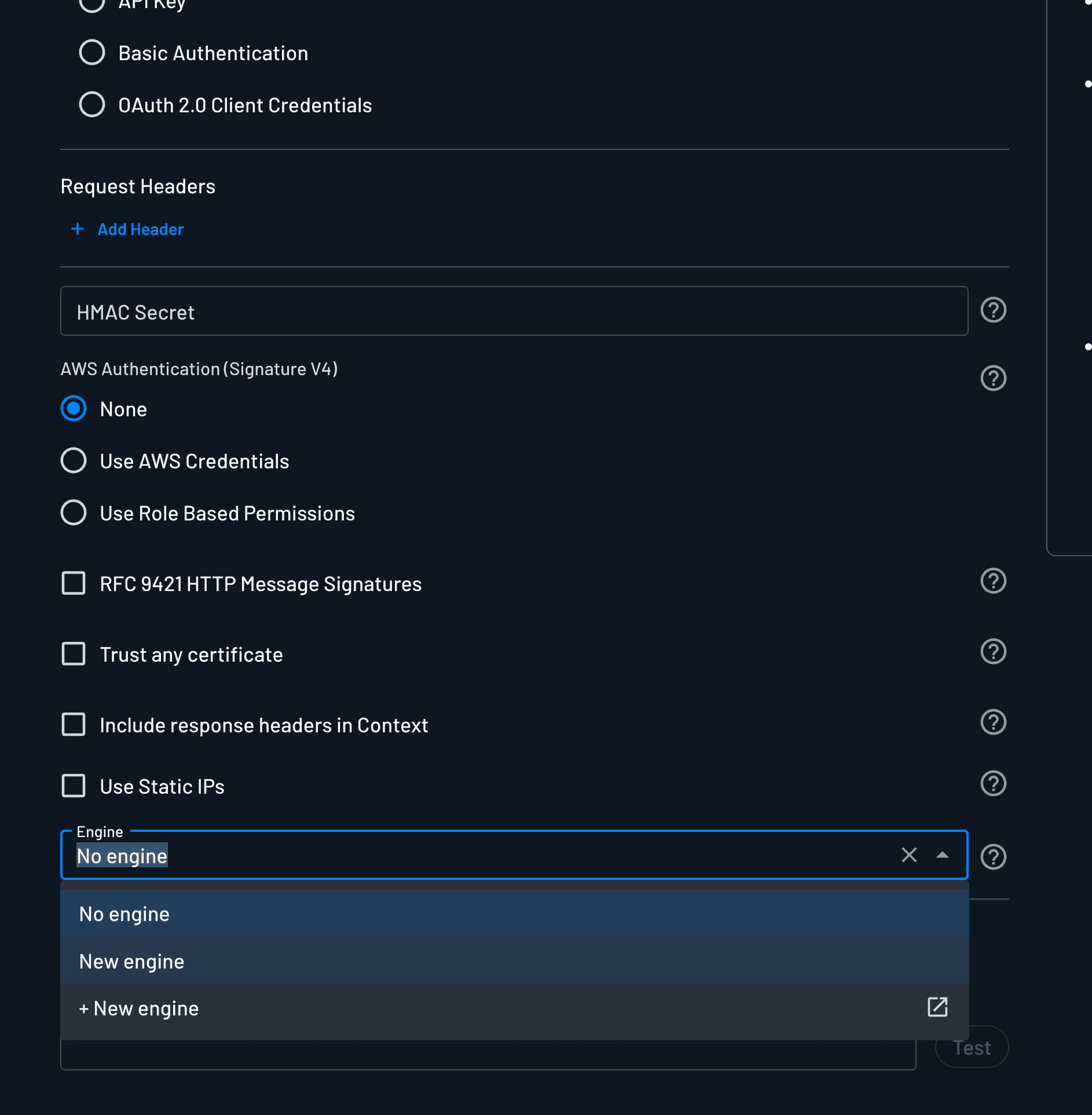
You can associate a connector with an Engine by selecting the Engine in the connector configuration page.
- Go to Connectors and open the connector configuration.
- In the Engine dropdown, select the Engine you created.
- Save the connector.
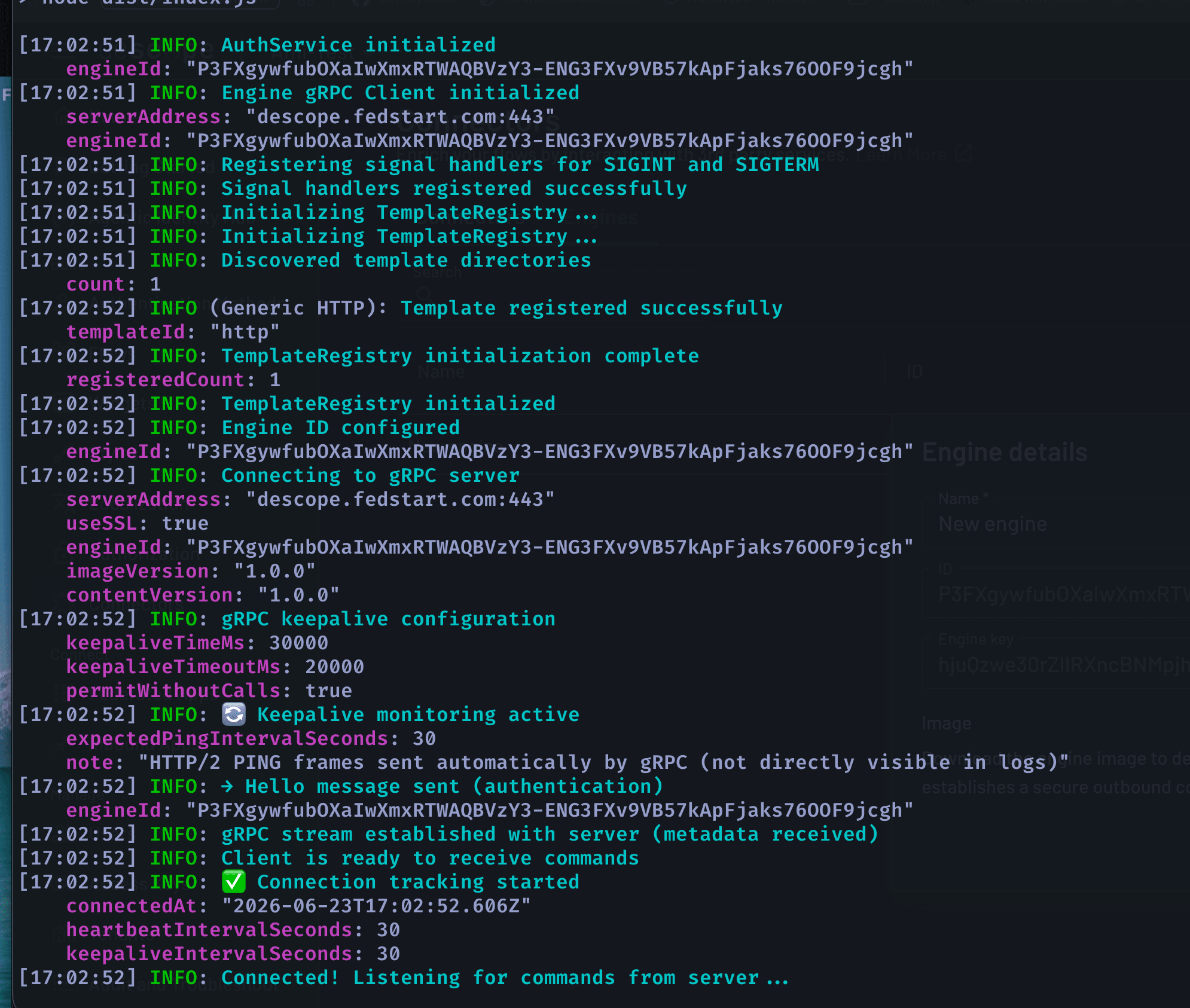
Once you've successfully associated a connector with the Engine, you can look for gRPC stream established with server and Listening for commands in your Docker container logs:
Run an end-to-end test
- Add the connector to a flow (or trigger the connector action you configured).
- Run the flow and confirm the connector completes successfully.
- Check Engine container logs for the execute command and response.
If the flow fails, see Troubleshooting.
Configuration Reference
All configuration is provided through environment variables you can set in your docker image.
Required
| Variable | Description |
|---|---|
ENGINE_ID | Engine ID from the Descope Console. Replicas sharing it form one HA group. Your Descope project is derived from this ID. |
ENGINE_SECRET | Engine Secret from the Console. Sent in the Hello message and verified by Descope on connect. |
ENGINE_IMAGE_VERSION | Pre-set in the official image — only set if you build your own image. |
ENGINE_CONTENT_VERSION | Connector template version identifier. Pre-set in the official image. |
Connection & TLS
| Variable | Default | Description |
|---|---|---|
SERVER_ADDRESS | localhost:50051 | Descope Engine gRPC endpoint (host:port). Use descope.fedstart.com:443 for FedRAMP / Gov. |
USE_SSL | true | Use TLS for the connection. Keep true in production. |
VERIFY_SERVER_CERTIFICATE | true | Verify the server TLS certificate. Set false only for self-signed certs in development. |
Timing & keepalive (optional)
| Variable | Default | Description |
|---|---|---|
HEARTBEAT_INTERVAL | 30000 | Application-level heartbeat interval (ms). |
GRPC_KEEPALIVE_TIME_MS | 30000 | HTTP/2 PING interval when idle (ms). Keeps the connection alive through proxies. |
GRPC_KEEPALIVE_TIMEOUT_MS | 20000 | How long to wait for a PING acknowledgement before dropping the connection (ms). |
GRPC_KEEPALIVE_PERMIT_WITHOUT_CALLS | true | Send PINGs even when there are no active calls. |
Reconnection (optional)
| Variable | Default | Description |
|---|---|---|
MAX_RECONNECT_ATTEMPTS | 10 | Maximum reconnection attempts before the process exits. |
BASE_RECONNECT_DELAY | 1000 | Initial reconnection delay (ms). |
MAX_RECONNECT_DELAY | 30000 | Maximum reconnection delay with jitter (ms). |
Logging (optional)
| Variable | Default | Description |
|---|---|---|
LOG_LEVEL | info | Log verbosity (fatal, error, warn, info, debug, trace). In production (NODE_ENV=production) logs are JSON; otherwise pretty-printed. |
Networking & Security
Review this section with your network and security teams before you deploy the Engine in production.
How traffic flows
The Engine runs in your environment and opens a single outbound gRPC connection to Descope over TLS. Descope never initiates inbound connections to your network. You do not need a public IP, load balancer, or inbound firewall rules for Descope to reach the Engine.
When a flow runs a connector assigned to that Engine, Descope sends the command over the existing connection. The Engine then calls resources inside your network (for example, an internal HTTP API) and returns the result to Descope over the same connection.
Firewall and egress
You will need to make sure that your network allows the FedRAMP static IPs, to be able to reach the Descope Engine.
The static IPs are documented here.
In addition, you will need to make sure that your network allows the outbound traffic to the Descope Engine:
| Direction | Destination | Port | Required for |
|---|---|---|---|
| Outbound | descope.fedstart.com | 443 (TLS) | Engine registration, heartbeats, and connector command dispatch |
| Outbound | Internal hosts your connectors use | Varies (e.g. 443, 5432) | Connector actions (APIs, databases, private S3 endpoints, etc.) |
If outbound access to descope.fedstart.com:443 is blocked, the Console shows Disconnected and connector actions cannot run. See Troubleshooting.
Runtime footprint
The Engine is stateless: it does not store customer data or require a database. Plan for container logs only; there is nothing to back up on the Engine itself.
Reconnect and High Availability
If the gRPC stream drops, the Engine retries with exponential backoff, sends Hello again, and resumes listening.
Run more than one container with the same ENGINE_ID and ENGINE_SECRET for HA. Descope dispatches each command to any connected container.
| Setup | What happens if one container goes down |
|---|---|
| Single container | Connector actions wait or fail until reconnect or replacement. |
Multiple containers, same ENGINE_ID | Other containers keep executing commands. |
Troubleshooting
These are some of the most common issues and fixes for the Descope Engine.
| Symptom | Likely cause / fix |
|---|---|
| Engines page missing | Engine not enabled on company license — contact Descope CS. |
| Invalid engine secret / auth failure | Wrong ENGINE_ID or ENGINE_SECRET, or secret rotated. Re-copy from Connectors → Engines → Edit. |
| Connection refused / cannot reach server | Wrong SERVER_ADDRESS, or egress firewall blocking TLS to descope.fedstart.com. |
| Connection drops when idle | Proxy idle timeout — lower GRPC_KEEPALIVE_TIME_MS. |
| Engine shows Disconnected | Container not running or credentials misconfigured. |
| Commands not executed | No connected Engine with the correct ENGINE_ID, or connector not assigned to the Engine. |
| Need a shell | The production image is minimal (FIPS Node runtime). Override the entrypoint only when your base tooling supports inspection. |