Descope MCP Server
The Descope MCP Server lets you manage your Descope project from any MCP-compatible AI agent. Ask your agent to search users, configure flows, inspect audit logs, manage tenants, and more, without leaving your IDE or chat interface. Documentation search and Q&A are built in.
Server URLs
Use the MCP server URL that matches where your Descope company and projects are hosted:
| Deployment | MCP server URL |
|---|---|
| US (default) | https://mcp.descope.com |
| EU | https://mcp.euc1.descope.com |
Note
If you run a private cloud deployment of Descope, the MCP server is not available at a public regional URL by default.
Contact Descope Support to enable the Descope MCP Server for your environment.
The connection examples below use the US endpoint. If your projects are in the EU region, substitute https://mcp.euc1.descope.com wherever a URL is shown. See Multi-Region Support if you're unsure which region your projects use.
Connecting to the MCP Server
Once connected, the server discovers your available Descope projects and prompts you to select one. You can switch projects at any time; just ask your agent to select a different project.
Security Model
Sessions start in read-only mode. Searching users, listing tenants, inspecting flows, and querying audit logs are all available immediately.
Write operations require explicit elevation. Ask your agent to elevate the session when you want to make changes. The write window is time-bounded and closes automatically, returning the session to read-only mode.
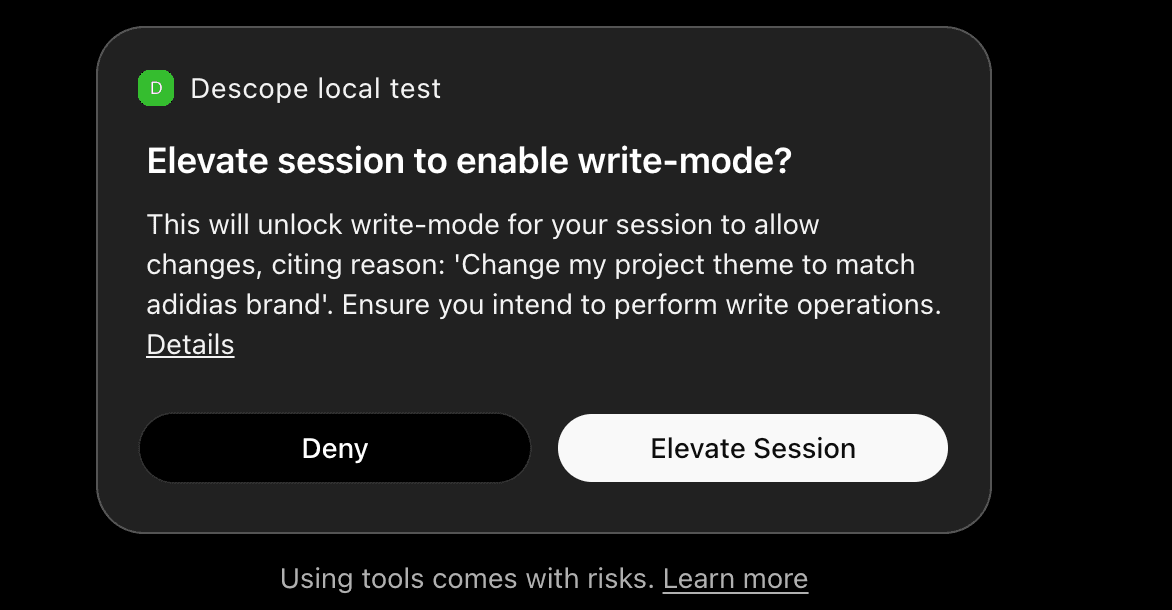
This means an AI agent browsing your project cannot make changes unless you explicitly grant it the ability to do so for that session.
Cross-App Access (XAA)
The Descope MCP Server can also accept Cross-App Access assertions, so your agents reach it through the identity provider your organization already runs instead of signing in to Descope separately.
This is the same arrangement a B2B customer sets up for their own MCP server, with the roles reversed. Descope operates the MCP server and acts as the validator, and your IdP is the issuer whose ID-JAGs Descope accepts for your company. Your IdP can be Okta, Entra, another workforce IdP that supports ID-JAG, or your own Descope project.
Enable Cross-App Access
Our Descope MCP Server supports Cross App Access (XAA), so you can enable this as an MCP server for specific users within your organization, in accordance with your centralized XAA policies.
To enable XAA for the Descope MCP Server:
- Open Company Settings and go to Console Access.
- Click SSO Configuration for Console Access to open the SSO Setup Suite.
- Follow the steps under Cross App Access (XAA) Configuration.
Tools
The MCP server exposes the following tools. Each tool groups a set of related operations. Use list_operations to discover the full operation catalog at any time.
| Tool | Description |
|---|---|
list_operations | Discover the full operation catalog; list all operations by bucket, or fetch the input/output schema |
session | Manage session context: switch projects, check current identity, generate onboarding plans, and elevate to write mode |
project_read | View project configuration including JWT templates, lists, snapshots, and messaging localization |
project_write | Update project settings, clone projects, manage JWT templates, lists, Descopers, and messaging localization |
access_control_read | Query FGA schemas, roles, permissions, ReBAC relations, and run authorization checks and dry-runs |
access_control_write | Create and update FGA schemas, roles, permissions, and relations; manage backups and resource details |
agentic_read | View MCP server definitions, clients, and client secrets |
agentic_write | Create, update, and delete MCP servers and clients; rotate client secrets |
audits_read | Search audit events and analytics |
auth_keys_read | View access key details and password settings |
auth_keys_write | Create, search, and manage access keys; configure password settings; update JWTs; and impersonate users |
flows_read | View flows, flow templates, themes, flow localization, and widgets |
flows_write | Import and manage flows, themes, and flow localization; apply project themes |
tenants_read | View tenants, tenant settings, and SSO admin link state |
tenants_write | Create and manage tenants, tenant settings, default roles, and SSO admin links |
connect_read | View SSO settings, IDP apps, inbound apps, outbound apps, and third-party apps |
connect_write | Create and manage SSO applications (OIDC, SAML, WS-Fed), inbound/outbound apps, and SSO tenant settings |
tests_read | Search test users |
tests_write | Create and delete test users; generate test OTPs, magic links, and enchanted links |
users_read | View user records, custom attributes, group membership, trusted devices, and auth history |
users_write | Create, update, and delete users; manage credentials (passwords, passkeys, TOTP), and custom attributes |
docs_search | Semantic search across Descope documentation and SDK references |
docs_ask_question | Ask natural-language questions about Descope and get answers grounded in official documentation |
What You Can Do
The server covers the full Descope Management API: users, tenants, flows, access control, connections, audit logs, auth keys, and more. Use natural language: you don't need to know specific operation names.
Example Prompts
Users and tenants
- "List all users in the engineering tenant"
- "What SSO connections are configured for tenant acme-corp?"
- "Show me all users who haven't logged in for 30 days"
Flows and configuration
- "What flows do I have configured and which one is the default sign-in flow?"
- "Show me the current FGA schema"
- "What access keys exist in this project and when do they expire?"
Audit
- "Show me the audit log for the last 24 hours filtered by login events"
- "Were there any failed authentication attempts in the last hour?"
Write operations (require elevation)
- "Create a test user with email test@example.com"
- "Add the 'admin' role to user alice@example.com in the acme-corp tenant"
- "Update the default session duration for this project"
Documentation Tools
The server includes two tools for Descope product knowledge:
docs_search: semantic search over Descope documentation and SDK references. Good for finding reference content, configuration details, and code examples.
docs_ask_question: ask a natural language question about Descope and receive a grounded answer. Good for troubleshooting, conceptual questions, and understanding what Descope supports.
Your agent picks the right tool based on what you ask. You can mix project management and documentation questions in the same conversation.
What You Can Ask
Troubleshooting
- "Why am I getting 'Invalid session token' when validating a JWT in my API?"
- "Magic link sign-in works in dev but fails in production, what should I check?"
- "How do I fix CORS errors when embedding the Descope flow?"
Setup and configuration
- "How do I add Google OAuth to my Descope flow?"
- "How do I map SSO groups to Descope roles?"
- "What are the steps to configure an MCP server in Descope?"
SDK and API
- "How do I get the session token in the React SDK?"
- "How do I validate a Descope JWT in a Lambda authorizer?"
- "What's the Management API call to create a user?"
Architecture
- "Design my backend: session validation on every API route plus role checks so only admins can access /api/settings. I'm using Next.js App Router and the Node SDK."
- "I'm building a multi-tenant app. Walk me through tenant resolution, attaching tenant to the session, and enforcing tenant-scoped role checks in my API."
- "How do I implement step-up authentication for a sensitive action?"
Tips for Better Results
- Be specific: "How do I validate a JWT in AWS API Gateway?" is better than "How do I validate JWTs?"
- Include context: mention your framework (Next.js, React, Python), auth method (magic link, OAuth, SSO), or environment (serverless, edge) when relevant
- Paste exact errors: for troubleshooting, include the error message or code snippet
- One topic per question: ask one clear question at a time; follow-ups work well
Descope Skills
For multi-step workflows (integrating auth, migrating from Auth0 or Okta, building BYOS screens, managing FGA schemas, or running security reviews), install Descope Skills. Skills complement this MCP server with structured agent instructions and guardrails.