Step-up Authentication
Step-up authentication is a security mechanism that allows you to add additional authentication requirements for sensitive operations in your application. It works by requiring users to re-authenticate when accessing high-risk features, even if they're already logged in.
How Step-up Authentication Works
When a user needs to perform a sensitive operation (like making a purchase or accessing personal data), you can trigger step-up authentication. This requires the user to verify their identity again, typically using a stronger authentication method than their initial login.
After successful step-up authentication, the user's session token is updated with a su (step-up) claim set to true. This allows your application to verify that the user has completed the additional authentication step. This stepped-up token will be valid for the duration of the
Step Up Token Timeout defined in Project Settings.
{
  "amr": ["xxxx"],
  "drn": "xx",
  "exp": xxxxx,
  "iat": xxxxx,
  "iss": "xxxxx",
  "rexp": "xxxxx",
  "su": true,
  "sub": "xxxxx"
}
Use Cases
Step-up authentication is particularly useful for:
- Financial transactions (e.g., making purchases, transferring money)
- Accessing sensitive personal information
- Administrative operations
- Changing account settings
- Any high-risk operation that requires additional verification
Implementation Options
You can implement step-up authentication using our Flows, Client SDKs, or Backend SDKs.
Option 1: Using Descope Flows
Descope provides a pre-built step-up flow that you can easily integrate into your application. This flow:
- Loads the user from their refresh token
- Marks the flow as a step-up authentication
- Presents authentication options (magic link, passkeys, social login)
- Updates the session token upon successful authentication
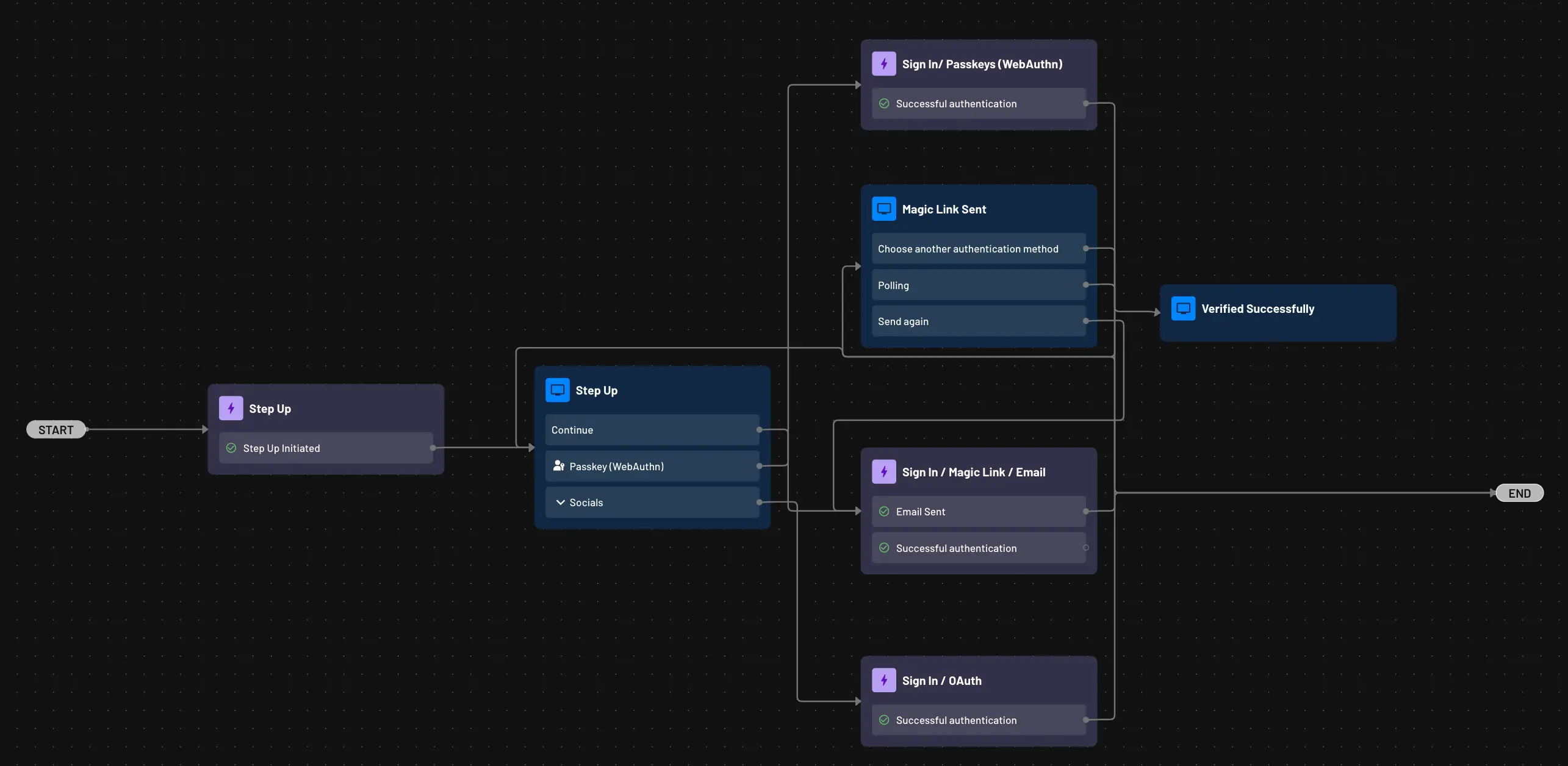
You can integrate a step-up flow in your application in the same way you would integrate a regular authentication flow. After the step-up flow succeeds,
the user's JWT will be updated with the su claim.
The authentication options in a step-up flow aren't limited to native Descope methods. If a user is authenticated through a homegrown or third-party IdP instead, a Generate JWT action placed after the Step Up action also issues a token with the su claim. See Step-Up Authentication for Third-Party IdP Sign-Ins for details.
Option 2: Using Client SDKs
To perform step-up authentication using our Client SDKs, you use the same "Sign In" or "Sign Up Or In" functions as you would for regular authentication. You just have to specify that you are performing step-up using the Login Options parameter.
The below example implements step-up authentication via OTP Sign-In after the user has already authenticated using another authentication method.
In loginOptions, stepup is set to true, indicating that this is a step-up authentication action. On success of the sign in function, the user's JWT will include the su claim.
// Args:
//    loginId: email or phone - becomes the loginId for the user from here on and also used for delivery
const loginId = "email@company.com"
//    deliveryMethod: Delivery method to use to send OTP. Supported values include "email", "voice, or "sms"
const deliveryMethod = "email"
//    loginOptions: login options for MFA, stepup, or custom claims. Ex: {stepup: true, mfa: false, customClaims: {}}
const loginOptions = {stepup: true}
//    token: refresh token from the successful sign-in of the user
const token = "xxxxxx"

const resp = await descopeClient.otp.signIn[deliveryMethod](loginId, loginOptions, token);
if (!resp.ok) {
  console.log("Failed to initialize step-up flow")
  console.log("Status Code: " + resp.code)
  console.log("Error Code: " + resp.error.errorCode)
  console.log("Error Description: " + resp.error.errorDescription)
  console.log("Error Message: " + resp.error.errorMessage)
}
else {
  console.log("Successfully initialized step-up flow")
}
Option 3: Using Backend SDKs
To perform step-up authentication using our Backend SDKs, you use the same "Sign In" or "Sign Up Or In" functions as you would for regular authentication. You just have to specify that you are performing step-up using the Login Options parameter.
The below example implements step-up authentication via OTP Sign In after the user has already authenticated using another authentication method.
In loginOptions, stepup is set to true, indicating that this is a step-up authentication action. On success of the sign in function, the user's JWT will include the su claim.
// Args:
//    deliveryMethod: Delivery method to use to send OTP. Supported values include "email", "voice, or "sms"
const deliveryMethod = "email"
//    loginId: email or phone - email or phone - the loginId for the user
const loginId = "email@company.com"
//    loginOptions: login options for MFA, stepup, or custom claims. Ex: {stepup: true, mfa: false, customClaims: {}}
const loginOptions = {stepup: true}
//    token: refresh token from the successful sign-in of the user
const token = "xxxx"

var resp =  await descopeClient.otp.signIn[delivery_method](loginId, loginOptions, token);
if (!resp.ok) {
  console.log("Failed to initialize step-up flow")
  console.log("Status Code: " + resp.code)
  console.log("Error Code: " + resp.error.errorCode)
  console.log("Error Description: " + resp.error.errorDescription)
  console.log("Error Message: " + resp.error.errorMessage)
}
else {
  console.log("Successfully initialized step-up flow")
  console.log(resp.data)
}
Step-Up Validation
To validate that the session was successfully stepped up, you can utilize the Backend SDKs to validate the session and check that the su claim is true.
// Args:
//   sessionToken (str): The session token, which contains the signature that will be validated
const sessionToken="xxxx"

try {
  const authInfo = await descopeClient.validateSession(sessionToken);
  console.log("Successfully validated user session:");
  console.log(authInfo);
  if ("su" in authInfo.token) {
    console.log("Session is stepped up.");
  }
} catch (error) {
  console.log ("Could not validate user session " + error);
}
Resources
The B2C Retail Sample App, Peek-a-Box demonstrates a practical implementation of step-up authentication. Users can browse products and add items to their cart with basic authentication. When the user proceeds to checkout, step-up authentication is required.
Check out our learning center article for more examples, use cases, and guidelines on implementing step-up authentication.
Adaptive MFA
Learn how to implement adaptive MFA within your Descope flows. This guide has examples of trusted device, IP reputation, and impossible traveler adaptive MFA.
Fingerprinting
This guide explains the fingerprinting capabilities available in Descope, including device fingerprinting, risk-based authentication, and bot detection.