Errors and TroubleshootingAudit

Filtering Audit Events

The Descope Audit Trail supports flexible filtering so you can quickly isolate the events that matter. You can filter audit events directly in the Descope Console, through the Backend SDKs, or via the Search Audit REST API endpoint.

Filtering in the Descope Console

The Descope Console provides a visual interface for searching and filtering your audit trail without writing any code. Navigate to the Audit page in your project to access these controls.
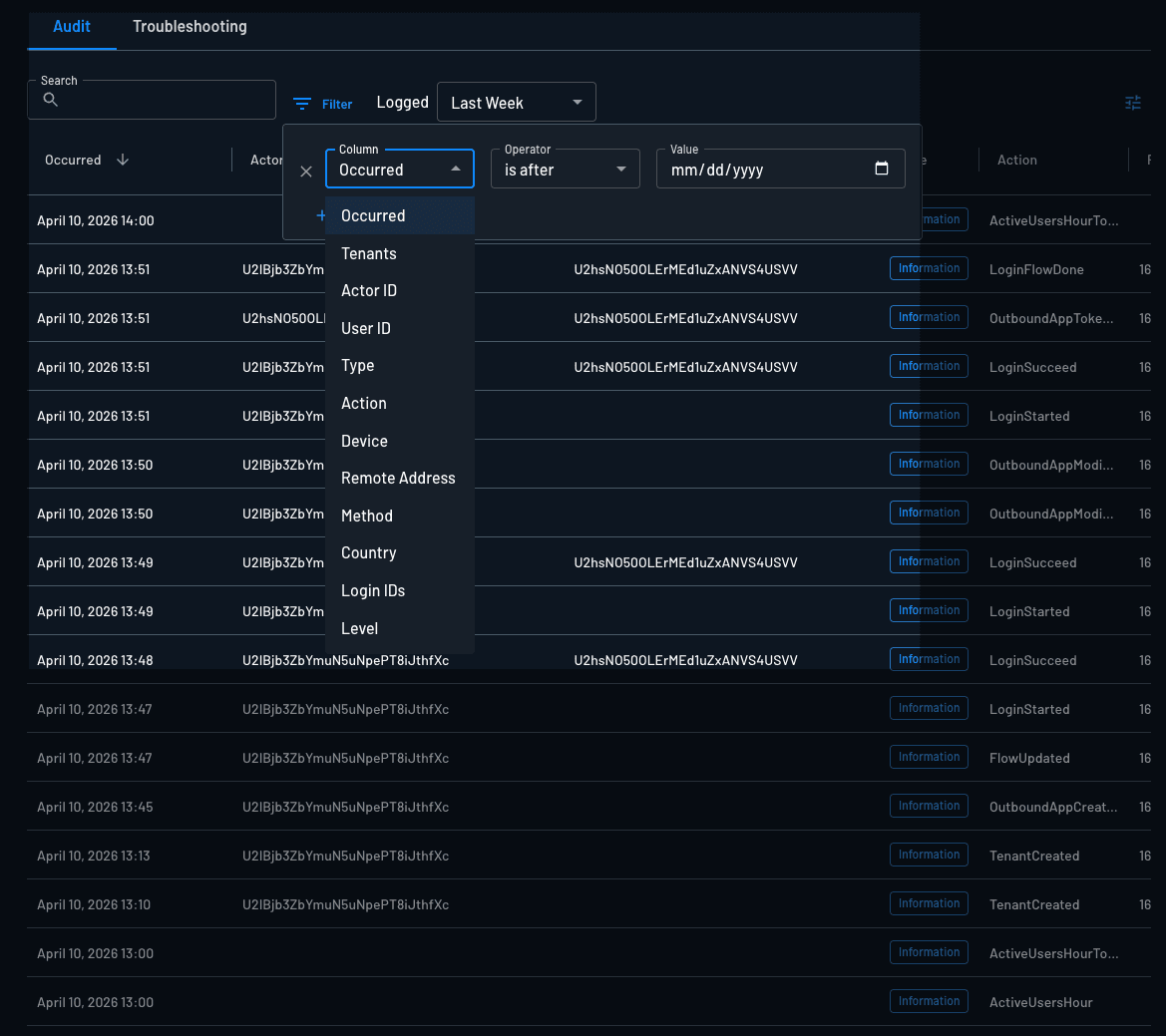
audit filtering example

Filter by User

Search for audit events tied to a specific user by entering their Login ID (e.g., email address or phone number) or User ID into the search bar.
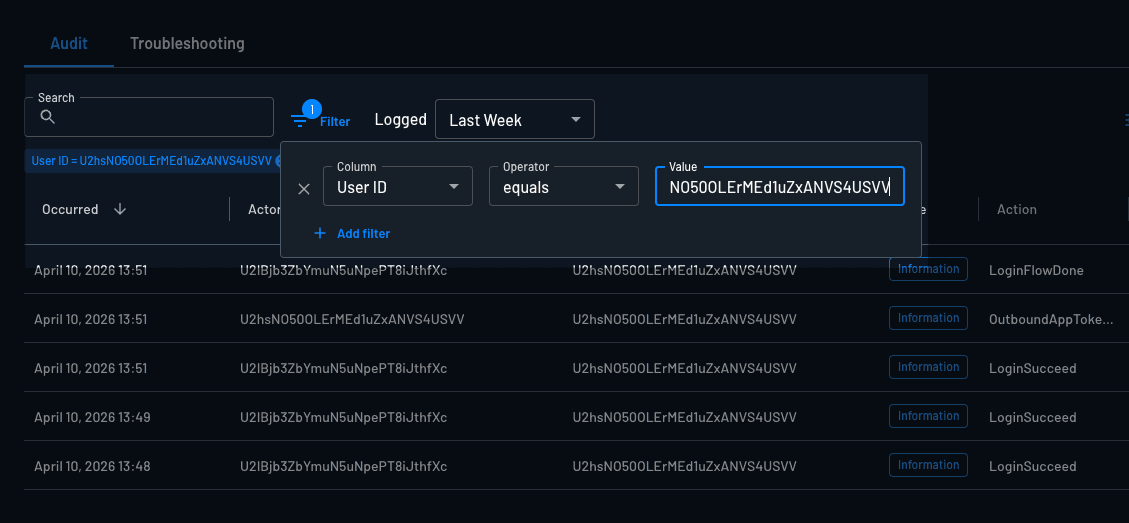
audit filtering by userID example

Filter by Action

You can use the action to search for items like LoginStarted, LoginSucceed, or general Failed items. See Audit Events for valid values.
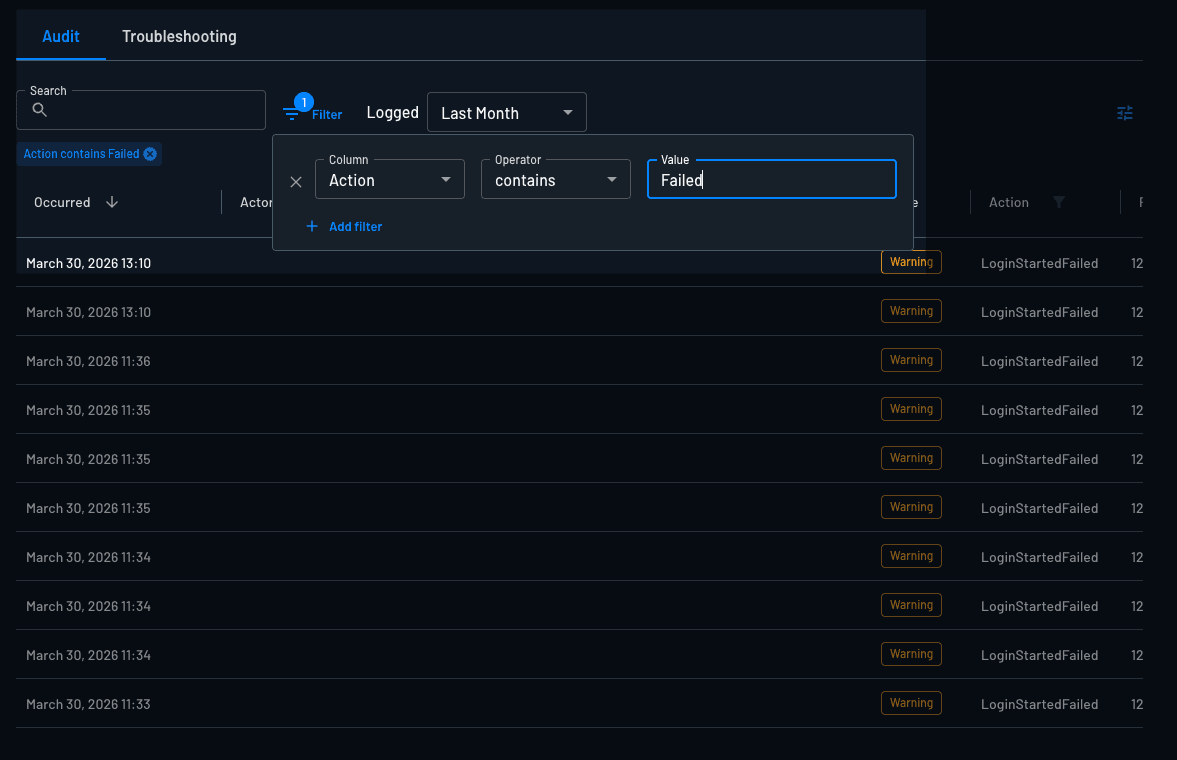
audit filtering by failed example

Additional Console Filters

The Console also supports filtering by:

  • Device — Filter by device category: Desktop, Mobile, Tablet, Bot, or Unknown.
  • Authentication Method — Filter by method: otp, totp, magiclink, oauth, saml, or password.
  • Geographic Location — Filter by country code (e.g., US, IL).
  • Remote Address — Filter by originating IP address.
  • Tenant — Filter events scoped to a specific tenant.
  • Free Text — Full-text search across all audit fields simultaneously.
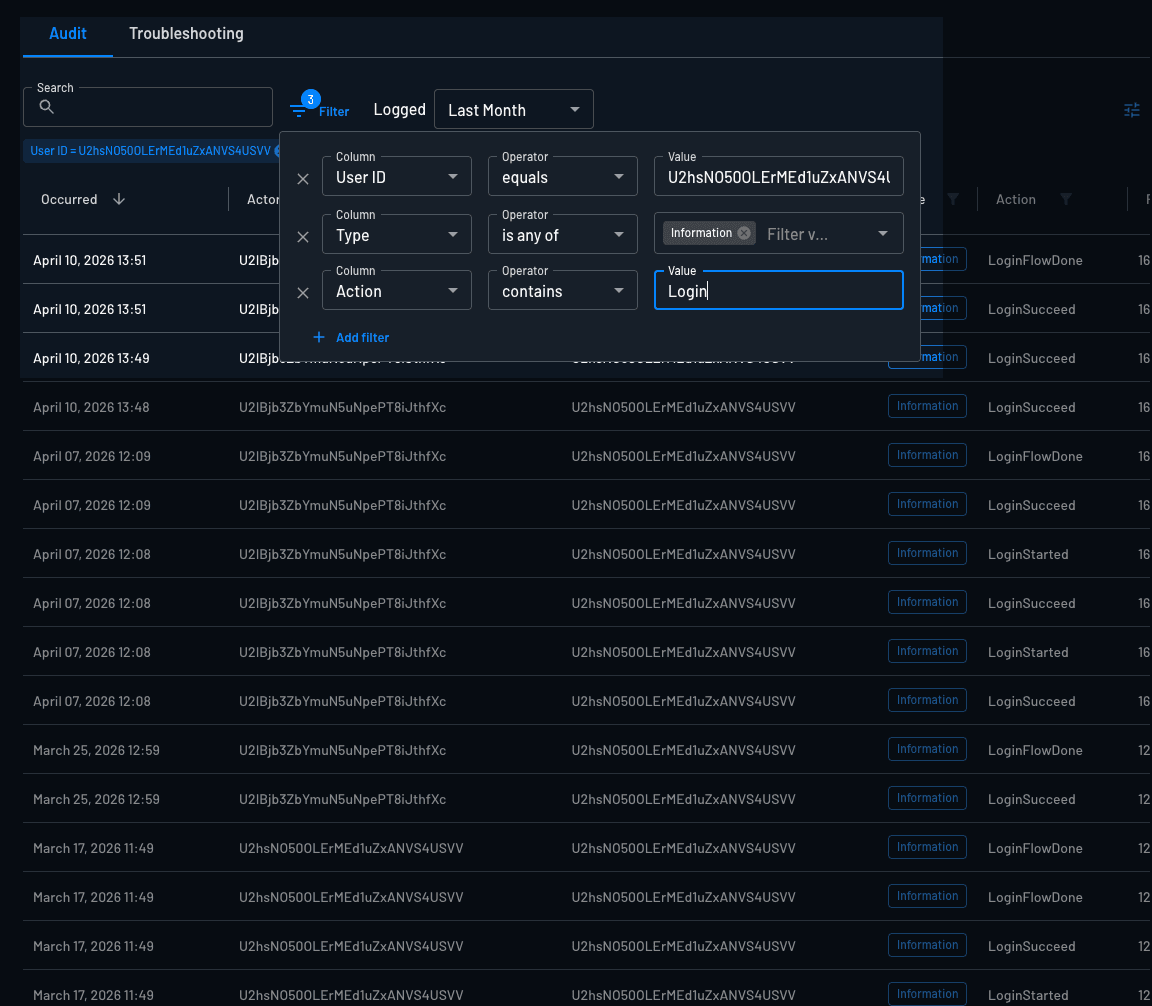
audit filtering with multiple fields example

Filtering via the Backend SDK

You can programmatically search and filter audit events using any of the Descope Backend SDKs. This is useful for building custom security dashboards, automated compliance reports, or alert pipelines.

Rate Limiting

Descope enforces a rate limit of 10 requests per minute for audit search operations.

Backend SDK

Install SDK

Terminal
npm i --save @descope/node-sdk
Terminal
pip3 install descope
Terminal
go get github.com/descope/go-sdk
// Include the following in your `pom.xml` (Maven)
<dependency>
    <artifactId>java-sdk</artifactId>
    <groupId>com.descope</groupId>
    <version>sdk-version</version> // Check https://github.com/descope/descope-java/releases for the latest versions
</dependency>
Terminal
gem install descope
Terminal
composer require descope/descope-php
Terminal
dotnet add package descope

Import and initialize SDK

import DescopeClient from '@descope/node-sdk';
try{
    //  baseUrl="<URL>" // When initializing the Descope client, you can also configure the baseUrl ex: https://auth.company.com  - this is useful when you utilize a custom domain within your Descope project.
    const descopeClient = DescopeClient({ projectId: '__ProjectID__' });
} catch (error) {
    // handle the error
    console.log("failed to initialize: " + error)
}
from descope import (
    REFRESH_SESSION_TOKEN_NAME,
    SESSION_TOKEN_NAME,
    AuthException,
    DeliveryMethod,
    DescopeClient,
    AssociatedTenant,
    RoleMapping,
    AttributeMapping,
    LoginOptions
)
try:
    # You can configure the baseURL by setting the env variable Ex: export DESCOPE_BASE_URI="https://auth.company.com  - this is useful when you utilize custom domain within your Descope project."
    descope_client = DescopeClient(project_id='__ProjectID__')
except Exception as error:
    # handle the error
    print ("failed to initialize. Error:")
    print (error)
import "github.com/descope/go-sdk/descope"
import "github.com/descope/go-sdk/descope/client"

// Utilizing the context package allows for the transmission of context capabilities like cancellation
//      signals during the function call. In cases where context is absent, the context.Background()
//      function serves as a viable alternative.
//      Utilizing context within the Descope GO SDK is supported within versions 1.6.0 and higher.
import (
	"context"
)

// DescopeBaseURL // within the client.Config, you can also configure the baseUrl ex: https://auth.company.com  - this is useful when you utilize a custom domain within your Descope project.

descopeClient, err := client.NewWithConfig(&client.Config{ProjectID:"__ProjectID__"})
if err != nil {
    // handle the error
    log.Println("failed to initialize: " + err.Error())
}
import com.descope.client.Config;
import com.descope.client.DescopeClient;

var descopeClient = new DescopeClient(Config.builder().projectId("__ProjectID__").build());
require 'descope'

@project_id = ENV['__ProjectID__']
@client = Descope::Client.new({ project_id: @project_id})
require 'vendor/autoload.php';
use Descope\SDK\DescopeSDK;
 
$descopeSDK = new DescopeSDK([
    'projectId' => $_ENV['__ProjectID__'],
]);
// appsettings.json

{
  "Descope": {
    "ProjectId": "__ProjectID__",
    "ManagementKey": "DESCOPE_MANAGEMENT_KEY"
  }
}

// Program.cs

using Descope;
using Microsoft.Extensions.Configuration;

// ... In your setup code
var config = new ConfigurationBuilder()
  .AddJsonFile("appsettings.json")
  .Build();

var descopeProjectId = config["Descope:ProjectId"];
var descopeManagementKey = config["Descope:ManagementKey"];

var descopeConfig = new DescopeConfig(projectId: descopeProjectId);
var descopeClient = new DescopeClient(descopeConfig)
{
    ManagementKey = descopeManagementKey,
};

Filtering by Action

Since event type and action share a one-to-one relationship, filtering by actions is the programmatic equivalent of filtering by event type in the Console. Pass one or more action names to narrow results to specific event types.

For the full list of valid action values, refer to the Audit Events reference.

const searchOptions = {
  actions: ["LoginSucceed", "LoginFailed"], // Filter to specific event actions/types
  excludedActions: ["UserRefresh"],          // Optionally exclude specific actions
}

const resp = await descopeClient.management.audit.search(searchOptions)
if (!resp.ok) {
  console.log("Failed to search audits.")
} else {
  console.log("Successfully searched audits.")
  console.log(resp)
}
try:
    resp = descope_client.mgmt.audit.search(
        actions=["LoginSucceed", "LoginFailed"],
        excluded_actions=["UserRefresh"],
    )
    print("Successfully searched audits")
    print(resp)
except AuthException as error:
    print("Failed to search audits")
    print("Status Code: " + str(error.status_code))
    print("Error: " + str(error.error_message))
ctx := context.Background()
searchOptions := &descope.AuditSearchOptions{
    Actions:         []string{"LoginSucceed", "LoginFailed"},
    ExcludedActions: []string{"UserRefresh"},
}

res, err := descopeClient.Management.Audit().Search(ctx, searchOptions)
if err != nil {
    fmt.Println("Unable to search audits: ", err)
} else {
    fmt.Println("Successfully searched audits:")
    for _, auditEvent := range res {
        fmt.Println(auditEvent)
    }
}
AuditService as = descopeClient.getManagementServices().getAuditService();
try {
    AuditSearchResponse resp = as.search(AuditSearchRequest.builder()
            .actions(Arrays.asList("LoginSucceed", "LoginFailed"))
            .from(Instant.now().minus(Duration.ofDays(7))));
} catch (DescopeException de) {
    // Handle the error
}
$response = $descopeSDK->management->audit->search(
  actions: ["LoginSucceed", "LoginFailed"],
  excludedActions: ["UserRefresh"],
);
print_r($response);

Full Filter Parameter Reference

All parameters are optional. Combine them to build precise queries.

ParameterTypeDescription
actionsstring[]Filter to specific event actions (maps 1:1 to event types). See Audit Events for valid values.
excludedActionsstring[]Exclude specific event actions from results.
userIDsstring[]Filter by Descope User ID(s).
loginIDsstring[]Filter by Login ID(s) (e.g., email address, phone number).
fromtimestampReturn events newer than this time. Cannot be older than 30 days.
totimestampReturn events older than this time.
devicesstring[]Filter by device type: "Bot", "Mobile", "Desktop", "Tablet", "Unknown".
methodsstring[]Filter by authentication method: "otp", "totp", "magiclink", "oauth", "saml", "password".
geosstring[]Filter by country code, e.g. "US", "IL".
remoteAddressesstring[]Filter by originating IP address(es).
tenantsstring[]Filter by tenant ID(s).
noTenantsbooleanWhen true, always includes events with no associated tenant alongside tenant-scoped results.
textstringFree-text search across all audit fields.

Example: Failed Logins for a Specific User (Last 7 Days)

const searchOptions = {
  userIDs: ["U2abc123xyz"],
  actions: ["LoginFailed"],
  from: new Date(Date.now() - 7 * 24 * 60 * 60 * 1000),
}

const resp = await descopeClient.management.audit.search(searchOptions)
from datetime import datetime, timedelta

try:
    resp = descope_client.mgmt.audit.search(
        user_ids=["U2abc123xyz"],
        actions=["LoginFailed"],
        from_ts=datetime.utcnow() - timedelta(days=7),
    )
    print(resp)
except AuthException as error:
    print("Error: " + str(error.error_message))
ctx := context.Background()
from := time.Now().AddDate(0, 0, -7)
searchOptions := &descope.AuditSearchOptions{
    UserIDs: []string{"U2abc123xyz"},
    Actions: []string{"LoginFailed"},
    From:    from,
}

res, err := descopeClient.Management.Audit().Search(ctx, searchOptions)
AuditService as = descopeClient.getManagementServices().getAuditService();
try {
    AuditSearchResponse resp = as.search(AuditSearchRequest.builder()
            .userIds(Arrays.asList("U2abc123xyz"))
            .actions(Arrays.asList("LoginFailed"))
            .from(Instant.now().minus(Duration.ofDays(7))));
} catch (DescopeException de) {
    // Handle the error
}
$response = $descopeSDK->management->audit->search(
  userIds: ["U2abc123xyz"],
  actions: ["LoginFailed"],
  fromTs: (new DateTime())->modify('-7 days'),
);
print_r($response);

Filtering via the REST API

You can also query audit events directly using the Search Audit REST API endpoint. The request body accepts the same filter fields described in the SDK reference above.

curl --request POST \
  --url https://api.descope.com/v1/mgmt/audit/search \
  --header 'Authorization: Bearer <management-key>' \
  --header 'Content-Type: application/json' \
  --data '{
    "actions": ["LoginSucceed", "LoginFailed"],
    "userIds": ["U2abc123xyz"]
  }'

Understanding Event Types and Actions

Every audit event recorded by Descope has both a type and an action. These two fields have a one-to-one relationship — each action maps to exactly one type. For example, the LoginSucceed action always corresponds to the Information type, while LoginFailed maps to Warning.

Because of this direct mapping, filtering by action in the SDK or API is functionally equivalent to selecting event types in the Console filter dropdown. There is no need to convert between the two — use whichever is more convenient for your workflow.

For the full list of event types, actions, and their descriptions, see the Audit Events reference.

Was this helpful?

On this page