remainingOTPAttempts Condition
In your flow, check the remainingOTPAttempts dynamic value to see how many OTP attempts a user has left. Descope returns the same action error whether a user mistypes the code once or exhausts every attempt, remainingOTPAttempts is what lets you tell the two apart, so you can warn users as they approach the limit.
Descope sets remainingOTPAttempts to your configured limit when it sends the OTP, decrements it after each incorrect attempt, and clears it to an empty value on lockout. It's only populated for OTP sent by email, SMS, voice, WhatsApp, or instant message — for any other authentication method, the value is empty.
Detect a Locked Out User
Set the OTP verification action's error handling to Continue and connect its error output into a condition, with the key set to remainingOTPAttempts, the operator set to Greater Than, and the value set to 0. With the default Automatic handling the user is returned to the previous screen and the condition never runs.
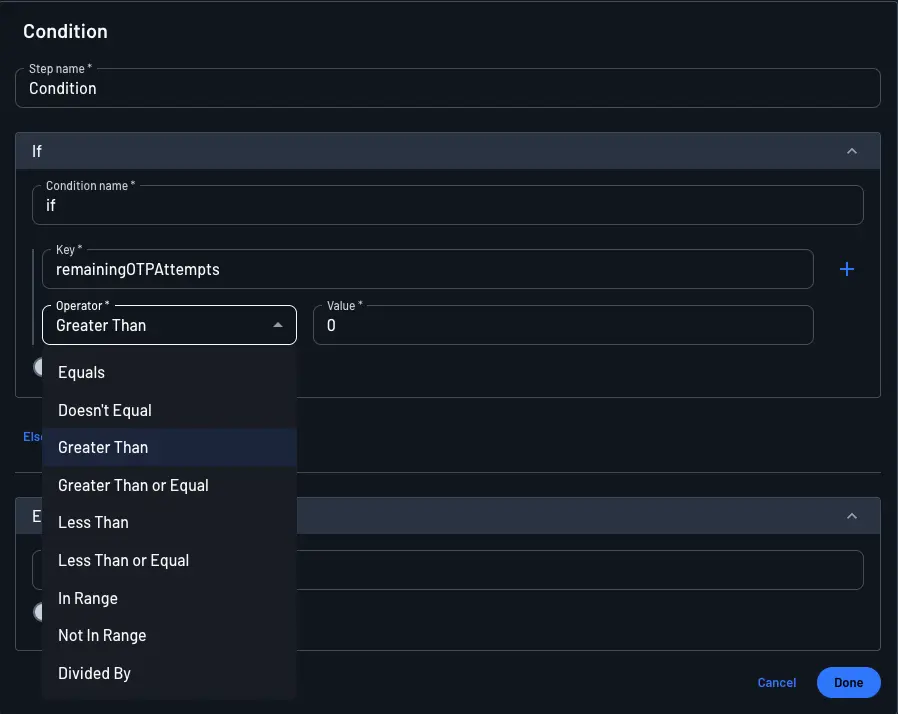
The If branch means the user still has attempts left, so return them to the code entry screen. The Else branch means they are locked out, and you can route them to a dedicated screen, a custom error message, or an account recovery step.
Warn Before Lockout
To warn the user on their final attempt, change the If value from 0 to 1, then add an Else if with the operator set to Equals and the value set to 1. Connect it to a screen that makes the consequence explicit, such as prompting the user to request a new code rather than risk being locked out.
This gives you three branches, evaluated in order: Greater Than 1 for users with attempts to spare, Equals 1 for the final attempt warning, and Else for the lockout. Leaving the If at 0 makes the Else if unreachable, since a value of 1 already satisfies Greater Than 0.
Show the Remaining Count in an Error Message
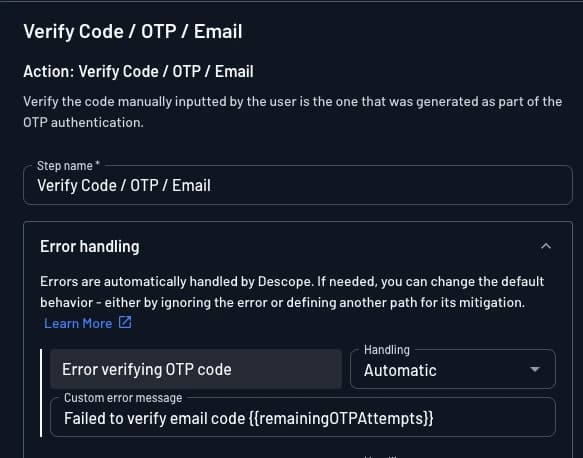
Instead of (or in addition to) branching with a condition, you can insert remainingOTPAttempts directly into a customized error message on an action or a condition, so the live count shows up in the same message the user already sees. This uses the same mechanism described in Dynamic Values in Flow Errors: open the message field, then use its dynamic value picker to insert remainingOTPAttempts at the point in the text where the count should appear.
On the Verify Code / OTP action
- On the OTP verification action, leave (or set) the error's handling to
Automatic. - Open the Custom Error Message field and write your message, inserting
remainingOTPAttemptsas a dynamic value where the count should appear, for example:Incorrect code. You have {{remainingOTPAttempts}} attempts left before your account is locked. - At runtime, Descope substitutes the live count, so a user on their second wrong attempt (of a 3-attempt limit) sees:
Incorrect code. You have 1 attempts left before your account is locked.
On a condition, alongside the branches from above
Because a condition lets you branch on the exact value, you can pair a custom error message with each branch from Warn Before Lockout, each branch only ever shows the message written for it:
Greater Than1: route back to the code entry screen with a generic retry message, optionally still including the count, for exampleIncorrect code. You haveremainingOTPAttemptsattempts left.Equals1: route to a dedicated warning screen (or the same screen with a distinct message) with wording likeIncorrect code. This is your last attempt before your account is locked. Consider requesting a new code instead.Else(locked out): sinceremainingOTPAttemptsis already empty here, use a fixed message with no dynamic value, for exampleYou've used all your attempts. Request a new code or contact support to continue.