Just-in-Time (JIT) Provisioning
With JIT provisioning enabled on a tenant’s SSO connection, Descope creates the user on first SSO login and refreshes mapped attributes and groups on later logins. You don’t have to pre-create every account before someone signs in.
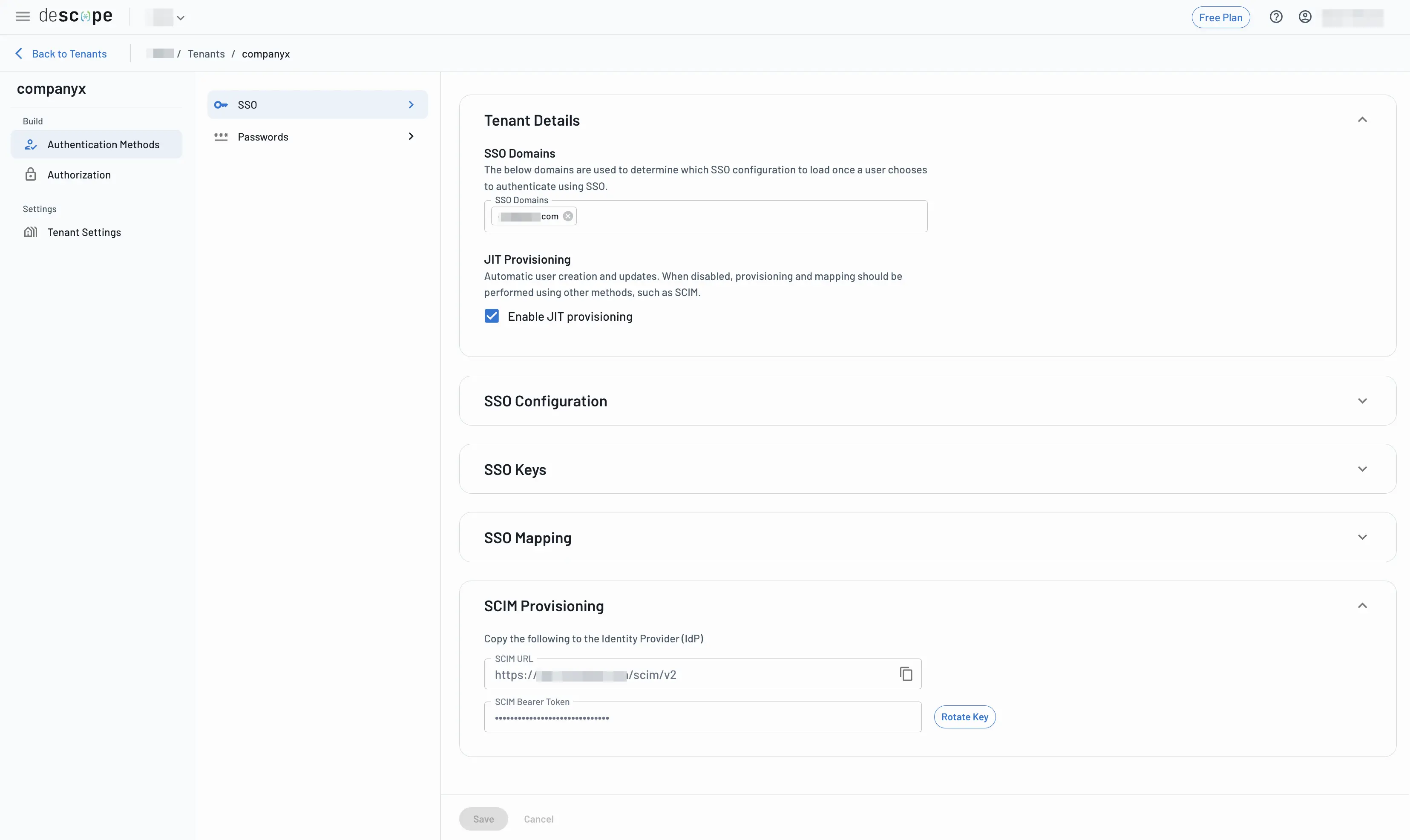
JIT is configured per SSO connection on the tenant (SAML or OIDC), under Authentication Methods → SSO.
What Descope Does When JIT Is On
On a successful SSO login:
- If the user doesn’t exist yet, Descope creates them from assertion attributes (email, name, and anything you’ve mapped).
- If the user already exists, Descope updates mapped attributes and group → role assignments from the latest assertion.
- If no mapped roles apply, Descope can still assign Default Roles configured in the Roles & Groups tab for that tenant.
That update-on-login behavior is why JIT is useful even after the first signup, as long as people keep logging in via SSO.
JIT vs SCIM
| JIT | SCIM | |
|---|---|---|
| When users appear | On first (and later) SSO login | When the IdP pushes create/update/deactivate |
| Attribute / group updates | On each SSO login | Continuously from the directory |
| Deprovisioning | Not automatic; the user can remain until you remove them or use SCIM | IdP can deactivate / remove users |
| Best for | Fast SSO rollouts, small orgs, or “login creates the account” | Enterprises that require hire/fire sync without waiting for login |
You can run both: SCIM for lifecycle, JIT for attribute refresh on login (or turn JIT off if SCIM should be the only writer). See SCIM and SCIM best practices.
How to Enable or Disable JIT
- Open the Tenants page and select the tenant.
- Go to Authentication Methods → SSO (and pick the right SSO profile if you use multiple IdPs).
- Toggle JIT Provisioning on or off.
Your customer’s IT admin can also change this in the SSO Setup Suite.
Manual field reference: SAML and OIDC configuration.
Mapping That JIT Relies On
JIT only knows what you map from the IdP:
- User attribute mapping: Email, name, phone, and custom attributes.
- Group and role mapping: IdP groups to Descope roles (and optional FGA mappings).
- Default roles: Applied when no group mapping matches.
Configure those in the Console, Setup Suite, or Management API. Details: SSO user and group mapping.
Security Notes
- Restrict SSO domains so only intended emails can hit this connection.
- Prefer strict group → role maps over broad default roles in production.
- If users might already exist from password/OTP, read Merging SSO identities before go-live.
- Confirm creates and updates in Audits (
LoginSucceededand related SSO fields). See SSO audit fields.
Related
Multiple SSO Providers Per Tenant
Configure more than one SAML or OIDC IdP on a single Descope tenant, route users by domain or ssoId, and manage Setup Suite and SCIM per connection.
SSO User and Group Mapping
Map IdP attributes and groups to Descope users, RBAC roles, and FGA relations for SAML and OIDC SSO.