Push Authentication Settings
Configure Push Authentication from the Descope console (Settings > Authentication Methods > Push).
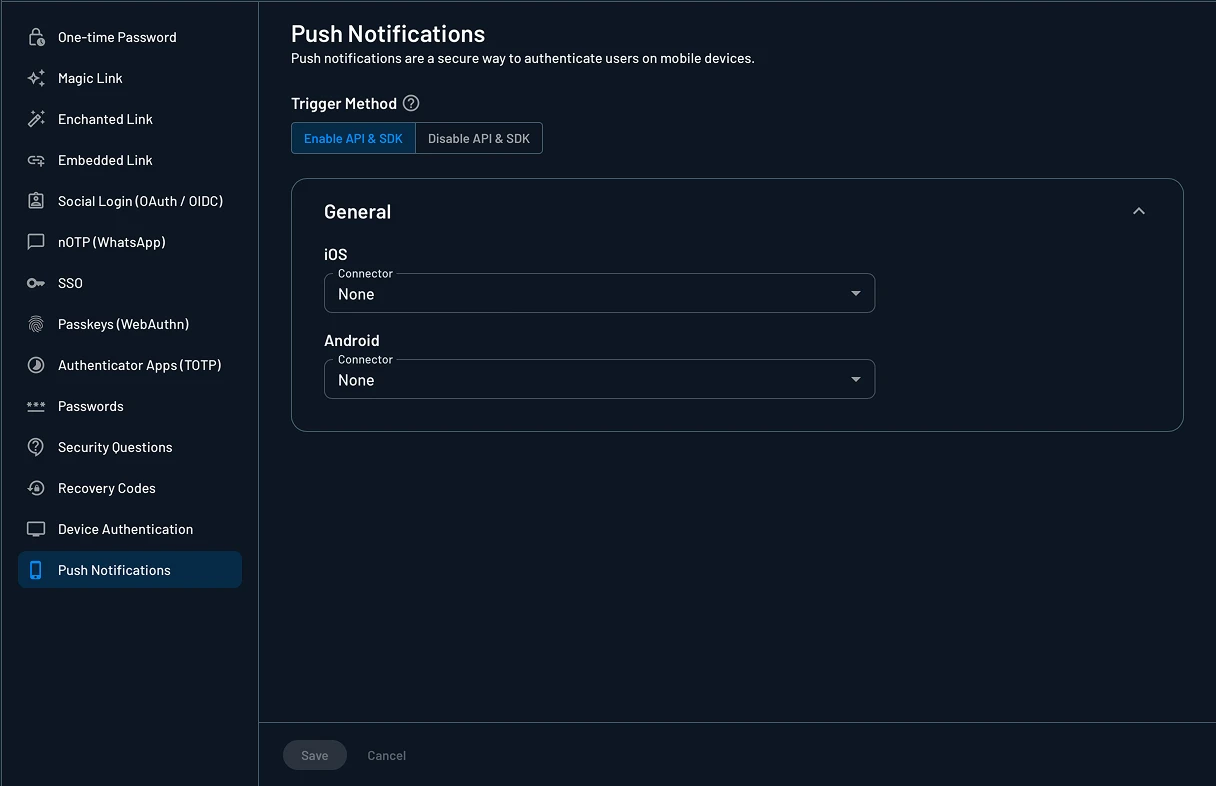
Enable Method in API and SDK
The Enable method in API and SDK toggle controls whether Password authentication can be invoked programmatically via APIs and SDKs.
- When enabled: Authentication works via flows, APIs, and SDKs
- When disabled: Authentication only works with flows or calls made with a valid management key
Connectors
Note
If you only ship an app for one platform (iOS or Android), configure the matching connector and leave the other empty.
Push notifications are delivered through messaging connectors configured on the Connectors page. Create the connector for each platform you support and select it in the settings above.
APNs (iOS)
Create an Apple Push Notification (APN) connector and provide your Team ID, Bundle ID, Key ID, and Private Key (.p8) from your Apple Developer account. Then, assign the connector in this settings page.
FCM (Android)
Create a Firebase Cloud Messaging (FCM) connector and provide your Firebase service account key (and optionally a Notification Channel ID). Then, assign the connector in this settings page.
Push Authentication
Add push notification authentication to your mobile app using the Descope mobile SDKs. Includes console setup, connector configuration, and sample code.
Device Authentication
Create OAuth Device Authentication flow with Descope for smart TVs, IoT devices, and other input-constrained devices.