Okta Customer Identity Solution (CIS) Migration Guide
Note
This guide is for customers using Okta Customer Identity Solution (CIS). If you use Auth0 instead, see the Auth0 migration guide.
Migration Skill Available
Want a faster, guided migration? The Okta CIS to Descope Migration Skill in descope/skills is a skill for AI agents that interactively walks you through the full migration — user export, attribute mapping, SDK replacement, and more.
You can migrate from Okta CIS to Descope in two main ways:
- Full Migration - Export users from Okta (or connect your existing data store) and move them to Descope, then run entirely on Descope.
- JIT Migration - Provision users in Descope on sign-in or when they use an existing Okta session. Options include verifying the password with Okta (traditional JIT) or session migration (JIT without re-login—existing Okta token is exchanged for a Descope session).
You can also combine these with SSO migration for tenant SSO setups and additional considerations for other migration details.
Full Migration
In a full migration you move your users and identity data to Descope and eventually run only on Descope. Two approaches:
- Export from Okta Users API - List users via the Okta API, then import into Descope.
- Connect your existing data store - If Okta sits in front of your own DB (On-prem SCIM Server Agent or Access Gateway), connect that same store to Descope and then sever Okta.
Users are Owned By Okta (Export from Okta Users API required)
Use the Okta Users API to list and export users. This API may be rate limited; for large user bases, use pagination and backoff.
Prerequisites
- Access to your Okta CIS tenant with an API token that can list users (List all users)
- Your Descope project ID and a Descope Management Key
Step 1: Export users from Okta CIS
- Create an API token in Okta (if you don't have one):
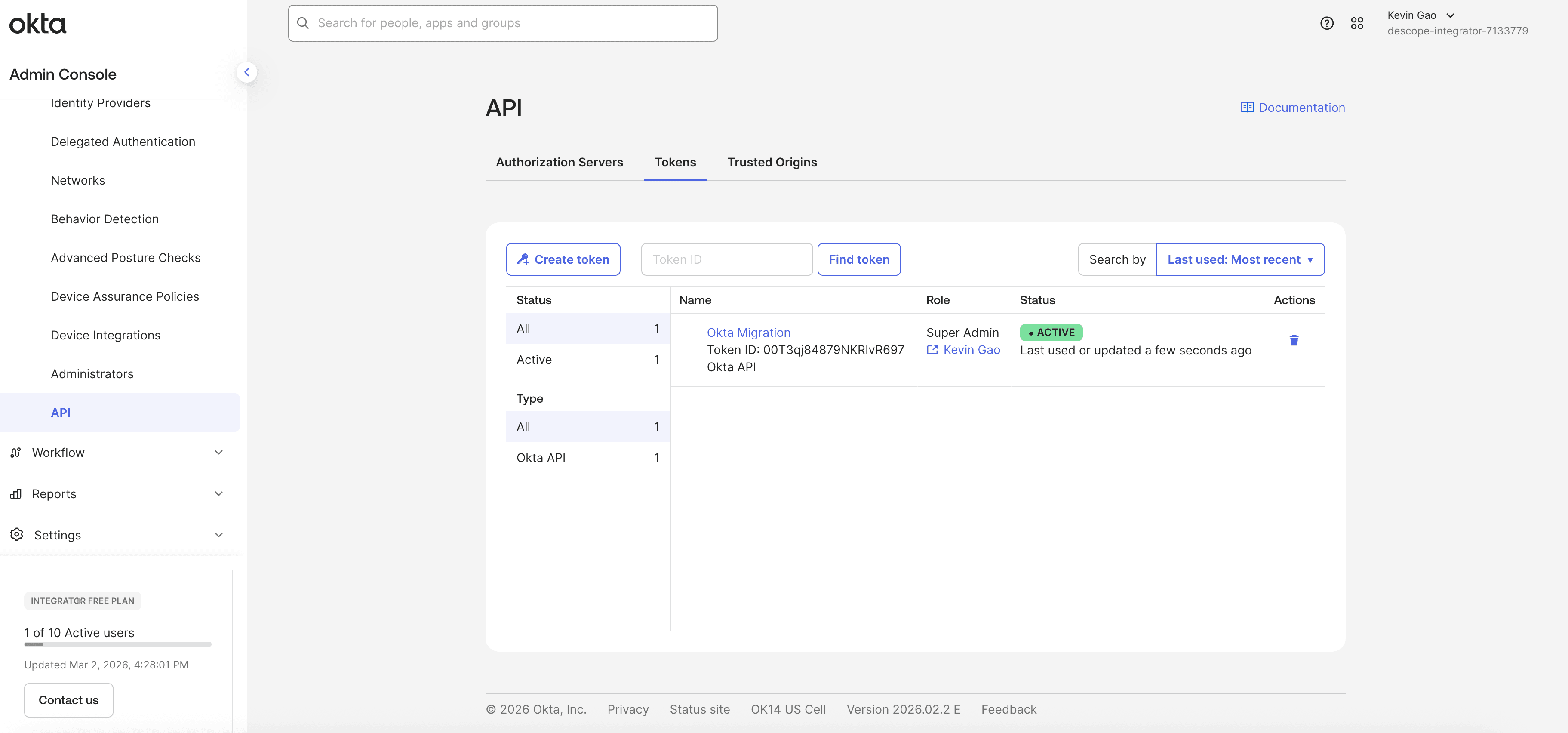
- In the Okta Admin Console, go to Security → API → Tokens.
- Click Create Token, name it (e.g. "Descope Migration"), and copy the token. Store it securely; it won't be shown again.
-
List users via the Okta Users API:
- Call
GET https://${yourOktaDomain}/api/v1/userswith the headerAuthorization: SSWS ${api_token}. - Use query parameters:
limit=200(max per page) and, for the next page,after=${userId}from theLinkheader or the last user'sid. Repeat until all users are fetched. - See List all users for rate limits and response format.
- Call
-
Map Okta attributes to Descope - For each user, map:
- Okta
profile.loginorprofile.email→ DescopeloginIds(required; unique per user). - Okta
profile.firstName,profile.lastName→ DescopegivenName,familyNameorname. - Okta
profile.email→ Descopeemail. - Any custom Okta profile fields → Descope custom attributes as needed.
- Build a JSON array (or CSV) in the format expected by Descope (see user format guide).
- Okta
Step 2: Import users into Descope
- Open the Descope Console - Go to Users (or use the Management API; see below).
- Import via API (recommended for bulk):
- Use the Create User or Batch Create User API with your Management Key.
- Send the exported JSON (one user per request, or a batch). Set a unique
loginIds(e.g. email or Oktalogin) per user. - Optionally set a custom attribute
freshlyMigratedtotrueto be used in your Descope flow to identify users who have been migrated.
- Or import via the Console - If your project supports it, use Import users (or equivalent) from the Users page and upload a CSV/JSON that matches the required fields.
Step 3: Verify and cut over
- Verify in Descope - In the Descope Users list, confirm that migrated users appear with correct login IDs, emails, and names.
- Test sign-in - Run your application's sign-in flow and confirm that a few migrated users can authenticate.
- Confirm import coverage - Since Okta's Users API doesn't export password hashes, freshly imported users won't have a password set in Descope — checking the
passwordfilter here won't tell you whether the import succeeded. Instead, run an unfiltered Search Users API call (or scope it withfromCreatedTime) and compare the returnedtotalagainst your expected user count. - Cut over - Once satisfied, switch your application to use only Descope for authentication and retire Okta CIS for this app.
Using the Okta On-prem SCIM Server Agent or Access Gateway
If you use Okta On-prem SCIM Server Agent or Okta Access Gateway with a new Data Store backed by your own SQL database (MySQL, MS SQL, Oracle, Postgres) or LDAP, your users and their information are already owned by you in that store. You do not need to export from Okta's user API.
- Connect the same DB to Descope - Use an HTTP Generic Connector in your Descope flow to connect to that data store and use it as the originating identity source. Configure the connector to call your store's API or endpoints so that authentication and user lookup are performed against the database or LDAP, and map the response to Descope users and sessions.
- Sever the connection to Okta - Once Descope is successfully authenticating against your data store, remove or disable Okta from the path. Your identity data stays in your DB; only the connection moves from Okta to Descope.
JIT Migration
With Just-In-Time (JIT) migration, you do not bulk-export users. Users are provisioned in Descope when they sign in or when they use an existing Okta session.
JIT can be passwordless (e.g. session migration or email/username lookup plus email verification) or password-based (verify the user's password with Okta). Two common approaches are:
- Traditional JIT (password verification) - Verify the user's password with Okta; if correct, create or link the user in Descope and issue a Descope session. The user must enter credentials again.
- Session migration (JIT without re-login) - Use the user's existing Okta session token; Descope validates it, provisions the user in Descope just in time, and issues a Descope token. The user only needs to update the app; they do not have to log in again.
Note
Session migration is more reliable than traditional JIT for users who already have an active Okta session, as their session will be automatically migrated and a Descope token will be issued without re-entering credentials.
Designing your JIT flow
The value of JIT is that you control the flow. It is not limited to “collect username and password, then call Okta.” You design the steps in your Descope flow and decide when (and whether) to involve Okta. For example:
- If you have passwords -
- For users new to Descope, you might ask for the password only as a verification step (e.g. after they enter email/username, verify with Okta, then create or link the user and issue a Descope session).
- You might look up the user as they type email or username, then force verification of the email on file (e.g. magic link or OTP to that email) instead of asking for a password.
- You can combine steps, add conditions, or branch based on whether the user already exists in Descope—so the flow can do a variety of things, not just “take username/password and run the flow.”
- If you go passwordless -
- You can use session migration (existing Okta token) to migrate users who already have an active Okta session.
- You can use a flow that looks up the user by email/username and only verifies ownership of the email (e.g. magic link or OTP), then provisions them in Descope without ever asking for a password.
The important part is that your backend (or flow) can call the Okta APIs when you need to verify the user, and then create or link the user in Descope and issue a Descope session—according to the path you designed.
Implementing JIT with Okta APIs (password verification)
One way to implement JIT is to verify the user's password with the Okta Authentication API, then provision them in Descope. Example flow:
- User enters username and password in your app (or in a Descope flow that passes credentials to your backend).
- Your backend sends the credentials to the Okta Authentication API (
/api/v1/authn) to verify the password. - If authentication succeeds, create the user in Descope (if they do not already exist) or link to the existing user, then issue a Descope session (e.g. via exchange access key or your chosen method).
- The user is now signed in with Descope; no bulk export is required.
Example request (Okta Authentication API):
curl -v -X POST \
  -H "Accept: application/json" \
  -H "Content-Type: application/json" \
  -H "Authorization: SSWS ${api_token}" \
  -H "User-Agent: Mozilla/5.0 (${systemInformation}) ${platform} (${platformDetails}) ${extensions}" \
  -H "X-Forwarded-For: 23.235.46.133" \
  -d '{
    "username": "dade.murphy@example.com",
    "password": "correcthorsebatterystaple",
    "options": {
      "multiOptionalFactorEnroll": false,
      "warnBeforePasswordExpired": false
    },
    "context": {
      "deviceToken": "26q43Ak9Eh04p7H6Nnx0m69JqYOrfVBY"
    }
  }' "https://${yourOktaDomain}/api/v1/authn"
Replace ${yourOktaDomain} with your Okta domain (e.g. your-org.okta.com) and ${api_token} with a valid Okta API token.
On success, use the response to identify the user and create or link them in Descope, then complete the sign-in with a Descope session.
To carry the verified password over so the user can keep signing in with it, store it in Descope as part of the same flow. Use Sign Up / Password for users new to Descope, or Update Password when the user already exists there, which is the case if your flow signs them in with a magic link or OTP first. Both actions take the password from either the Login Password or the New Password screen component; Login Password suits a migration screen better, because the user is entering an existing password rather than picking a new one.
Note
The password must satisfy your project's password policy regardless of component collected it. If Okta's policy was more permissive, expect some users to fail at this step. As a workaround, align the policies for the migration window, or send the failure to a password reset path.
Storing a password this way is what makes the password: false filter under Tracking migration progress a meaningful signal for these users.
Session migration (JIT without re-login)
Session migration is a form of JIT: the user must update to a new version of your web or mobile app, but they do not have to log in again.
The app sends their existing Okta session token to Descope; Descope validates it, pulls the user's information from Okta CIS, provisions the user in Descope just in time, and issues a Descope token. The user's session is automatically migrated—no password re-entry, no interruption.
To roll this out, deploy a new version of your app that uses the Descope SDK with session migration.
Users who already have a valid Okta session are migrated when they open the updated app; their pre-existing Okta token is exchanged for a Descope session and their user record is created or updated in Descope as needed.
See the Session Migration guide for setup, prerequisites, and SDK usage (React, NextJS, WebJS, Kotlin, Swift).
Tracking migration progress
Since JIT migration happens gradually as users sign in, you'll want a way to see how many users have completed migration and how many are still pending. This is especially relevant for Okta CIS, since Okta's Users API does not export password hashes — passwords can only be captured as users authenticate.
You can use the password filter on the Search Users API (or the SDK's searchAll function) to check migration coverage:
password: true- Returns users who already have a password set in Descope (migrated).password: false- Returns users who do not yet have a password set in Descope (still pending migration).
Note
This filter only reflects password-based JIT. Users migrated through session migration or any passwordless path (magic link, OTP, social login) never get a password set in Descope, so they'll always show up under password: false even after they've fully migrated. If your JIT flow mixes password-based and passwordless paths, don't rely on password: false alone to measure overall completion — pair it with another signal, such as fromCreatedTime/fromModifiedTime or a custom attribute you set on successful migration.
Example: Find users still pending migration
curl -i -X POST \
  __BaseURL__/v2/mgmt/user/search \
  -H 'Authorization: Bearer __ProjectID__:<ManagementKey>' \
  -H 'Content-Type: application/json' \
  -d '{"password": false}'
Compare the total field returned for a password: true search against a password: false search to track how many users remain.
This is a native alternative to manually tracking migration status with a custom attribute like freshlyMigrated.
SSO migration
If your Okta CIS setup includes SSO (SAML/OIDC) for tenants or organizations, you can migrate those SSO configurations to Descope without forcing tenant admins to re-configure their IdPs.
Descope can consume the existing IdP response (e.g. same ACS URL) and complete authentication so that end users keep a seamless experience.
For the full process—implementing SSO with Descope, setting up tenants, DNS redirect, and testing—see SSO Migration.
Additional considerations
- Passkeys and TOTP cannot be migrated - With Okta CIS, you cannot migrate passkeys or TOTP seeds to Descope. Users who had passkeys or authenticator apps (TOTP) in Okta will need to reprovision them in Descope (e.g. enroll a new passkey or set up TOTP again in your Descope flow after migration).
- JIT provisioning and user attributes - With JIT provisioning (password verification or session migration), you control how users are created or updated in Descope. Configure whatever user attributes you need from Okta (or your IdP) and map them to Descope user attributes accordingly when you create or update the user via the Management API or session-migration flow.
Backend Session Validation Strategy
Whether you do a full migration or a JIT migration, plan for a period when some users have Descope sessions and others still have Okta sessions. Your backend should support both token types during the transition:
- Validate Descope OAuth tokens for users who have already migrated or signed in via Descope.
- Validate Okta JWTs for users who still have active Okta sessions.
When a request arrives, inspect the token (e.g. issuer or kid) to determine the provider, then validate accordingly. This lets you roll out the migration gradually without forcing everyone to re-authenticate at once. For more information on this implementation pattern, see the docs here.