Downstream Credential Access
When a service holds an inbound Descope access token and needs to call a different downstream API, it usually needs a credential scoped to that target, not the token it already has. That applies to MCP servers fetching third-party OAuth tokens, MCP tools calling internal APIs registered as separate Resources, and any middleware that brokers access on an agent's behalf.
This page covers the server side: validate the inbound token, get an outbound credential from Descope, and call the downstream service with it. For where this fits among the ways agents get tokens, see Auth Patterns. For what's specific to MCP tool handlers and the Python SDK helpers, see Calling External APIs from MCP Tools.
Choose a Path
The inbound token is the access token the agent or MCP client sent your service. Its aud is your Resource, and it carries who is calling and the scopes they consented to. What you send downstream depends on the target:
| Downstream target | Pattern | What you send downstream |
|---|---|---|
| A Descope Resource that accepts the inbound token's audience and scopes | Passthrough | The inbound token as-is |
| An internal API registered as a different Descope Resource | Resource exchange | A Descope JWT from a token exchange at the token endpoint, scoped to that Resource's aud and scopes |
| A third-party OAuth service or API-key-based service | Connection fetch | The OAuth token or API key from the Connection token endpoints |
Passthrough only works when the downstream service is the same Resource, or accepts the same audience and scopes. For most tool handlers, get a new credential instead. Forwarding the inbound token exposes its full scope set downstream, and it skips the per-target policy check and audit event that each exchange or fetch gets.
Setup
1. Register a Client for Your Server
A Resource exchange needs your server to act as an OAuth client toward Descope, so the same server is both a Resource on the inbound side and a Client on the outbound side. A Connection fetch doesn't need this, because it presents the inbound token itself.
In the Descope Console, go to Clients and create a client to represent the server:
- Enable the Client Credentials grant type, and disable the grant types the server won't use.
- Copy the generated Client ID and Client Secret, and keep them in the server's environment or secrets manager.
This client is separate from the agents or MCP clients that call your service. Its client ID tells Descope which server is making the exchange, so policies can target your server with client.tags or client.name, and the audit log records the chain from the user, through the calling client, to your server. Without it, Descope can't tell a legitimate server-side exchange from a caller trying to get credentials directly.
2. Register the Downstream Targets
| Downstream target | Where to configure it | What Descope returns |
|---|---|---|
| Internal API that validates Descope JWTs | Connect → Resources as an API Resource | A Resource-scoped Descope JWT |
| Third-party OAuth or API-key service | Agentic Identity Hub → Connections | The OAuth token or API key stored in the Connections vault |
MCP scopes → Connection scopes
MCP Server Resource scopes are what a user consents to when they authorize your MCP server (for example mcp:read_hubspot_contacts). In the MCP server's scopes config, you map each of those scopes to the downstream Connection scopes it needs (for example crm.objects.contacts.read).
Descope uses that mapping at two points, and you never pick Connection scopes by hand at either:
- During the connect: when the user links the Connection, Descope requests exactly the Connection scopes that correspond to the MCP server scopes the user consented to, so the token stored in the Connections vault carries the right scopes.
- At fetch time: when your server fetches the token, Descope reads the scopes on the access token (the same MCP server resource scopes) and automatically returns the stored Connection token with the matching Connection scopes.
You can also map an MCP server scope to an API key Connection, such as OpenAI or a custom API key Connection. An API key has no scopes to request, so the MCP scope maps to the Connection as a whole, and the connect step above doesn't apply.
Which stored key a fetch can return depends on what the key is associated with. An API key can belong to a user, to a user within a specific tenant, or to a tenant, the same three models as OAuth tokens. The access token you fetch with has to match that association:
- User-level keys: The mapping returns keys stored for the same user as the access token. If that user has more than one key on the Connection, set an
externalIdentifieron each key when you store it, and pass the sameexternalIdentifierwhen you fetch the token so Descope knows which key to return. Keys the same user holds in different tenants don't need one, sincetenantIdalready tells them apart. - User-level keys associated with a tenant: The access token must be for that user signed in to that same tenant. An access token for the same user in a different tenant, or with no tenant, can't get the key, and the fetch fails.
- Tenant-level keys: The fetch succeeds when the access token's user belongs to the tenant and your policies allow it, or when the access token comes from a client credentials flow for a client associated with that tenant.
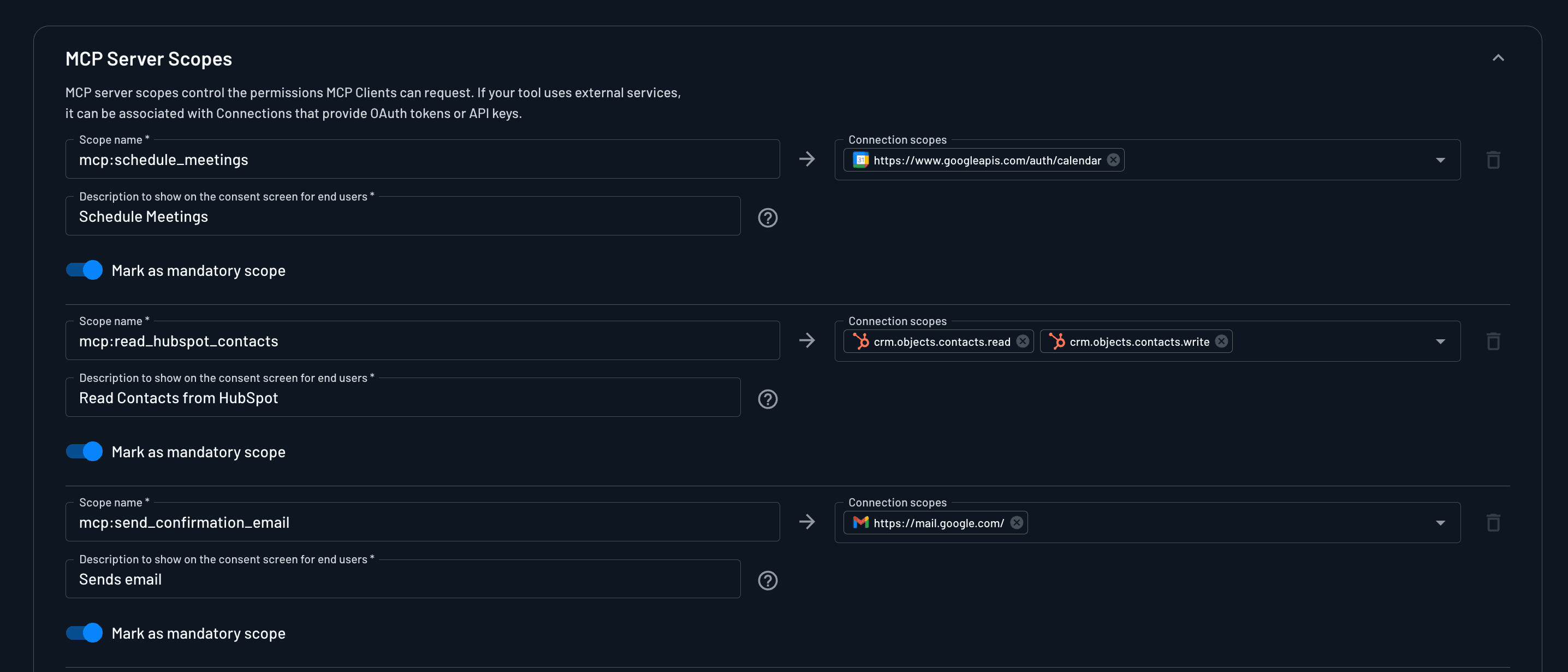
Configure this mapping in your MCP server configuration underneath the Scopes section, not on the Policies page. See MCP Server Resource scopes, for how scopes map to tools.
3. Allow It with a Policy
The scope mapping decides which Connection scopes a token gets. A policy with the Delegated access (token exchange) grant type decides whether your server may get that credential at all, for both Resource exchanges and Connection fetches. Without a matching policy, the request is denied even when the scope mapping is correct. See A Policy on Every Hop, for how these checks chain across services.
Making the Request
At request time your server validates the inbound access token against Descope's JWKS, then asks Descope for the outbound credential:
Exchanging for a Resource Token
Your server calls the token endpoint as its registered client, with the inbound access token as the subject token and the target Resource's URL as resource:
POST /oauth2/v1/apps/token
Authorization: Basic {base64(client_id:client_secret)}
Content-Type: application/x-www-form-urlencoded

grant_type=urn:ietf:params:oauth:grant-type:token-exchange
&subject_token={inbound_access_token}
&subject_token_type=urn:ietf:params:oauth:token-type:access_token
&resource={resource_url}
Descope validates your server's credentials, evaluates policy against the inbound token's claims, and returns a Descope JWT scoped to that Resource. See Token Exchange for optional scope narrowing, and the Token API for the full parameter reference.
Fetching a Connection Token
Your server calls the Connection token endpoint with the inbound access token in the Authorization header, naming the Connection and the user:
curl -X POST "__BaseURL__/v1/mgmt/outbound/app/user/token/latest" \
  -H "Content-Type: application/json" \
  -H "Authorization: Bearer <PROJECT_ID>:<INBOUND_ACCESS_TOKEN>" \
  -d '{
  "appId": "<CONNECTION_ID>",
  "userId": "<USER_ID>"
}'
Descope evaluates policies for the token's subject and returns the stored OAuth token or API key that the subject is allowed to read. Tenant-level tokens use a separate endpoint. Fetching Connection Tokens covers every endpoint and SDK method, and the MCP Auth SDKs make this call for you inside an MCP server.
Audit Trail
Descope always counts token exchanges per client in the ClientIdExchange audit event. To see each exchange on its own, you need the per-request TokenExchangeSuccess event, which is off by default.
Turning on per-request exchange events
Contact Descope Support with your project ID to turn on TokenExchangeSuccess for your project.
Each TokenExchangeSuccess event records:
- The user from the subject token
- The client that made the exchange, which is your server's client ID
- The audience and Resource of the new token, and its scopes
- The actor chain and a transaction ID, which link the hops of a delegation chain
A fetch from the Connection token endpoints isn't recorded in the audit trail when it succeeds. A denied fetch is logged as a policy violation. When a gateway fetches a Connection credential through a token exchange, the exchange is counted and audited like any other, with the Connection route as the requested Resource.