Agent Authorization
Policies are allow rules that control who can access which Resources and Connections, and with which scopes.
See our Policies doc for the full guide: subjects, targets, grant types, and how to author rules in the Console.
For agents specifically, policies answer two questions at runtime:
- Resource targets: Which scopes can this agent receive on a backend API or MCP server access token?
- Connection targets: Can this agent retrieve a third-party Connection token from the Vault, and with which scopes?
Note
Policies cannot be managed with Terraform or via APIs at this time.
How Policies Are Enforced for Agents
See How Policies Are Enforced for grant-type behavior across all applications. For agents, evaluation differs by target:
Resource Targets
The access token a policy governs here is the one your MCP server or backend API validates at runtime.
User access (authorization code): the flow most user-delegated agents use:
- Scope request: The client calls
/authorizewith requested scopes. Descope confirms the client configuration allows those scopes. - Policy filtering and consent: Descope evaluates matching policies, typically on
user.roles,user.tenantIds, andclient.tags(see condition keys), and the user consents within what they allow. See Policies and User Consent for more details. - Token issuance: The access token carries only the scopes that were granted. See What Ends Up in the Token for how Descope decides which scopes are included.
- Runtime enforcement: The Resource validates the token on each request. An MCP server does this when tools are invoked.
If an agent needs a scope that no policy permits, a Descope admin has to update the policy. Until then, the scope is never offered for consent and never appears in the token.
Delegated access (token exchange) and M2M (client_credentials) skip consent, so the policy alone decides the scopes. For API Resources with scope-to-role mapping, the granted scopes also add their mapped roles to the token. See Scopes and roles for how M2M clients get roles.
Connection Targets
Connection policies are enforced when an agent, MCP server, or gateway presents a Descope access token to the Connection token endpoints to fetch a credential from the vault. There is no consent screen:
- Fetch request: The caller presents a Descope access token and requests a Connection token.
- Policy evaluation: Descope checks whether the subject may retrieve a token for the requested Connection and which scopes it may carry.
- Connection token issuance: If a matching policy permits the fetch, Descope returns a scoped Connection token. Otherwise the fetch is denied.
- Runtime enforcement: The downstream service enforces scopes when the agent calls its API.
A Policy on Every Hop
An agent's request often passes through more than one service. The agent calls an MCP server, and the MCP server calls your billing API or the user's Google Calendar. Each call is its own hop, and Descope checks a policy at each one instead of letting the first token carry access all the way down:
- First hop: When the agent gets its token, a User access or M2M policy for the first Resource, such as an MCP server or gateway, decides whether the agent may reach it and with which scopes.
- Each downstream hop: When that Resource asks Descope for a downstream credential, a policy with the Delegated access (token exchange) grant type decides whether it may use the agent's token for that target. The same check runs when it exchanges for another Resource's token and when it fetches a Connection token.
The agent's token is valid only at the first Resource, so that Resource can't forward it to the next service. It has to ask Descope, and the policy for the next target decides the answer. Because each target has its own rule, the same MCP server can be allowed to read from your billing API but not write to it, or to use one customer's HubSpot Connection but not another's. The check still uses the user and tenant on the token, so conditions such as user.tenantIds apply on every hop, not only on the first.
If no policy allows a hop, Descope returns no token and logs a policy violation. Each hop is its own grant in the audit trail, which shows who did what on whose behalf. For how to make the downstream requests, see Downstream Credential Access.
Recommended Policy Patterns
Note
IaC managed policies are coming soon.
Common agent patterns use user.roles and user.tenantIds from SSO group mapping - see SSO User and Group Mapping for setup details.
Resource Targets
Internal MCP: Corporate Tenant Isolation
Restricts access to users in finance and operations tenants using internal agents:
Rule name: Internal MCP Corporate Tenants Only
Conditions:
user.tenantIds IN ["corp_finance", "corp_ops"]
client.tags CONTAINS "internal-agent"
Allowed Scopes:
* mcp:invoice.create
* mcp:calendar.read
External MCP: Read-Only Access
Read-only calendar access for users with the calendar_editor role:
Rule name: External MCP - Read Only Default
Conditions:
user.roles CONTAINS "calendar_editor"
Allowed Scopes:
* mcp:calendar.read
Access Only if Using Verified Agentic Identity
Verified agents receive read/write calendar and invoice scopes:
Rule name: Verified Agent MCP Access
Conditions:
client.tags CONTAINS "verified-agent"
Allowed Scopes:
* mcp:calendar.read
* mcp:calendar.write
* mcp:invoice.create
Backend API: Read-Only for Delegated Agents
Agents acting on a user's behalf via token exchange receive read-only Orders API access:
Rule name: Orders API - Delegated Read Only
Conditions:
client.tags CONTAINS "verified-agent"
Allowed Resource: orders-api
Allowed Scopes:
* orders.read
Grant types: Delegated access (token exchange)
Tenant-Scoped Scheduler (SSO groups → roles)
Users mapped from an IdP "Schedulers" group to a Descope role, scoped to specific tenants:
Rule name: Scheduler Access to Calendar MCP
Conditions:
user.roles CONTAINS "Scheduler"
user.tenantIds IN ["tenant-a", "tenant-b"]
Allowed Scopes:
* mcp:calendar.write
* mcp:calendar.readonly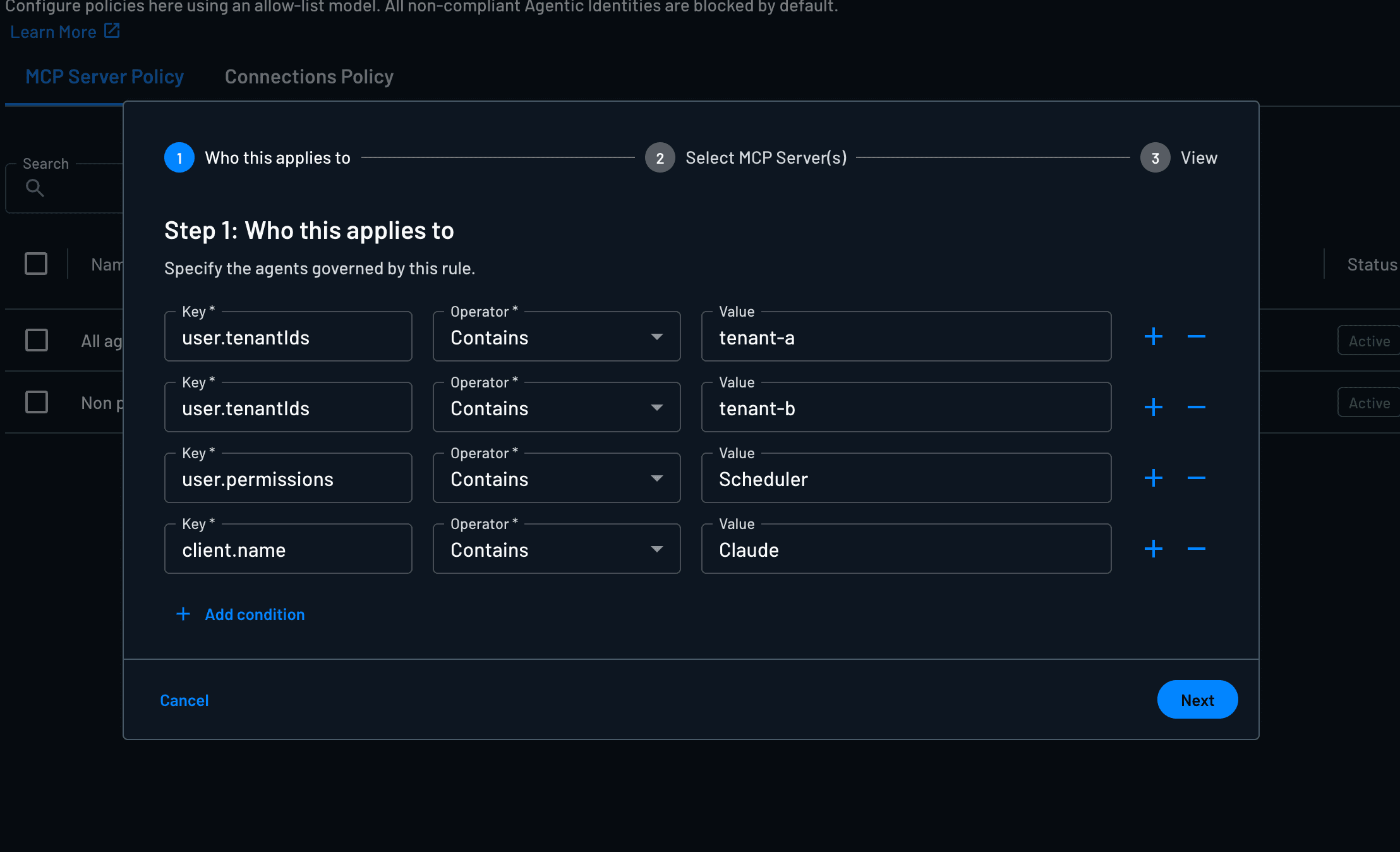
Partner Agents: Shared Docs Server Only
Partner agents can read a shared docs MCP server. Since scopes are only granted when a policy allows them, partner agents get nothing on Resources without a matching rule, such as a customer's production MCP server:
Rule name: Partner Docs Access
Conditions:
client.tags CONTAINS "partner-agent"
Allowed Resource: docs-mcp
Allowed Scopes:
* mcp:docs.read
Staging vs. Production: Write Tools on Staging Only
Model staging and production as separate MCP Server Resources, then grant write scopes only on staging. Production gets a read-only rule for the same agents:
Rule name: Staging MCP - Read and Write
Conditions:
client.tags CONTAINS "internal-agent"
Allowed Resource: billing-mcp-staging
Allowed Scopes:
* mcp:invoice.read
* mcp:invoice.create

Rule name: Production MCP - Read Only
Conditions:
client.tags CONTAINS "internal-agent"
Allowed Resource: billing-mcp-prod
Allowed Scopes:
* mcp:invoice.read
Connection Targets
Read-Only Calendar Access for Standard Users
Rule name: Calendar Read-Only - Standard Users
Conditions:
user.roles CONTAINS "user"
Allowed Connections:
* google-calendar
Allowed Scopes:
* https://www.googleapis.com/auth/calendar.readonly
Read-Write Calendar Access for Schedulers
Rule name: Calendar Read-Write - Schedulers
Conditions:
user.roles CONTAINS "scheduler"
Allowed Connections:
* google-calendar
Allowed Scopes:
* https://www.googleapis.com/auth/calendar
Tenant-Scoped Slack Access
Rule name: Slack Access - Corporate Tenants
Conditions:
user.tenantIds IN ["corp_finance", "corp_ops"]
Allowed Connections:
* slack
Allowed Scopes:
* chat:write
* channels:read
Verified Agent Access to GitHub
Rule name: GitHub Access - Verified Agents Only
Conditions:
client.tags CONTAINS "verified-agent"
Allowed Connections:
* github
Allowed Scopes:
* repo
* read:orgAccept Your Customers' XAA Tokens
Let enterprise customers govern agents that reach your MCP server using their own XAA-compatible workforce IdP, such as Okta or Ping.
Resources
Define API and MCP Server Resources in Descope with OAuth scopes, RBAC role mapping, and connection scope mapping for agent and client access.