Clients
A client is an OAuth application that requests tokens from Descope and, in most cases, needs a user or tenant to consent before it can act on their behalf. The Clients page is where you register, view, and manage the clients that belong to your agentic setup. From here you can:
- Create clients manually for autonomous agents, pre-registered MCP clients, or any case where you want to configure credentials and grant types ahead of time
- View your agentic clients, including those created automatically via DCR or CIMD when MCP clients like Claude or Cursor connect to your MCP servers
- Manage clients: update tags, configure grant types, and delete clients that are no longer in use
Clients and Inbound Apps
A client and an Inbound App are the same kind of object. Both are OAuth clients that request tokens from Descope and consent from your users, and both are configured with the same settings. What separates them is where you create them.
A client you create in the Agentic Identity Hub is marked as agentic. An Inbound App you create outside the Hub is not. That one distinction decides which lists it appears in:
| Where you create it | Listed under Clients | Listed under Inbound Apps |
|---|---|---|
| Agentic Identity Hub, Clients | Yes | Yes |
| Identity Federation, Inbound Apps | No | Yes |
The visibility is deliberately one-way. Inbound Apps holds the full list, and Clients narrows it to the agentic ones. That gives you a place to work with your agents and MCP clients without the rest of your OAuth clients getting in the way.
Created something under Inbound Apps and cannot find it here?
It will not appear on the Clients page. Only clients created inside the Agentic Identity Hub are listed there. Look for it under Inbound Apps instead.
Because the two share a single configuration surface, this page links to Creating Inbound Apps for the settings that behave identically on both, and documents the agentic-specific behavior itself.
Types of Clients
Separately from whether a client is agentic, clients fall into two categories based on how they were registered:
- Dynamically registered clients: Clients registered automatically through Dynamic Client Registration (DCR) or Client ID Metadata Documents (CIMD) when an MCP client like Claude, Cursor, or VS Code connects to one of your MCP servers. These get access to the MCP server they registered with automatically, with no policy required.
- Manually registered clients: Clients you pre-register yourself, typically for autonomous agents using
client_credentialsor for cases where you have disabled DCR/CIMD on your MCP server. These need a policy before they can reach a Resource.
CIMD clients with the same metadata URL are one client
All CIMD registrations that present the same metadata URL resolve to the same client with one client ID. Every Claude user, for example, presents Claude's metadata URL, so they all appear under a single Claude client, but each user's consent creates its own agentic identity under that client.
Viewing Clients
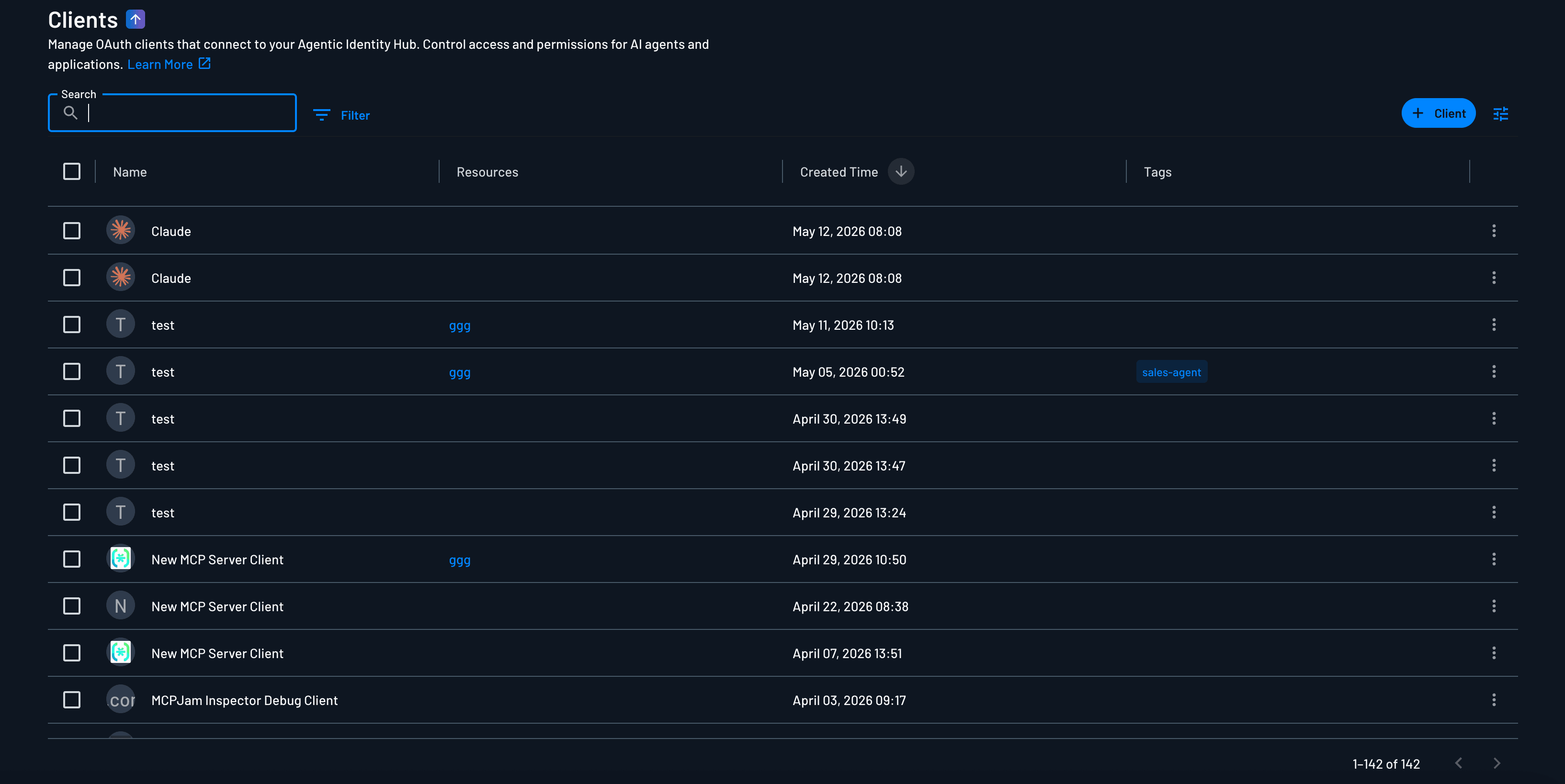
Navigate to the Clients section in the Descope Console to see your agentic clients and their details. Clients created outside the Agentic Identity Hub are listed under Inbound Apps rather than here.
Creating a Client
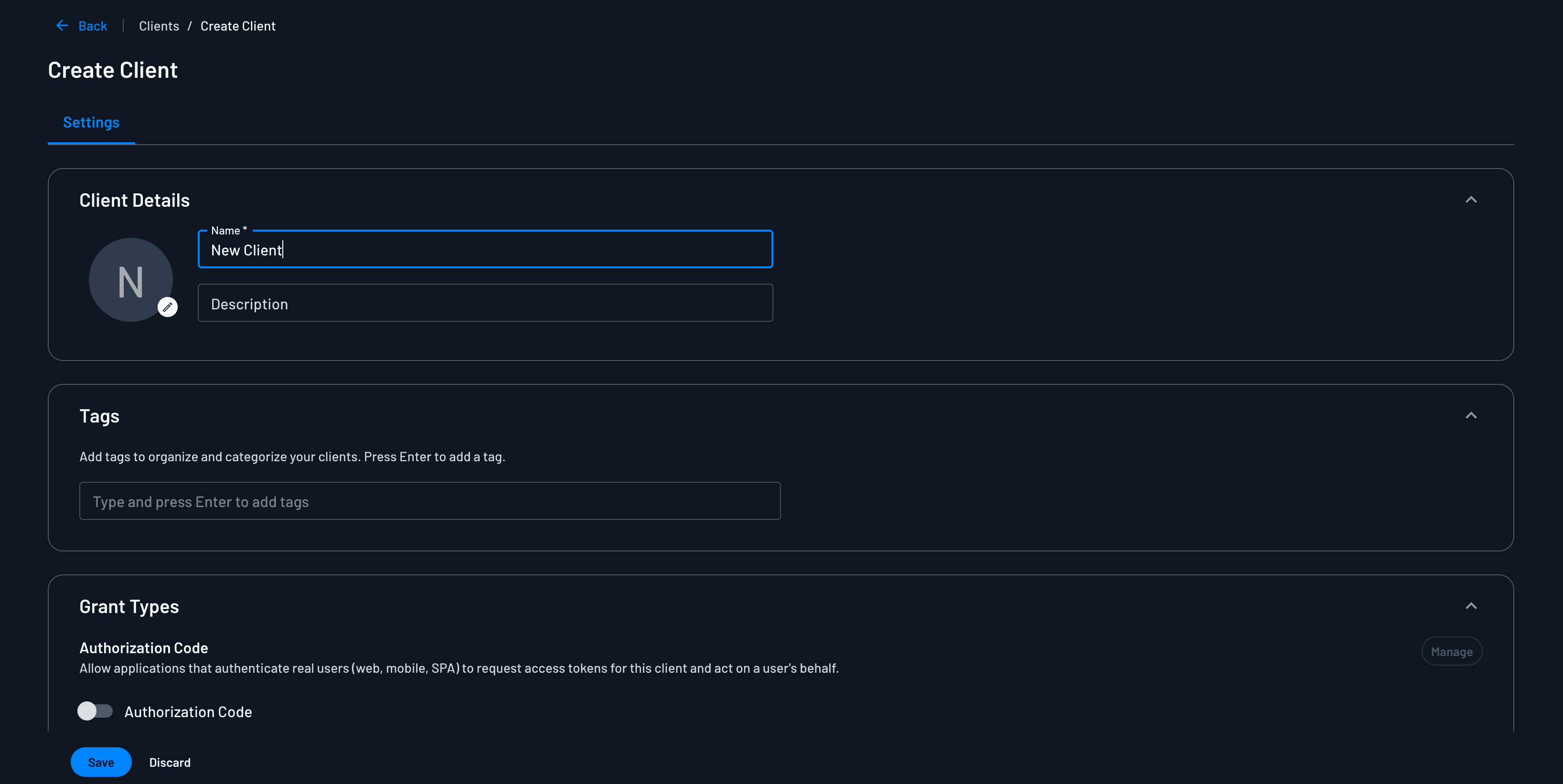
To create a new client manually, click the + Client button in the top right of the Clients page. The creation form is divided into several sections.
A manually created client also needs a policy to reach a Resource
Creating the client does not by itself grant it access to anything. To let a manually created client reach a Resource, for example an MCP server, you must also add a policy whose subject is this client and whose target is that Resource, with the scopes it may receive. The Console shows a reminder in the bottom-right corner after you create the client.
This applies only to manually created clients. Clients registered through DCR or CIMD automatically get access to the MCP server Resource they registered with; no policy required.
Client Details
The Client Details section captures the basic identifying information for the client.
Name
The client name is a required, human-readable identifier that helps you distinguish between clients in your project.
Description
The description is an optional field where you can provide additional context about the client, such as its purpose, owner, or environment.
Logo
You can optionally paste a logo for the client. When a client is registered dynamically through a well-known MCP client such as Claude, Cursor, or VS Code, Descope will pre-fill the logo for you automatically.
Tags

Tags are optional labels you can assign to a client for organization and categorization. You can add as many tags as you want. Press Enter after typing each tag name to add it to the client.
Tags help you group and filter clients based on custom criteria such as environment, team, or use case.
Grant Types
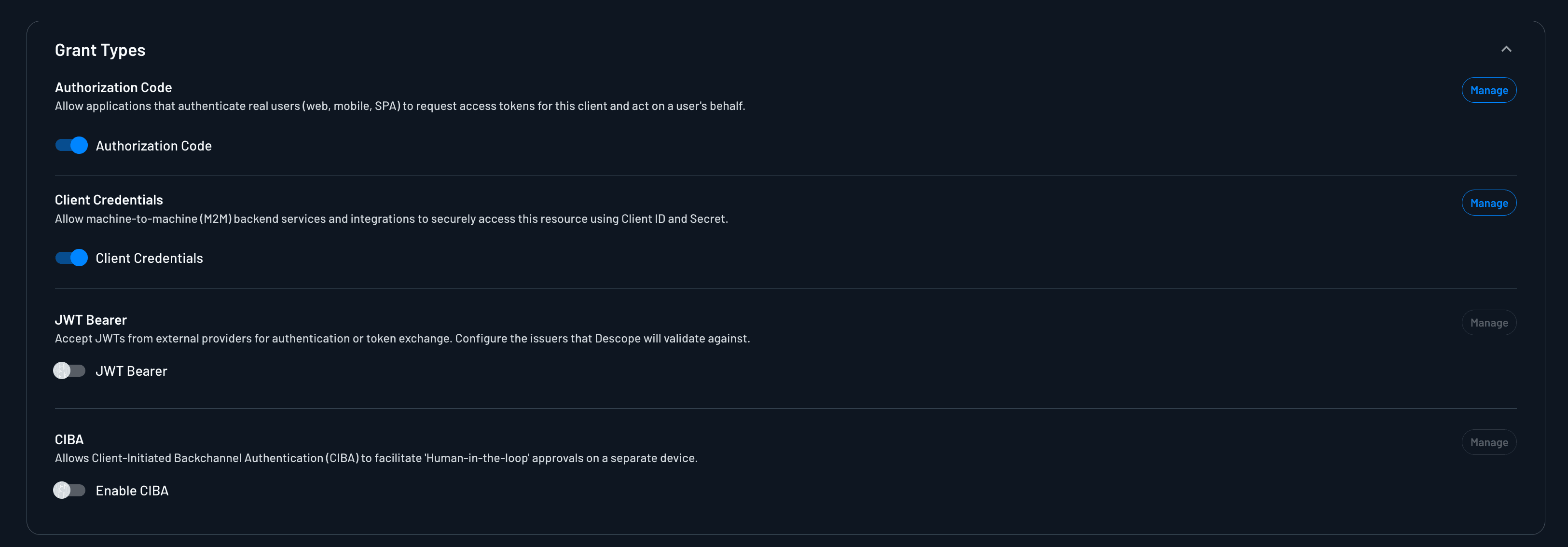
The Grant Types section controls which OAuth grant types the client is allowed to use. Enable a grant type with the toggle on the left; use Manage on the right to configure grant-specific settings.
Because clients and Inbound Apps are the same kind of object, their Console grant-type settings are identical. Use Creating Inbound Apps as the source of truth for approved redirect URLs, Allowed Tenants, trusted issuers, and CIBA delivery settings. This section covers agentic-specific behavior.
Enable only the grant types the client will actually use. Unused grant types expand the attack surface without adding value.
| Grant Type | Description | Configuration |
|---|---|---|
| Authorization Code | Interactive flows where a user authenticates and consents to the client acting on their behalf. | Creating Inbound Apps |
| Client Credentials | Machine-to-machine authentication where the client authenticates as itself, with no user involved. | Creating Inbound Apps |
| JWT Bearer | The client presents a signed JWT from a trusted issuer to obtain a Descope access token (urn:ietf:params:oauth:grant-type:jwt-bearer). Not enabled by default. | Creating Inbound Apps |
| CIBA | Client-Initiated Backchannel Authentication for asynchronous, decoupled user authorization. Not enabled by default. | CIBA |
For request format and code examples, see Using Inbound Apps.
Authorization Code
Used when an MCP client or application redirects a user through Descope for login and consent (for example Claude, Cursor, or VS Code connecting to your MCP server). If you're pre-registering a client instead of relying on CIMD or DCR, create the client here and configure its client ID on the MCP client side.
Note
For clients registered through CIMD or DCR, redirect URLs from the registration payload are added automatically.
Client Credentials
Used when an autonomous agent or backend service authenticates with its client ID and secret and receives a token with no end-user session. Disable any other grant types on these clients.
Enabling this grant type on a client automatically creates a corresponding agentic identity in the Agentic Identity view; no separate setup required.
Configure Allowed Tenants as described in Creating Inbound Apps → Client Credentials Flow.
JWT Bearer
Used when the client exchanges an external OIDC JWT for a Descope-issued token at the token endpoint.
For AWS and GCP workload identity, see Using Descope with Workloads. For other trusted issuers and examples, see External token management.
Required for manually registered clients that present ID-JAGs
If a client is manually registered and will reach an MCP server that validates ID-JAGs, you must enable JWT Bearer on that client. The ID-JAG arrives as a signed assertion from the customer's trusted issuer, and JWT Bearer is the grant that exchanges it for a Descope access token. Leaving it off means the exchange is rejected, since the grant is not enabled by default.
For how validation is configured on the server side, see Validating ID-JAGs.
CIBA
Used when the agent has no browser and the user approves on another device. After enabling CIBA, select or generate the flow under CIBA Flow on this client. See CIBA for delivery and expiration settings.
Token Exchange
Token exchange isn't a toggle in this section. A client that holds a Descope token can exchange it for a token scoped to another Resource, or for an ID-JAG to reach a third-party server, whenever a policy with the client as subject allows it. See Token Exchange for the request format and policy setup.
Flows
The Flows section controls the experience users see when you run through OAuth grant types against this client.
User Consent
Under Flows, you can select the Descope Flow the client will run during the authorization code flow. This is where you configure the authentication and consent experience for end users.

You can also check the Skip consent screen box to bypass the consent screen entirely for this client. This is useful for trusted first-party clients where displaying a consent prompt would add friction without adding meaningful security.
Skipping the screen does not skip consent itself. The flow still has to record one, and Descope still writes a consent record for the user and this client. See A Consent Action Is Always Required for more details.
When you do show the screen, it needs the Inbound App Scopes component before the consent action, unless that action has Scopes auto approval turned on. The action records the approval the user gives on that component, and the consent fails without it.
Policies decide which scopes the consent screen can show, and consent accumulates per user per client across sign-ins. See Consent Flows for how both work.
CIBA Flow
Note
This section will only be visible if you have enabled CIBA for this client.
If you enable CIBA, you can select the Descope Flow the client will run during the CIBA flow. You will be able to either select your own flow, or generate a pre-built flow that contains the required actions for the CIBA grant type.

Session Management
The Session Management section controls how tokens are issued and how long they remain valid for this client.
By default, this is set to According to system settings, which uses the project-level session settings. You can switch to Custom to override these defaults on a per-client basis.
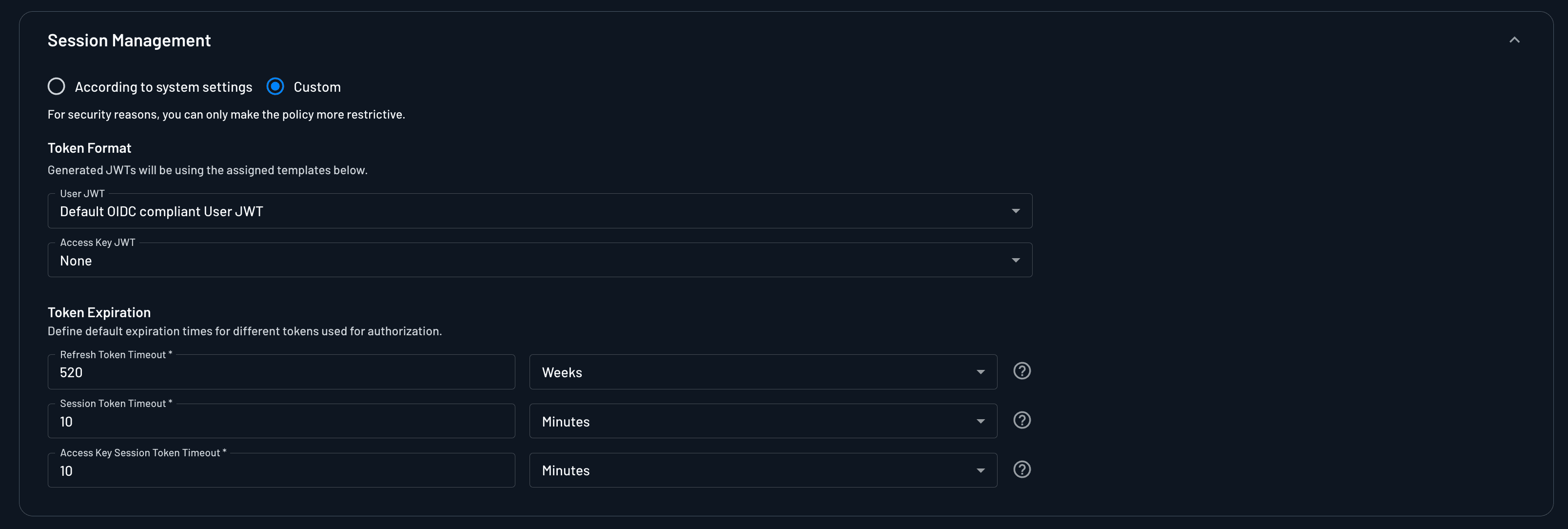
Token Format
When using custom session management, you can choose between two token formats:
- User JWT: A JWT representing a user session. Relevant for authorization code and CIBA flows.
- Access Key JWT: A JWT representing a machine identity. Relevant for
client_credentialsflows.
Depending on which grant types you have enabled, one or both of these formats may apply to the client.
Token Expiration
You can configure the following expiration settings:
| Setting | Description |
|---|---|
| Refresh token timeout | How long a refresh token remains valid before the client must re-authenticate. |
| Session token timeout | How long a user session token remains valid. |
| Access key session token timeout | How long an access key session token remains valid for machine clients (Only applies to client_credentials grant type). |
Cross App Access Targets
When the client exchanges a token for an XAA token (ID-JAG) to reach a third-party Resource, the assertion's client_id has to be the ID that the Resource's authorization server knows this client by. That's usually different from the client's Descope client ID, so you map it per Resource here. For a Resource with no mapping, the ID-JAG's client_id falls back to the client's Descope client ID.
Click + Map Resource, pick a Resource under Resources, and enter the client's ID at that Resource's authorization server under Client ID. If the client registers with the target through CIMD, enter its CIMD URL.

Only API Resources with Cross App Access turned on can issue ID-JAGs. For the full setup, see Issue XAA Tokens for Your Agents.
Managing Clients
Filtering Clients
You can filter the client list to find specific clients based on various criteria. Filter operators behave the same way as in the Agentic Identity view, supporting operators such as Contains, Equals, In, Matches, and timestamp comparisons across columns like Name, Client ID, and Tags.
Selecting Clients
Select one or more clients from the list to perform bulk operations such as managing tags or deleting clients.
Managing Tags
You can add or remove tags on individual clients or multiple clients at once.
Deleting Clients
Deleting a client is immediate and cannot be undone. Any agents or applications using this client ID will lose access and will need to be re-registered.
Deleting a client removes the OAuth client and invalidates its client ID. Note that deleting a client is not the same as revoking access for an agentic identity.
Revoking access invalidates previously granted user consent while leaving the client ID intact, whereas deleting the client removes the OAuth client entirely.