Attribute Scopes
An attribute scope is an OAuth scope, such as profile or email, that decides which user or tenant attributes a client receives. Each attribute scope maps to a set of claims. When a client requests the scope and it's granted, Descope adds those claims to the tokens it issues and to the /userinfo response.
Attribute scopes are defined once for the project and used by Inbound Apps and Federated OIDC Apps. Each app can use the project's definition of a scope as is, or define its own version of it. To add claims to every token regardless of which scopes a client requests, use JWT templates instead.
Attribute Scopes and Permission Scopes
Attribute scopes and the permission scopes on a Resource answer different questions:
- Permission scopes decide what a client can do, such as
contacts.readon your API. They live on a Resource and map to roles. - Attribute scopes decide what a client can know about the user, such as their name and email. They map to claims and don't grant access to anything.
A client often requests both kinds in one authorization request, for example openid profile contacts.read.
Viewing Attribute Scopes
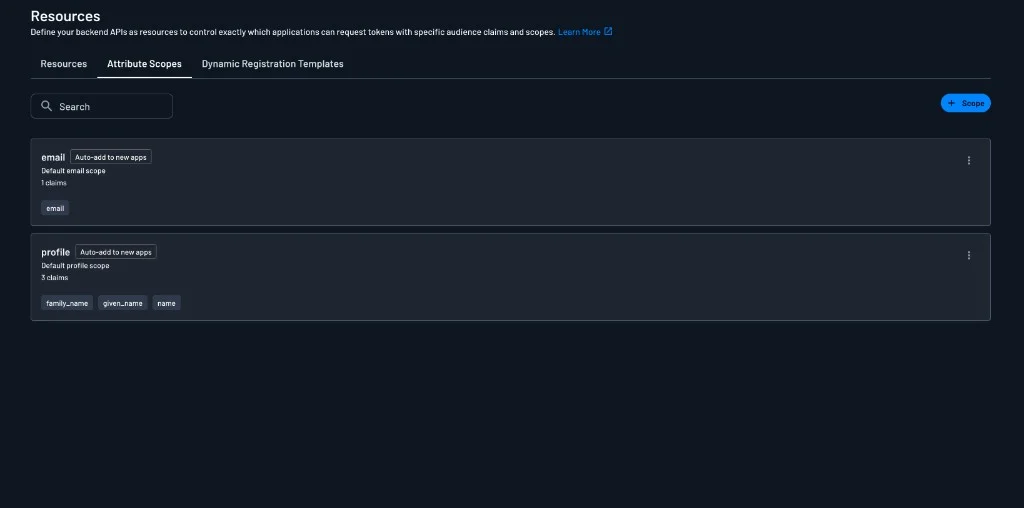
Attribute scopes live in the Descope Console under Resources, on the Attribute Scopes tab. Each scope shows its description, how many claims it maps, and the claim names. Scopes marked Auto-add to new apps are added to every new app automatically (see Adding Scopes to New Applications).
Every project starts with two default scopes:
| Scope | Claims |
|---|---|
email | email |
profile | name, given_name, family_name |
Other scopes a client might expect, such as offline_access, aren't created by default. Create them yourself, as described in Creating an Attribute Scope.
Creating an Attribute Scope
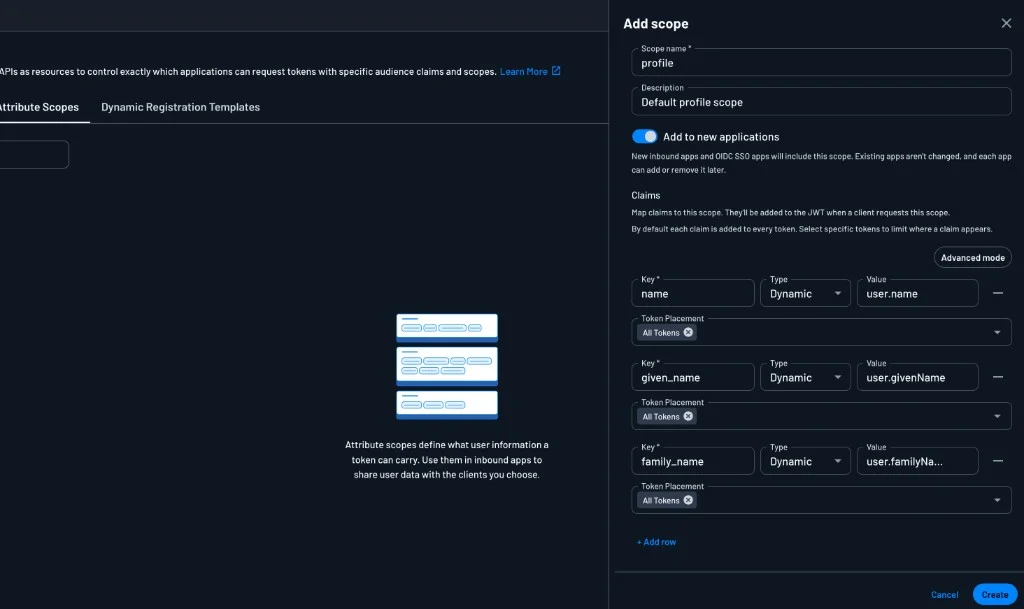
Click + Scope to create a scope, or click an existing scope to edit it. Each scope has:
- Scope name: The scope string clients request, such as
profile. - Description: Optional text that explains what the scope shares.
- Add to new applications: Whether new apps get this scope automatically.
- Claims: The claims the scope adds.
Each row under Claims defines one claim:
- Key: The claim name as it appears in the token, such as
given_name. - Type: Dynamic to read the value from the user or tenant at token time, or Static for a fixed value.
- Value: For a dynamic claim, the attribute to read, such as
user.nameoruser.givenName. For a static claim, the literal value. - Token Placement: Which tokens the claim is written to. See Token Placement for the options.
Click + Add row to add a claim. To define all of the claims as a JSON object instead, click Advanced mode.
Note
Custom attributes must already exist under Users before you can map them to a claim.
Token Placement
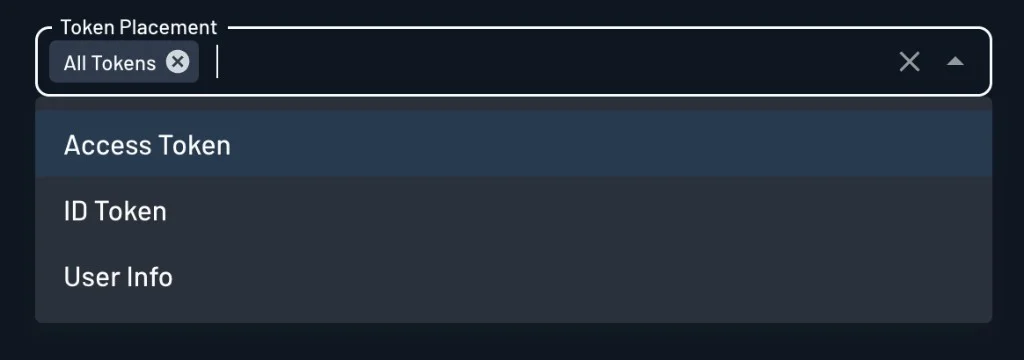
By default, each claim is written to All Tokens. To limit where a claim appears, remove All Tokens and pick one or more of:
- Access Token: The token the client sends to your APIs.
- ID Token: The token that tells the client who signed in.
- User Info: The response from the
/userinfoendpoint.
For example, you might put email in the ID token and User Info but leave it out of the access token, so it isn't sent to every API the client calls.
Adding Scopes to New Applications
When Add to new applications is on, every Inbound App and Federated OIDC App created from then on includes the scope, using the project's definition. The toggle only affects apps created after you turn it on:
- Turning it on doesn't add the scope to apps that already exist.
- Turning it off doesn't remove the scope from apps that already have it.
After an app is created, it owns its scope list. You can add or remove the scope on that app at any time.
Using Attribute Scopes in an App
Note
If an attribute scope isn't associated/defined on an app, the app will not receive any claims from that scope.
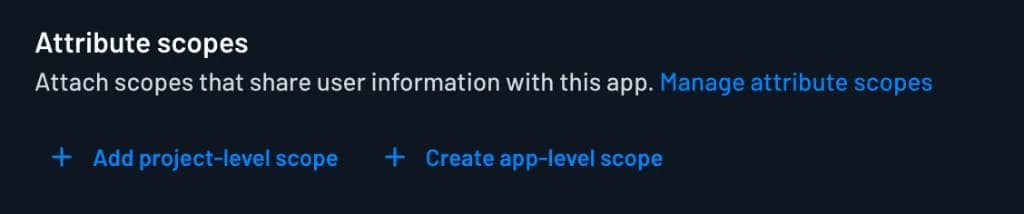
Inbound Apps and Federated OIDC Apps each have an Attribute scopes section that lists the scopes the app's clients can request. You can add scopes to it in two ways:
- Add project-level scope: Adds a scope defined on the Attribute Scopes tab. The app uses the project's claims and token placement for it, so a change to the project-level scope applies to every app that uses it.
- Create app-level scope: Defines a scope that only this app uses, with its own claims and token placement. Use this when one client should get different information for a scope. For example, an app-level
profilescope could return onlygiven_nameto one app, while other apps keep the project-levelprofile.
Click Manage attribute scopes to go to the Attribute Scopes tab.
Managing Attribute Scopes with the API
You can manage the project-level scopes with the Management API: get, set, or delete the scope claim mapping. Each entry has a scope, its claims, optional claimTargets for token placement, and addToNewApplications.
On an app, the same entries are listed in scopeClaimMapping. An entry with useProjectMapping set to true uses the project-level scope. With useProjectMapping set to false, the entry is an app-level scope and uses its own claims and claimTargets.
Scopes and Roles
Map OAuth scopes on API Resources to Descope RBAC roles, and map MCP Server Resource scopes to Connection scopes for third-party tool access.
Dynamic Registration Templates
Share consent flow, session, and token defaults across MCP Server Resources for clients that register through DCR or CIMD.