Issue XAA Tokens for Your Agents
Use this guide when pre-built clients you do not control (Claude Code, VS Code, Cursor, and similar) need to reach third-party MCP servers and APIs you do not protect with Descope, such as HubSpot, Asana, Linear, or Canva, over a standard protocol like MCP.
The agent vendor and the tool vendor each have their own auth. Your enterprise still needs one place to decide which users and agents may reach which tools. Descope is that identity provider: clients sign in once to Descope, and Descope governs access to those third-party servers.
What each agent may reach is decided by policies. You can see and revoke every agent in Agentic Identity.
This page covers connecting them with Cross App Access (XAA), where Descope issues an XAA token for each tool. You can use XAA directly, with nothing between the agent and the tool, which is what most of this page sets up, or with a gateway. For building MCP servers or agents you write yourself, see Use cases.
Why this matters
The diagrams below connect the same five MCP servers, first with a separate consent screen per server, then with a single sign-in to Descope using XAA.
Without Cross App Access (XAA)
Without Cross App Access
Each MCP server manages its own authorization
Without Cross App Access (XAA), each MCP server runs its own OAuth flow and manages access in its own admin console. The user signs in and approves scopes on every server — Linear, then Canva, then GitHub, and so on. There is no central place to see who has access, set policy once, or revoke an agent across every service.
With Cross App Access (XAA)
Cross App Access (XAA)
One sign-in — Descope mints XAA tokens for each server
The user signs in once to Descope, your enterprise IdP and ID-JAG issuer. Descope mints a separate assertion for each MCP server the agent is entitled to and connects them all in a single burst. Access is governed centrally through policies you set on each Resource — one place to allow, audit, and revoke agent access across every downstream service.
Enforce with XAA
Use this path when the target can validate an XAA token (ID-JAG), typically a third-party MCP server or API that supports Cross App Access, or an MCP server you protect with Descope, with Descope as both issuer and validator (see Protecting Your Company's APIs). Because Descope mints each XAA token per request, it enforces policies on every hop.
How it works
Three things have to be true before an agent can reach a third-party server:
- The target has to be a Resource in Descope with Cross App Access turned on, which names the authorization server that will accept the assertion.
- The client needs a Cross App Access target for that Resource, which names the client ID the target's authorization server knows it by.
- A policy has to allow the agent to request an XAA token (ID-JAG) for the Resource.
An XAA token grants access to a Resource, and its resource claim is that Resource's URL, so you register the third-party MCP server as a Resource whose URL matches the server you actually connect to. This is a Resource, not a Connection: you mint a signed assertion the downstream authorization server honors; you are not vaulting a token to replay later.
Which Resources an agent may reach, and with which scopes, is decided by policies grounded in the real users in your tenant. An agent never gets broader access than the user it acts for.
For the full token exchange (curl examples, claims, confidential clients, downstream registration), see How XAA and ID-JAG work → When Descope is the IdP.
XAA setup
Create an API Resource for the Target
In the Descope Console, create a Resource of type API for the third-party MCP server or API you want to reach, even when the target is an MCP server. Only API Resources have the Cross App Access settings that ID-JAGs need. MCP Server Resources are for MCP servers you protect with Descope yourself.
Set the Resource identifier to the exact URL of the third-party server. That URL becomes the resource claim of the ID-JAG, and it is the value your agent sends as resource when it requests the assertion.
For example, if Canva's MCP server is https://mcp.canva.com/mcp, set the Resource identifier to https://mcp.canva.com/mcp.
Note
The URL must match the downstream server exactly. A trailing-slash or path mismatch produces an assertion the downstream server will reject.
Add the same scopes as the downstream server
Define scopes on the Resource that are identical to the scopes the downstream MCP server expects. The ID-JAG, and the access token the downstream server mints from it, carries these scopes, so they must match what that server publishes.
Check the third-party server's documentation or its OAuth metadata for the scope names, and mirror them on your Resource.
Turn on Cross App Access for the Resource
An ID-JAG names both the resource the agent wants (resource) and the authorization server that will accept the assertion (aud). Descope takes resource from the Resource identifier, and it takes aud from the Resource's Cross App Access section, so you set the target authorization server on the Resource itself.
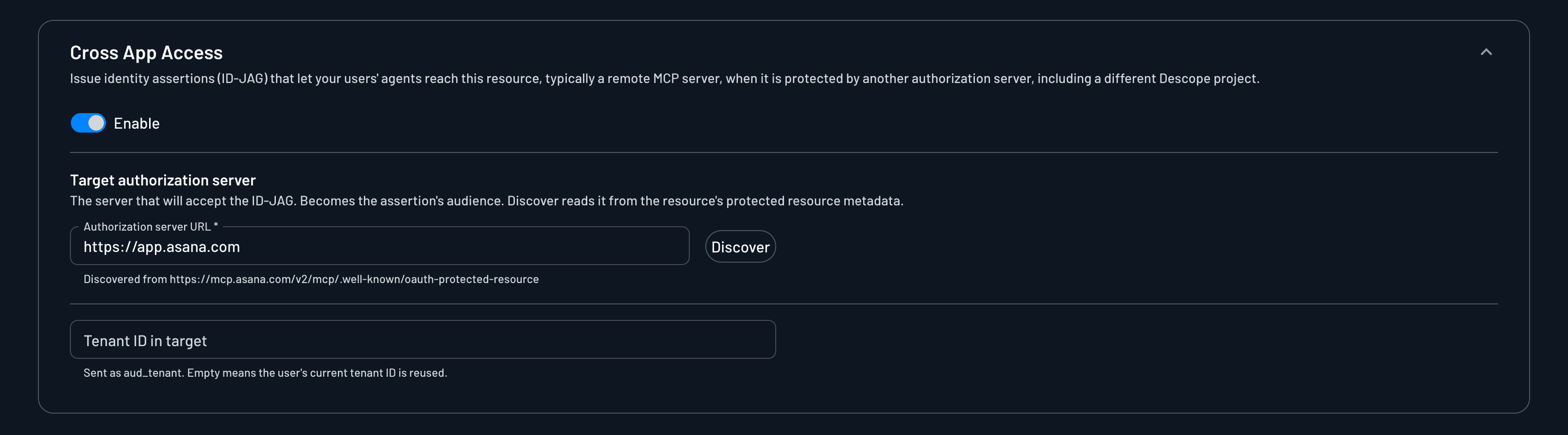
In the Resource's settings, open Cross App Access and turn on Enable. Then fill in:
- Authorization server URL: The authorization server that will accept the ID-JAG, which becomes the assertion's
aud. Click Discover to read it from the resource's protected resource metadata (/.well-known/oauth-protected-resource) instead of typing it. For Asana's MCP server athttps://mcp.asana.com/v2/mcp, Discover findshttps://app.asana.com. - Tenant ID in target: The tenant the user belongs to at the target, sent in the assertion as
aud_tenant. Leave it empty to send the user's current Descope tenant ID.
Set Descope as the client's IdP (and pre-register it if needed)
In your MCP client's Enterprise-Managed Authorization (Cross App Access) settings, set the identity provider to Descope, using your project issuer.
The issuer is <base-url>/v1/apps/__ProjectID__, where <base-url> is your region's Descope base URL (for example https://api.descope.com), or your custom domain if you have one set up for your Descope project. The ID-JAG carries the same issuer as your Descope access tokens.
Whether you also pre-register a client depends on the MCP client:
- Clients that support CIMD (for example VS Code) register with Descope automatically, so there is no client to create. You still map their XAA targets in the next step.
- Clients that do not support CIMD must be pre-registered: create the client in Descope and hand its ID and secret to the MCP client. Claude's organization connectors work this way, with an Inbound App you create for them.
See the XAA client setup guides for the exact per-client steps.
Map the Resource to the Client's ID at the Target
The target authorization server has to recognize the client presenting the ID-JAG, so the assertion's client_id must be the ID that server knows the client by. You set that ID per Resource on the client. If a client has no mapping for a Resource, the ID-JAG's client_id falls back to the client's Descope client ID, which the target usually won't recognize.
Open the client in Descope, go to Cross App Access Targets, and click + Map Resource. Pick the Resource you created under Resources, and enter the client's ID at the target authorization server under Client ID. If the client registers with the target through CIMD, enter its CIMD URL.

Add one mapping for each XAA-enabled Resource the client reaches. For how the client gets that ID at the target, see Registering the client with the downstream authorization server.
Write a token-exchange policy
Create a policy that governs who can obtain an ID-JAG for this Resource. Set the grant type to Delegated access (token exchange), then define:
- Subject: which agents or users the rule applies to (for example a client tag like
verified-agent, or a user role). - Target: the API Resource you created, and the allowed scopes on it.
Only subjects a policy allows can exchange their Descope token for an ID-JAG on that Resource, and only for the scopes the policy permits. Because the subject resolves to a real user in your tenant, an agent never gets broader access than that user has.
The token exchange policy is the control point for XAA on the Descope side. It decides which ID-JAG clients reach which XAA-enabled Resources, so a client with no matching policy cannot obtain an assertion at all.
This matters most for manually registered clients. Clients that arrive through CIMD or DCR are granted access to the Resource they registered with, but a client you create by hand in Descope starts with none. If you manually register an ID-JAG client, write the policy in this step or the exchange will fail.
Exchange the token at runtime
The agent calls the token endpoint (RFC 8693) to exchange its Descope token for an ID-JAG scoped to the Resource, then presents that ID-JAG to the downstream server's authorization server to receive an access token. Clients like Claude and VS Code do this for you automatically.
XAA client setup guides
These guides walk through configuring Cross App Access (XAA) on popular MCP clients with Descope as the identity provider. They are not gateway setup. For gateways, see Gateways.
Once configured, the client signs in to Descope once and can obtain XAA tokens for every XAA-enabled MCP server you registered, without another prompt.
The same XAA client setup applies when the MCP server is yours and Descope is both issuer and validator. See Protecting Your Company's APIs for how that looks on your own servers.
Claude
Connect Descope to Claude as a custom OIDC provider and turn on managed authorization for your organization's connectors, then connect the Claude Code CLI per developer.
VS Code
Configure VS Code for XAA with Descope: identity provider in settings.json and enterprise-managed auth in mcp.json.
Using XAA with a Gateway
Note
If using a third-party gateway, you may not be able to use XAA with it. Check the gateway's documentation for details.
Putting a gateway in the path doesn't mean giving up XAA. When a downstream tool supports XAA, the gateway requests the XAA token (ID-JAG) for that tool and redeems it at the tool's authorization server, just as the agent would when using XAA directly.
You keep the gateway's controls in the path, such as prompt-injection detection or central inspection of tool calls, and the hop to the tool still gets a short-lived assertion that Descope checked against policy, with no stored credential to manage.
The same gateway can use XAA for the tools that support it and Connections for the ones that don't, so agents still have one entrypoint for everything. See Protecting Third-Party APIs Internally for how to choose.
You can use XAA with the Descope Agent Gateway, or you can bring your own gateway and configure it to use Descope as the IdP.
See Gateways for architecture and how token exchange fits, and Protecting Third-Party APIs Internally for putting a gateway in front of your company's agents.