MCP Gateways
MCP clients like Claude, Cursor, and ChatGPT rarely connect to just one server. Your agents call your own MCP servers, remote ones like Linear, and a customer's HubSpot, sometimes with a different environment per tenant. An MCP gateway gives them one URL to connect to, and gives you one place to decide who can call which tools, route each call to the right server with the right credential, apply limits per customer, and keep one audit trail.
Descope secures an MCP gateway the same way it secures a gateway in front of APIs: the gateway is a Resource that agents authenticate to, and the gateway exchanges the agent's token for each downstream server's credential. The architecture, the choice between one gateway or one per customer, and where policies apply are covered in Gateways. For how identity works for your customers' agents compared with your employees' agents, see Use Cases.
A gateway is an architecture choice rather than a requirement. When to Use a Gateway covers the reasons to add one, such as per-customer endpoints or leaving existing MCP servers unchanged, and when a single MCP server is enough on its own.
Choosing a Gateway
You can use Descope as the identity provider for an MCP-aware gateway you already run, or deploy the Descope Agent Gateway:
- Your own gateway: Azure AI Gateway, Kong AI Gateway, Portkey, Golf.dev, agentgateway, or any gateway that validates JWTs against a JWKS. See Gateway Integrations for the settings to point it at
- Descope Agent Gateway (early access): Descope creates the gateway's Resource and Client for you, and you add a route for each downstream MCP server or API. See Setting Up a Gateway
Exposing MCP to Your Customers
An external gateway exposes your MCP servers to your customers' agents. Each customer is a tenant in Descope, and isolation lives in the agent's token, in per-tenant policies, and in per-tenant Connections, not in separate hostnames. These work the same for MCP as for any gateway. The gateway can also enforce per-customer limits and plan tiers and give you one record of every call.
One URL, Many Tenants
Most B2B MCP setups give every customer one URL, the same way a B2B web app does. It's also what Claude Connectors and ChatGPT plugins for B2B require. Everyone connects to the same Resource, and the token's dct claim says which customer the user picked at consent. That one URL can be either of these:
- An MCP server, with no gateway: The server filters which tools each user sees based on
dct, and uses its own access token for token exchange when a tool needs a downstream API or Connection. See the Multi-Tenant MCP Server example - A gateway in front of your MCP servers: The gateway is the Resource, and it exchanges tokens for the servers behind it, so those servers don't each handle authorization and token exchange. See When to Use a Gateway for when that's worth the extra hop
Either way, tools and downstream calls that touch tenant data should key off dct.
Shared or Per-Customer MCP Servers
Behind that one URL, how customers map to MCP servers is up to you:
- One server for everyone: A single MCP server serves every customer, kept apart by
dct, policies, and per-tenant Connections - One server per customer: Each customer gets their own MCP Server in Descope, with its own well-known metadata, registration settings, consent flow, branding, audience, and scopes. That works even when every customer shares the same runtime, and it's how you give one customer stricter session timeouts, different consent copy, or their own logo. If you spin up a distinct deployment per customer, create the servers with the MCP Server Management API
- A mix: Shared servers for tools every customer uses, plus dedicated servers for customers who need their own environment or settings
None of these require a gateway. Without one, each customer's agents connect to the MCP server URL meant for them. With the Descope Agent Gateway, each server is a route. With another gateway, you configure the same routing in the gateway itself, for example by path or by the dct claim. To give each customer a gateway URL of their own as well, see One Gateway or One per Customer.
Tool Scopes and Connections
A few parts of tenant isolation are specific to MCP.
Give each MCP tool its own scope, so a tenant's policy can grant tools one by one and a customer only gets the tools they paid for. The Multi-Tenant MCP Server example builds this end to end.
When a tool calls a third-party service, MCP Server scopes map what the user consented to on your MCP server or gateway onto the scopes the third-party token actually needs.
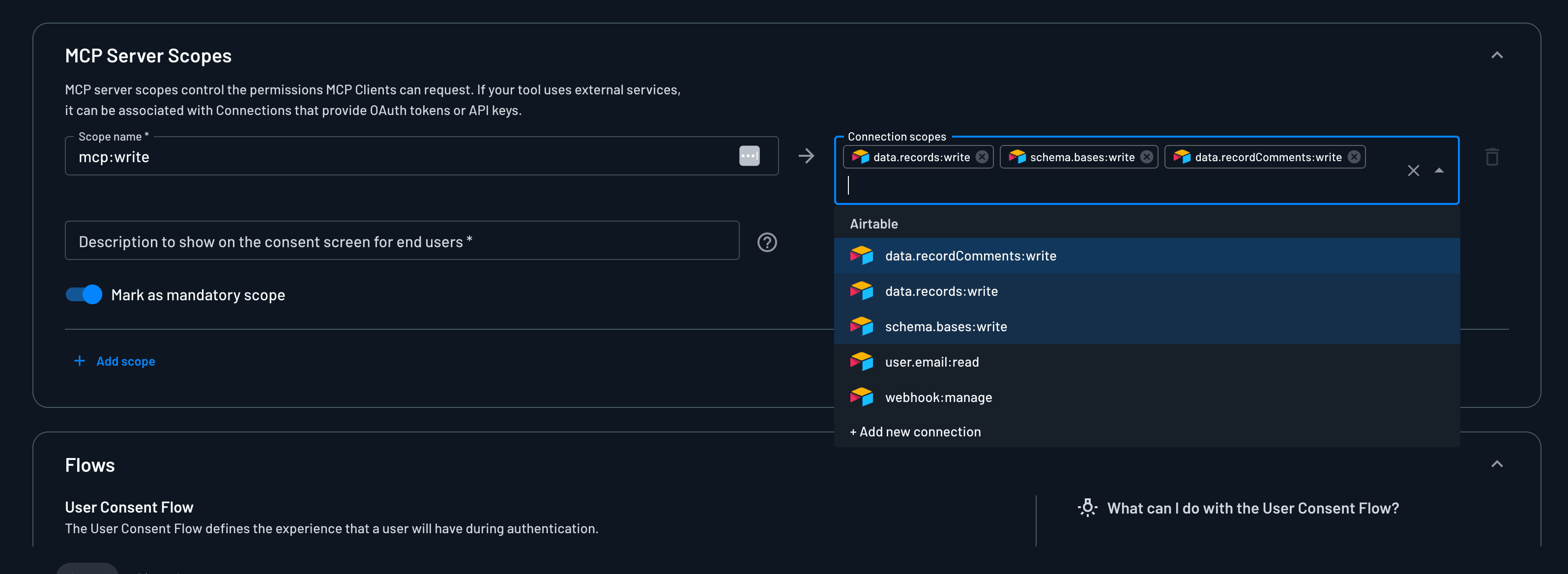
If the user hasn't connected the third-party account yet when a tool runs, the gateway or server can return a connect URL to the MCP client instead of failing, with Adaptive Connect.
Locking Down Your Own Agents' Traffic
An internal gateway puts every agent your employees run, whether that's Claude Code, Cursor, or an agent you built, behind one place you control.
Those agents usually need more than your own tools. They also want remote MCP servers you don't run, like Notion or Linear. Without a gateway, every MCP client gets configured with each of those servers separately, and each one runs its own login. With a gateway, the agent connects once. Connections hold the tokens for the third-party servers, per user or per tenant, and the gateway exchanges for them at tool time, while your internal servers keep validating Descope tokens behind it.
For how this works, including a diagram of your servers and third-party ones behind one gateway and when XAA can replace the gateway, see Protecting Third-Party APIs Internally and Gateway or XAA.
Next Steps
How gateways work
Architecture, one gateway or one per customer, token exchange, and a policy on every hop.
Use Cases
How Descope protects APIs and MCP servers for your customers' agents and your employees' agents.
Gateway Integrations
Use Descope as the identity provider for Azure AI Gateway, Kong, Portkey, Golf.dev, and others.
Setting Up a Gateway
Create a Descope Agent Gateway and its routes in the Console.
Python MCP SDK
Learn how to use the Descope Python MCP SDK to integrate authentication, authorization, and connection token retrieval with your MCP servers.
Gateway Integrations
Use Descope as the identity provider for Azure AI Gateway, Kong, Portkey, Golf.dev, and other MCP gateways that validate JWTs.