OTP Settings
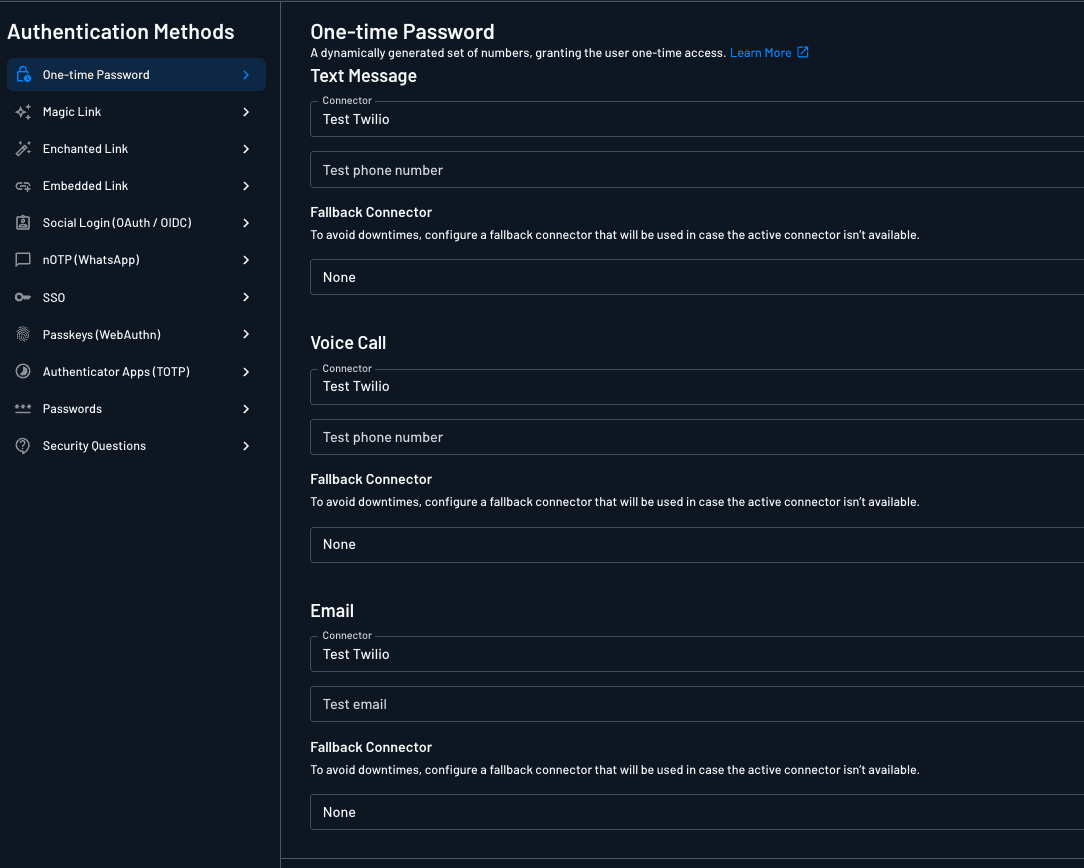
Customize your one-time password (OTP) authentication settings from the Descope console (Settings > Authentication Methods > One-time Password).
Note
OTP settings can also be overridden per tenant. See tenant authentication methods.
Trigger Method
The Trigger Method setting controls whether OTP authentication can be invoked programmatically via APIs and SDKs.
- Enable API & SDK: OTP can be triggered via flows, the Management API, and the client/server SDKs.
- Disable API & SDK: OTP can only be triggered by a flow, or by a call made with a valid management key.
Turning this off for methods you only trigger from a flow closes off a common bypass path for OTP abuse such as SMS pumping. See Preventing IRSF and SMS Pumping for the full picture.
Available Settings
This section describes additional details about the configuration options available.
Domain
The domain is the URL domain used in email or text message sent to the end user.
Expiration Time
Note
For increased security, we recommend an expiration time of 3-5 minutes.
Define length of time after which link or code expires. A shorter expiration time limits how long a malicious actor has to attempt an attack (such as a dictionary or brute force attack) on the code or link.
Number of Retries and Attempts Timeframe (seconds)
Limit the number of communication attempts (email, text, or voice) a recipient can receive within the defined timeframe. If the limit is exceeded, no further messages will be sent until the timeframe resets.
Verification Attempts
Limit how many times a user can enter an incorrect OTP code before the code is invalidated. Once the limit is reached, the code is discarded and the user gets a max attempts exceeded error (E061103) instead of an invalid code error (E061102). To continue, the user has to restart authentication and request a new code.
When running a flow, you can check how many attempts a user has left using the remainingOTPAttempts dynamic value. Use it to warn users as they approach the limit, or to show a custom message once they're locked out. See remainingOTPAttempts Condition.
Allow Unverified Recipient Email Addresses or Phone Numbers
Note
Enabling this option may increase the risk of spam and fraud.
By default, messages are sent only to verified email addresses or phone numbers. When enabled, this option allows messages to be sent to unverified email addresses or phone numbers.
If a user authenticates using an unverified contact, Descope automatically marks that contact as verified.
Connectors
A full list of messaging related connectors can be found on our Messaging Connectors Guide page.
Email Connectors
Descope supports sending email OTP messages using your email messaging provider, such as AWS SES, SendGrid, or a generic SMTP service. You can configure a email messaging connector by going to the connectors page within the Descope console and searching for the supported email messaging connectors. Then, on the OTP authentication method page, you can select the configured connector and customize the template if you would like.
Text Message (SMS) Connectors
Descope supports sending text messages using your text messaging provider, such as Twilio or Amazon SNS. You can configure a text messaging connector by going to the connectors page within the Descope console and searching for the supported text messaging connectors. Then, on the OTP authentication method page, you can select the configured connector and customize the template if you would like.
Voice Message Connectors
Descope supports sending voice OTP messages using your voice messaging provider, such as Twilio. You can configure a voice messaging connector by going to the connectors page within the Descope console and searching for the supported voice messaging connectors. Then, on the OTP authentication method page, you can select the configured connector and customize the template if you would like.
Instant Messaging (WhatsApp) Connectors
Descope supports sending text messages using your text messaging provider Twilio Verify. You can configure this connector by going to the connectors page within the Descope console and searching for the supported text messaging connector. Then, on the OTP authentication method page, you can select the configured connector and test the feature by providing a test phone number. This functionality requires no template.
Fallback Connector
To each of the connectors in this authentication method, Descope supports a fallback connector that is available to use to prevent downtimes. Descoper can configure a fallback connector that will be used in case the active connector isn’t available. This fallback connector can either be Descope's default connector or an alternate connector configured for sms/voice/email.
Templates
If you are using a customized connector, you can change the template of the email/sms which your user will receive. The default is System.