Handling Families in Flows
Four flow actions let your end users manage their own families inside a Descope flow. A parent can create a household during sign-up, add a child as a dependent, and switch into the child's session, without a call from your backend.
The family actions appear in the flow editor's action picker only when families are on for the project. If you turn families off later, flows that already use a family action still open in the editor. The family actions in them fail at runtime.
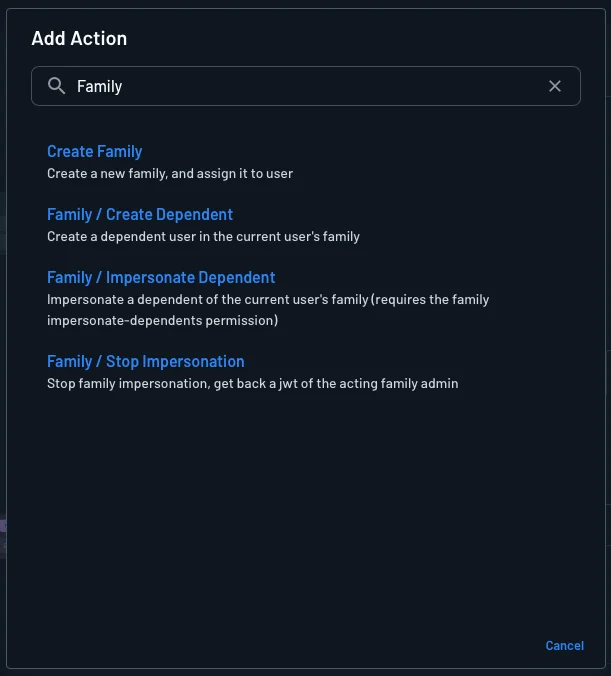
| Goal | Action |
|---|---|
| Create a family and add the current user to it | Create Family |
| Add a dependent to a family | Family / Create Dependent |
| Switch into a dependent's session | Family / Impersonate Dependent |
| Switch back to the guardian's own session | Family / Stop Impersonation |
How a Flow Picks the Family
The Family / Create Dependent action adds the dependent to an existing family, so it needs to know which family to use. Descope uses the first of these that has a value:
- The action's own Family ID input.
- The
familyIdstart option that your app sends when it starts the flow through the API. ThefamilyIdstart option sits next to thetenantstart option. - The
familyIdkey in the flow context, which an earlier Create Family action set. - The user's selected family, from the
dcfclaim in the user's session.
With that order, one onboarding flow can create a family and then add a dependent to it. The Create Family action writes the new family's ID to familyId in the flow context, and the Family / Create Dependent action reads it.
The other family actions do not use this order. Create Family always creates a new family, Family / Impersonate Dependent always works on the dependent's own family, and Family / Stop Impersonation takes no family.
Creating a Family
The Create Family action creates a family and, by default, adds the user signed in to the flow as a member. The action writes the new family's ID to familyId in the flow context.
- Family Name (will not override 'Family Name' end user input): A fixed or dynamic family name. When an earlier screen collects a family name from the end user, the action uses the end user's value instead. When neither has a value, Descope generates a name.
- Family roles for the current user (comma separated, defaults to Family Admin): The roles the current user gets in the new family, as a comma-separated list. The default is Family Admin, which lets the user act on behalf of dependents.
- Do not add the current user to the new family: Select this option to create the family without the current user as a member.
When the action adds the current user, Descope refreshes the user's session so that the families claim includes the new family.
Creating a Dependent
The Family / Create Dependent action adds a dependent to a family. The user signed in to the flow must be a member of that family.
- Family ID (defaults to the flow's family or the user's current family): The family for the dependent. If you leave it empty, the action uses the family from the order above.
- Dependent name, Dependent login ID, Dependent email, and Dependent phone: The dependent's details. The action needs a name or a login ID. When the login ID is empty, Descope derives it from the name.
The action fails if the family is full, disabled, or missing, or if the current user is not a member of the family.
Acting on Behalf of a Dependent
The Family / Impersonate Dependent action switches the flow's session to a dependent. The user signed in to the flow becomes the impersonator, and must have the Family Impersonate Dependents permission in the dependent's family. The action has two inputs:
- Dependent login ID: The login ID of the dependent to act on behalf of. The input is required.
- Family to scope the impersonated session to (optional): A family ID to set as the
dcfclaim in the dependent's session. The value must be the dependent's own family, or the action fails.
After the action, the flow continues as the dependent. The session token has the dependent as sub and the guardian in the act claim. For the full rules, see Acting on Behalf of a Dependent.
The Family / Stop Impersonation action has no inputs. It reads the guardian from the current impersonation session and restores the guardian's own session. If the session had a selected tenant that the guardian does not belong to, the action clears that selection.
Next Steps
For the general model of flow actions, see Flow Actions. To do the same tasks from your backend, see Families with SDKs.