Token Claims Management
Token management in Descope includes controlling the claim payloads in JWTs that are issued to users and machines.
In practice, this usually means configuring custom claims beyond standard claims like sub, iss, and exp so downstream services can make authorization and personalization decisions without extra backend calls.
For step-by-step setup details, see the Custom Claims flow action and JWT Templates docs.
Where Claims Appear in Tokens
When configured, custom claims can appear in every JWT Descope issues for the user or access key, including:
- Session tokens — short-lived JWTs sent to your application on every request. These are either issued for a user or an M2M client (with an access key, federated app, or inbound app).
- Refresh tokens — used to issue new session tokens. Custom claims travel with them, so they count against cookie size limits.
- ID tokens — issued when Descope is acting as an OIDC provider with Federated Applications, Inbound Apps, or Agentic Clients.
Standard Token Claims
Descope JWTs combine standard JWT claims, Descope-specific claims, and custom claims you configure.
Which claims appear depends on the token type (user or M2M), your JWT Template authorization format, and whether the user or access key has tenants, roles, or impersonation active.
Claims fall into three categories:
| Category | Meaning |
|---|---|
| Always present | Included on every token of that type. Your application can rely on these being there. |
| Context-dependent | Added when a specific condition applies — for example, the user belongs to tenants, is being impersonated, or the client SDK submitted claims. |
| Configuration-dependent | Added only when you set them via a JWT Template, Custom Claims flow action, or OIDC scope. |
For claim categories and a full reference table, see Standard Token Claims below.
User Session and Refresh Tokens
Session and refresh tokens share the same claim payload. Custom claims you configure are typically stored in the refresh token and copied into each new session token upon each refresh.
| Claim | Category | Description |
|---|---|---|
sub | Always present | Subject — the Descope User ID, unless a JWT template overrides system claims. |
dsub | Configuration-dependent | The Descope User ID, when a JWT template has Override system claims turned on. |
damr | Configuration-dependent | Descope's amr value, when a JWT template has Override system claims turned on. |
dact | Configuration-dependent | Descope's act value during impersonation, when a JWT template has Override system claims turned on. |
iss | Always present | Issuer — your Descope Project ID, or a full OIDC issuer URL when using an OIDC-compliant JWT Template. |
iat | Always present | Issued-at time (UNIX epoch seconds). |
exp | Always present | Session token expiration time. See Claims returned by the Client SDK for how the SDK reports it. |
drn | Always present | Descope Resource Name — where the token is stored. Typically DS for Descope-managed sessions. |
amr | Always present | Authentication Methods Reference — array of methods used to authenticate. See amr values below. A JWT template can override it. |
rexp | Context-dependent | Refresh token expiration. Present when a refresh token lifetime applies. See Claims returned by the Client SDK for details. |
dct | Context-dependent | Descope Current Tenant — the user's active tenant ID. Auto-set when the user belongs to one tenant; set after tenant selection in a flow. |
tenants | Context-dependent | Map of tenant IDs to nested roles and permissions. Present when the user has tenant associations and your JWT template uses the default authorization format. Omitted with Current Tenant, No Tenant Reference or No Descope Claims — see Authorization Claims Configuration. |
roles | Context-dependent | Project-level roles, or tenant-scoped roles at the JWT root when using Current Tenant, No Tenant Reference. |
permissions | Context-dependent | Project-level permissions, or tenant-scoped permissions at the JWT root when using Current Tenant, No Tenant Reference. |
act | Context-dependent | Actor — present during user impersonation. act.sub holds the impersonator's User ID; sub is the impersonated user. A JWT template can override it. |
nsec | Context-dependent | Non-secure claims added by the client SDK or API. Do not trust these on your backend — see Secure vs non-secured custom claims. |
aud | Configuration-dependent | Audience — intended recipients of the token. Set via JWT Template or Custom Claims action. |
azp | Configuration-dependent | Authorized party — added when Descope acts as an OIDC provider. See Additional standard claims for details. |
dci | Configuration-dependent | Descope Consent ID - an internal ID for the consent granted by the user. Only applicable for Inbound Apps and Agentic Clients. |
jti | Configuration-dependent | JWT ID — a unique identifier for the token, useful for tracking individual tokens and preventing replay attacks. Added when Add JTI Claim is enabled on the JWT Template. |
| Custom claims | Configuration-dependent | Any application-specific keys you define via JWT Template or Custom Claims flow action. Server-set custom claims appear at the JWT root; client-set claims appear under nsec. |
Note
In the tenants claim, parent and sub-tenant IDs sit at the same level. The claim does not encode hierarchy.
amr (Authentication Methods Reference)
The amr claim is an array of strings indicating which authentication methods were used for the session:
| Value | Meaning |
|---|---|
oauth | OAuth social login |
email | OTP, Magic Link, or Enchanted Link via email |
sms | OTP or Magic Link via SMS |
whatsapp | WhatsApp nOTP |
webauthn | Passkeys |
totp | Authenticator app (TOTP) |
fed | SSO / federated login (default for SSO) |
pwd | Password |
mfa | Two or more distinct authentication methods |
You can override amr when your SSO provider includes specific authentication methods in its OIDC token.
Claims Returned by the Client SDK
Your frontend can read a subset of the claims above without decoding the session token itself. The Descope Client SDKs expose them as a plain claims object:
| SDK | How to read claims |
|---|---|
| React, Next.js | const { claims } = useSession() — see Auth Helpers |
| Vue | const { claims } = useSession() (a ref — read claims.value) |
| Angular | DescopeAuthService.session$ → session.claims |
| Web JS, HTML | sdk.onClaimsChange((newClaims, oldClaims) => { ... }) |
| Any SDK holding a raw auth or refresh response | the claims field on the returned JWT response object |
For the minimum SDK version that returns this object, see Auth Helpers.
A claims object for a user with two custom claims (organization and role) looks like this:
{
  "amr": ["pwd"],
  "dct": "T2U7vUH1NPy4JzWHruoOVIGyzYlu",
  "exp": 1753401600,
  "rexp": "2025-08-25T09:20:00Z",
  "organization": "acme",
  "role": "USER"
}
For code that reads these values and warns a user before their session ends, see Reading the expiration time.
Access Key JWTs
When an M2M Access Key is exchanged for a JWT, or a client secret is used with client_credentials flow with a Federated Application or Inbound App, the token follows the same general structure as a user session token, with a few differences:
| Claim | Category | Description |
|---|---|---|
sub | Always present | Subject — the Access Key ID (not a user ID). |
iss | Always present | Issuer — your Descope Project ID. |
iat | Always present | Issued-at time (UNIX epoch seconds). |
exp | Always present | Token expiration time (UNIX epoch seconds). |
drn | Always present | Descope Resource Name — typically DS. |
tenants | Context-dependent | Tenants and authorization configured on the access key. Same nesting rules as user tokens. |
roles / permissions | Context-dependent | Authorization on the access key, at the root or nested under tenants depending on your Access Key JWT Template. |
nsec | Context-dependent | Claims submitted by the M2M client during key exchange. Untrusted — use a JWT Template instead for server-verified claims. |
jti | Configuration-dependent | JWT ID — a unique identifier for the token. To include this in your JWTs, you must enable the Add JTI Claim option under JWT Templates. |
| Custom claims | Configuration-dependent | Claims from an Access Key JWT Template are inserted at the JWT root (not under nsec). |
User session claims like amr, dct, and act do not apply to access key JWTs.
OIDC ID tokens
When Descope acts as an OIDC provider, ID tokens follow the OIDC specification. Standard claims are always present; profile, authorization, and custom claims require the corresponding scope.
| Claim | Category | Description |
|---|---|---|
iss | Always present | Issuer — https://api.descope.com/{projectId}. |
sub | Always present | Subject — the Descope User ID. |
aud | Always present | Audience — the OIDC application Client ID. |
iat | Always present | Issued-at time. |
exp | Always present | Expiration time. |
name, email, email_verified, picture, phone_number, phone_number_verified, given_name, family_name | Configuration-dependent | Standard OIDC profile claims — included when the client requests the matching scope (profile, email, phone). See OIDC Applications for the scope list. |
tenants | Configuration-dependent | User's tenants, roles, and permissions — included when the client requests the descope.claims scope. |
| Custom claims | Configuration-dependent | Application-specific claims — included when the client requests the descope.custom_claims scope and claims are configured via JWT Template or Custom Claims action. |
azp | Configuration-dependent | Authorized party — the Client ID that requested the token. |
jti | Configuration-dependent | JWT ID — a unique identifier for the token. Added when Add JTI Claim is enabled on the JWT Template. |
Two Ways to Configure Claims
Note
You can manage JWT Templates as code with our infrastructure as code (IaC) providers, such as Terraform.
There are two places you can configure claims in Descope:
| Method | Scope | When to use |
|---|---|---|
| JWT Template (preferred) | Project-wide, code-manageable | Claims that should appear on every JWT issued by a project, application, or Inbound App. Best for consistent token claims. |
| Custom Claims flow action | Per-flow | Claims that depend on flow context — conditional logic, connector responses, step-up authentication, or values collected from the user during the flow. |
It's worth noting that you can use both together. If a claim is set in both places, the Custom Claims flow action wins and overrides the JWT Template value for that flow.
Supported Claim Value Types
Custom claim values can be:
- Strings, booleans, or numbers — simple, flat values.
- Dynamic values — pulled from Descope user attributes, tenant attributes, or other available context. These automatically refresh when the underlying value changes (see Dynamic Claim Updates below).
- JSON objects — for grouping related fields under a single claim key (see Nested JSON Claims below).
Both the JWT Template editor and the Custom Claims flow action support a simple mode for flat key/value entry and an advanced mode for defining the claim payload as a JSON object.
Nested JSON Claims
Note
This is useful when downstream consumers expect related data grouped under a single key (for example, gateways like Hasura or external authorization systems that read structured claim objects).
You can use a JSON object as the value of a custom claim.
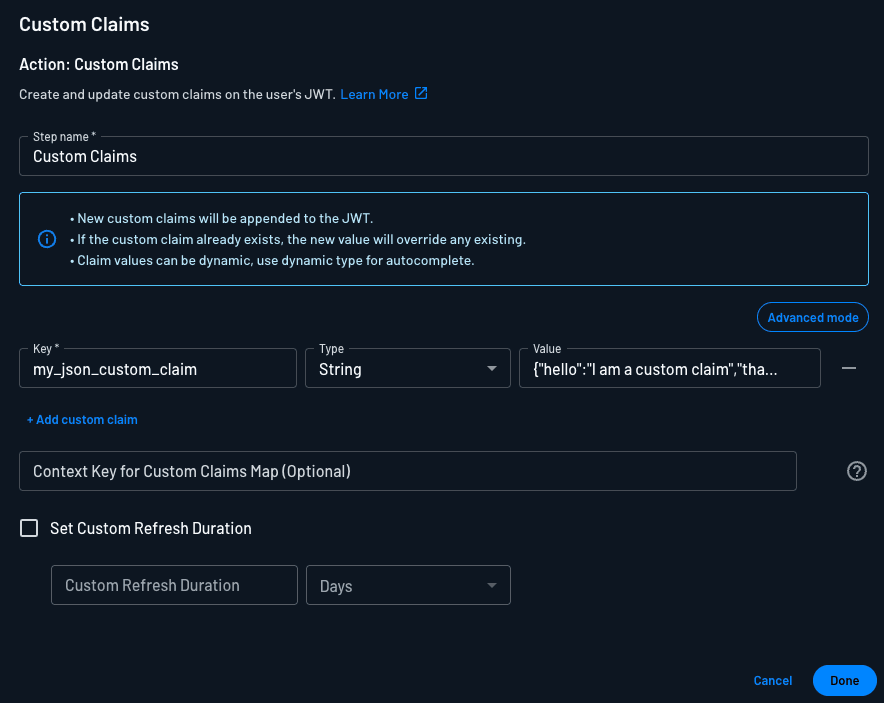
In advanced mode with JWT Templates, you can set the claim key to a JSON object instead of a flat value:
{
  "my_json_custom_claim": {
    "hello": "I am a custom claim",
    "that_has": "Nested Json"
  }
}
The object is embedded directly into the issued JWT under the specified key:
{
  "amr": ["oauth"],
  "drn": "DS",
  "exp": 1776282239,
  "iat": 1776281639,
  "iss": "P32jk5Nq29jcuXmAz56iGq5uRb7m",
  "my_json_custom_claim": {
    "hello": "I am a custom claim",
    "that_has": "Nested Json"
  },
  "sub": "U3B57mYzHbJY8HFvjHvhRkTPq5xr"
}
You can nest objects multiple levels deep, mix object and scalar values within the same template, and combine static fields with dynamic user-attribute references inside the same nested structure.
Dynamic Claim Updates
Claim values backed by a Descope user or tenant attribute update automatically whenever the underlying attribute changes and the user's session is refreshed. You don't need to re-issue tokens manually.
This is useful for:
- Real-time access control — role or permission changes take effect on the next refresh.
- Reflecting up-to-date profile data (display name, locale, preferences) without an extra API call.
- Multi-tenant context —
tenant_id,tenant.name, or tenant-specific attributes that shift when a user switches tenants.
Dynamic values can be used inside both flat and nested claim definitions.
Claim Limits
Each key can have a maximum of 60 characters, each claim value can have a maximum of 500 characters, and each JWT can have a maximum of 100 keys.
These limits apply across both the JWT Template and the Custom Claims flow action. Because Descope stores custom claims in the refresh token (typically held in a cookie), large or numerous claims also contribute to your overall cookie size — see JWT Claims security best practices for guidance.
Security Considerations
Custom claims are read by every service that consumes the JWT. A few things to keep in mind:
- Don't store sensitive data: JWTs are Base64-encoded, not encrypted. Treat anything in a claim as visible to anyone who holds the token.
- Trust only server-set claims: Claims added by a client SDK are placed under an
nsecclaim and should not be trusted by your backend. Claims set via JWT Templates or the Custom Claims flow action (server-side) are trusted. - Override standard claims carefully: You can override claims like
aud, and with Override system claims on a JWT template,sub,iss,amr, andact. Doing so has implications for token validation and audit trails.
For full guidance, see JWT Claims security best practices.