External Token
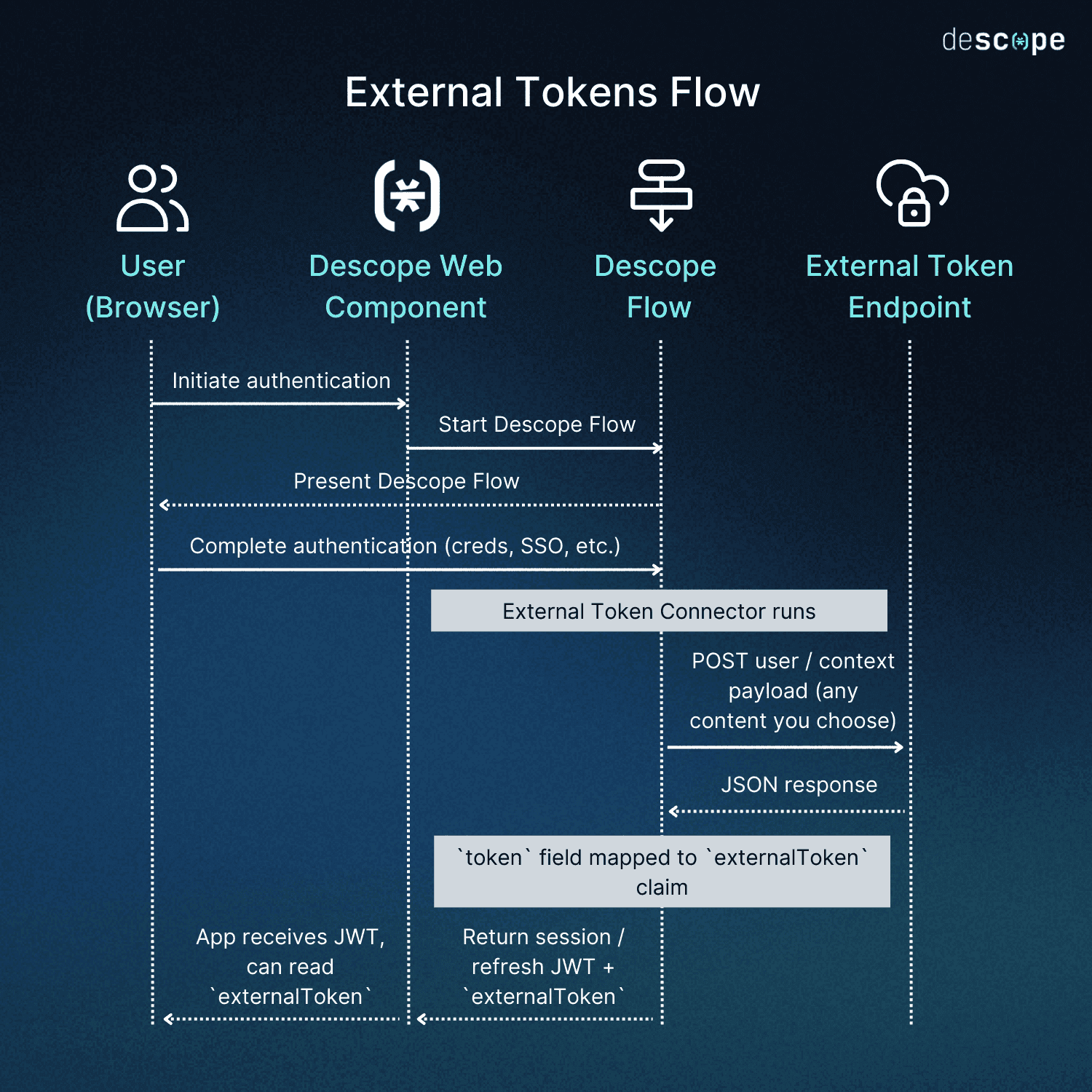
Descope's External Token feature supports hybrid authentication: run authentication in Descope Flows, and still return a token in your existing format (Firebase, Supabase, or custom) for backends and services that already validate that format.
At the end of a flow, a configured External Token connector generates the token. It is returned in the authentication response as externalToken, alongside Descope's session and refresh JWTs.
Note
This is not the same as External Token Management on Inbound Apps, which validates an incoming third-party JWT and exchanges it for Descope tokens.
Setup
This section describes how to set up External Token for a project.
Configuring a External Token Connector
To use the External Token feature, you need to configure an External Token connector in the Descope Console. The three supported connectors are:
- Firebase — Firebase-compatible tokens
- Supabase — Supabase-compatible tokens
- Generic HTTP Token — Custom format via your own API
See the External Token connector guides for configuration details for each connector.
Enabling External Token for a Project
Configure a connector, then select it under Session Management so all flows within your project will return externalToken in the authentication response.
- Open Session Management in Project Settings.
- In the External Token section, select the connector from Step 1.
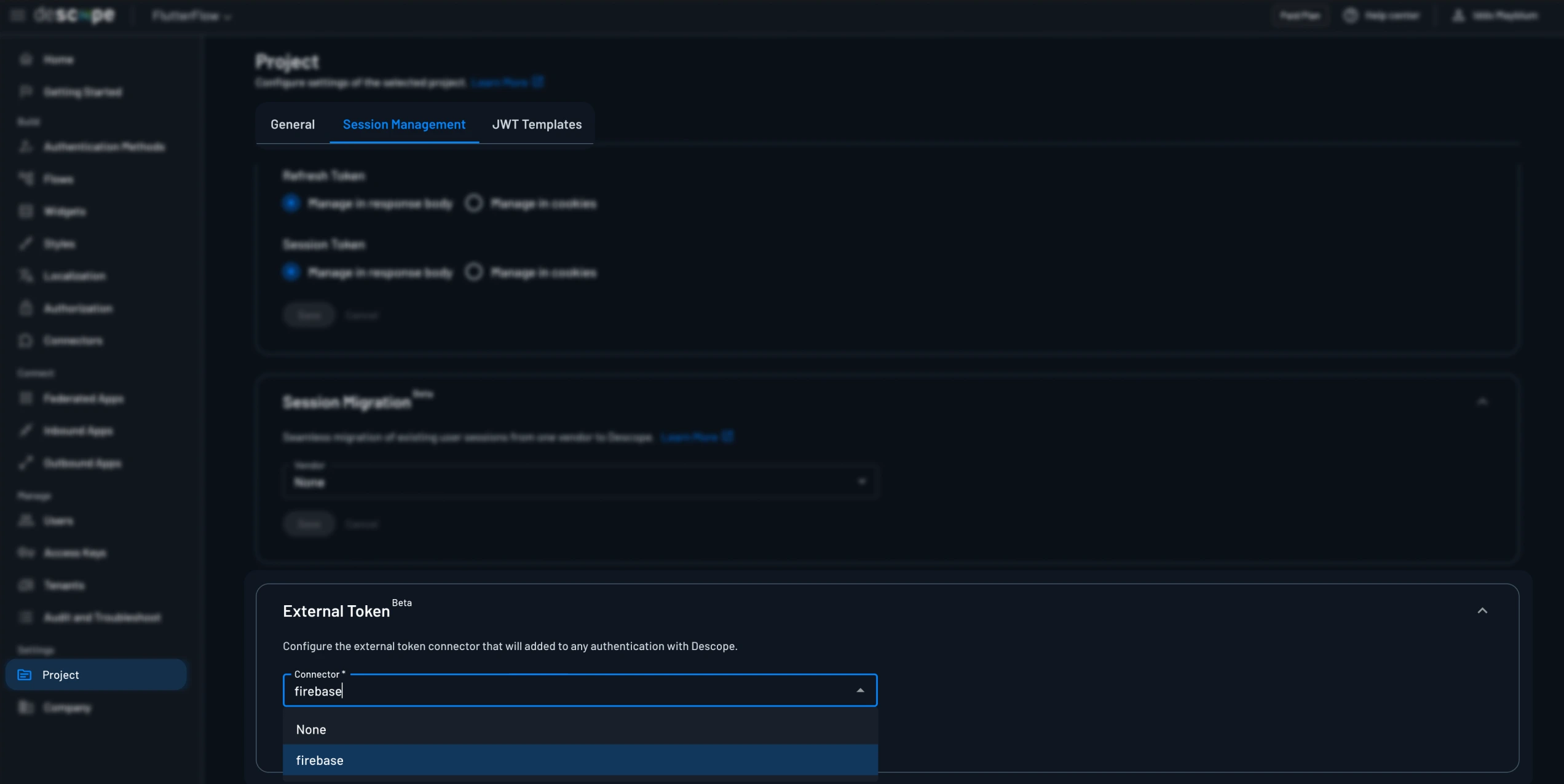
That Session Management selection applies to every flow when it finishes. You do not need to configure each flow separately for the connector to run.
If one flow should use a different connector than the rest of the project (for example a second Firebase project), set External Token Connector on that flow's End action. Flows that leave the End field blank keep using this Session Management selection.
Flow Authentication Response
When a flow completes with an External Token connector selected (via Session Management, or via that flow's End action), the authentication response includes externalToken:
{
  "cookieDomain": "",
  "cookieExpiration": 0,
  "cookieMaxAge": 0,
  "cookiePath": "/",
  "externalToken": "EXTERNAL_TOKEN",
  "firstSeen": false,
  "idpResponse": null,
  "refreshJwt": "DESCOPE_REFRESH_TOKEN",
  "sessionExpiration": 1750879215,
  "sessionJwt": "DESCOPE_SESSION_TOKEN",
  "user": {}
}
externalToken is unset / null when no connector is enabled for the project or that flow.
How to Use External Token
You can use External Token in your web or mobile application by following the steps below:
Web
import { Descope } from '@descope/react-sdk'

<Descope
  flowId="sign-up-or-in"
  onSuccess={(e) => {
    const externalToken = e.detail.externalToken
    if (externalToken) {
      // pass to the service that expects this token format
    }
  }}
/>
Mobile
With mobile SDKs, you can access the externalToken in the onSuccess callback.
func flowViewControllerDidFinish(_ controller: DescopeFlowViewController, response: AuthenticationResponse) {
    if let externalToken = response.externalToken {
        // pass the token to the service that expects it
    }
}