Creating a Connection
You can create a Connection in Descope using three different methods:
- Manually in the Console: Navigate to the Connections section of the console and select
+ Connection. You can then select a custom connection, or one of our preconfigured connections within the library. - Programmatically via APIs/SDKs: Use the CRUD APIs to create connections programmatically through the Descope Management API or SDKs.
- From a DCR Preset Connection: Create a new connection instance from a DCR preset connection. This is useful when building an MCP gateway, or when you want to create different tenant-specific connections for an OAuth provider used with another MCP server.
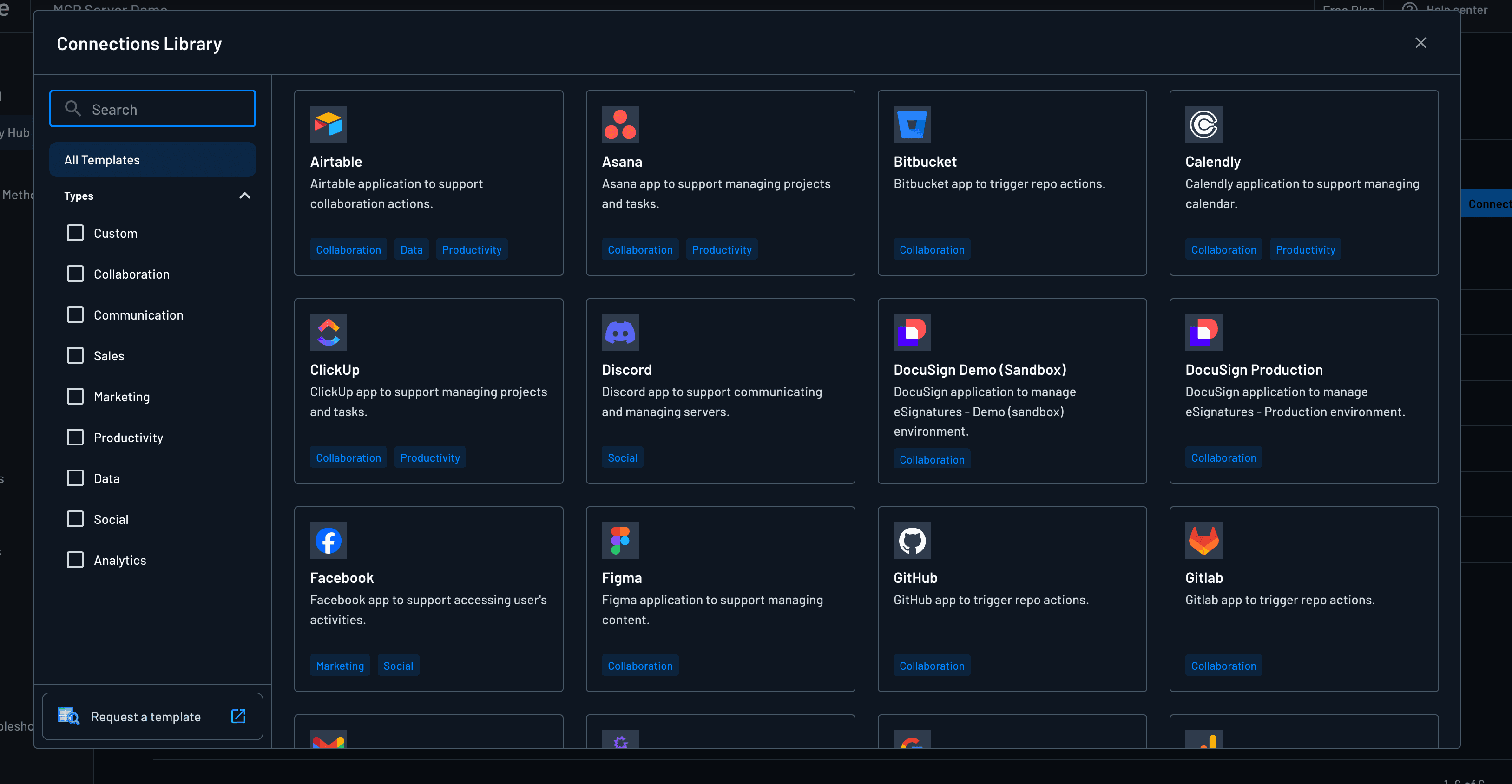
There are two different types of Connections in Descope: OAuth-based and API key-based Connections.
OAuth Connections
An OAuth Connection lets Descope run a provider's OAuth flow and store the tokens it returns. You can build one from scratch as a custom connection, or start from a pre-configured template in the library.
Register an OAuth App with the Provider
Most setups use Manual connection settings, so you register an OAuth application with the provider yourself (Google, Microsoft, Salesforce, and so on) before you configure anything in Descope. Descope then acts as a confidential OAuth client for that provider: you create the app on their side and paste its Client ID and Client Secret into Descope.
Two things need to match up on the provider's app:
- Scopes: The app must allow the scopes you define on the Connection (see Scopes). Enable the same scopes on the provider that you list in Descope.
- Authorized redirect URI: Whitelist Descope's outbound OAuth callback URL on the provider app (see Connection Settings below).
Some providers support Dynamic Client Registration against Descope's callback URL, which lets you skip the manual app and use the DCR option in Connection Settings instead. Most do not, so you will usually register the app by hand.
Connection Details
Note
The connection ID cannot be shared with any other connection or outbound app.
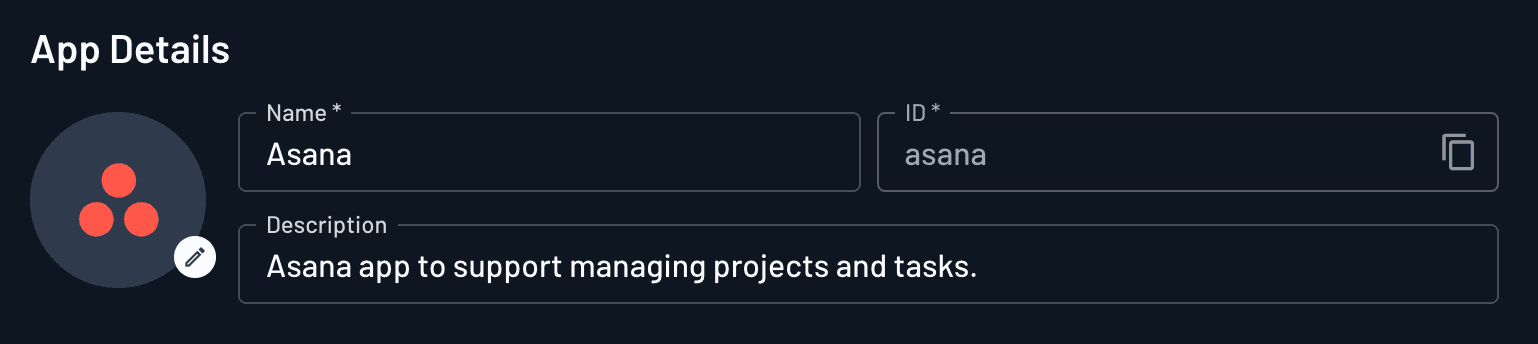
These fields set the Connection's identity and, optionally, scope it to a tenant:
- Name (Required): Display name for the Connection.
- Connection ID (Required): Unique identifier. Set only at creation; not editable afterward.
- Description (Optional): Short summary of what the Connection is for.
- Associated Tenant (Optional): Dropdown to tie the Connection to a specific tenant. Use this when the Connection should be scoped to one organization (for example, tenant-specific credentials in a gateway). Leave unset for a project-wide Connection.
Account Information
Account Information is where you connect Descope to the provider and list the OAuth scopes the Connection can request.
Connection Settings
Choose how Descope registers as an OAuth client with the provider:
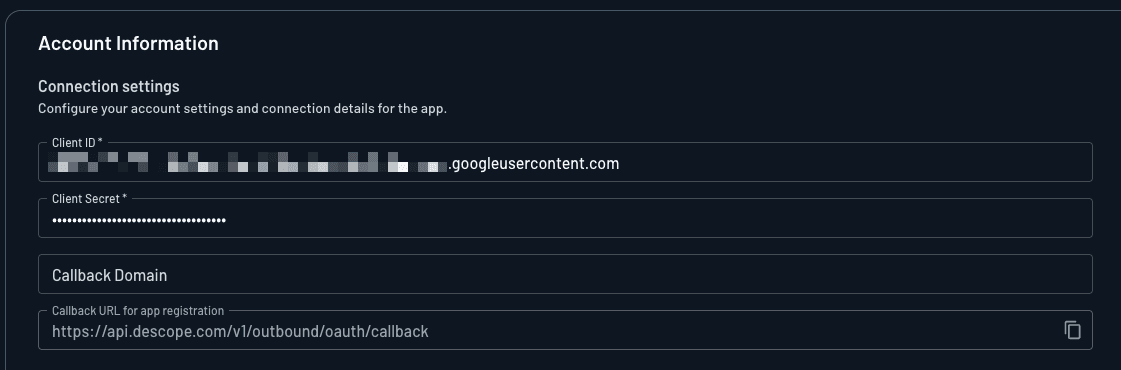
Manual
Enter credentials from an OAuth app you created at the provider:
- Client ID (Required): The client ID from your OAuth application at the provider.
- Client Secret (Required): The client secret from the same OAuth application.
Note
Most OAuth providers require this callback URL in the app's authorized redirect URI list. Without it, the provider rejects the request when a user connects.
When creating an OAuth app integration with your desired provider, the default callback URL to whitelist is:
__BaseURL__/v1/outbound/oauth/callback
Note
If you set a Callback Domain or use a custom domain, the URL in the console may differ.
Always use the value displayed here when registering the app at the provider.
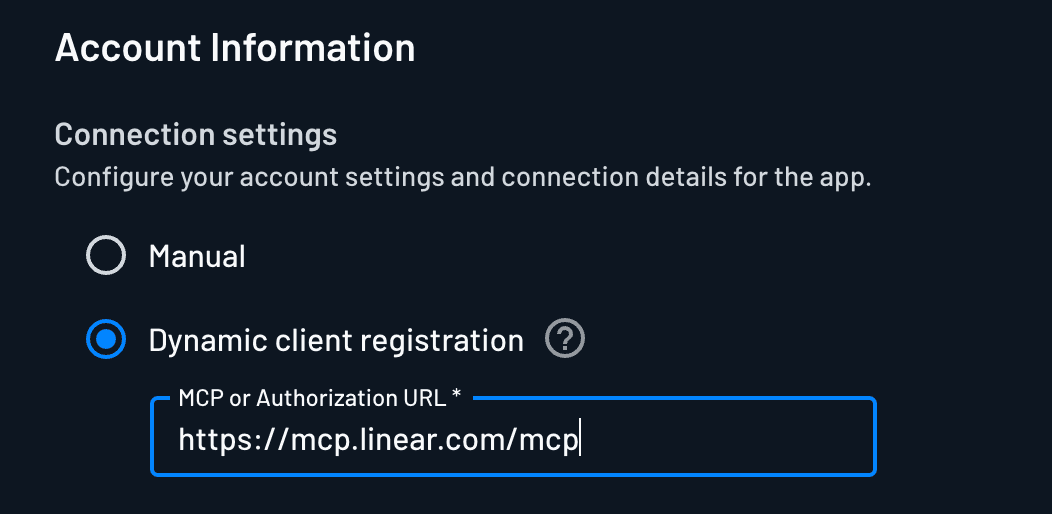
Dynamic Client Registration
If you don't wish to create an OAuth app in the provider, and the provider supports Dynamic Client Registration, you can provide a provider endpoint and Descope will register an OAuth app for you:
- Registration URL: An
/mcpURL or other dynamic client registration endpoint exposed by the provider.
Note
Most OAuth providers do not allow Dynamic Client Registration when Descope is the redirect URL.
In practice you usually need Manual registration: create an approved app at the provider, then paste its Client ID and Client Secret into Descope.
Scopes
This is the master list of OAuth scopes the Connection can request from the provider. Add every scope you might need, even if you do not use them all on every connect.
Descope uses this list in a few places:
- Default at connect time: If the MCP client, your app, or a Connection flow action does not pass specific scopes, Descope requests the scopes defined here.
- Override at connect time: A client or flow action can request a subset (or custom set). Those override the defaults for that connect only.
- MCP Server mapping: Scopes defined here appear in MCP Server Scopes under Connection scopes, where you map each MCP server scope to the provider scopes this Connection should fetch. They do not appear in that mapping UI until you define them on the Connection.
You must also enable the same scopes on the provider's OAuth app. Otherwise the provider will not grant them.
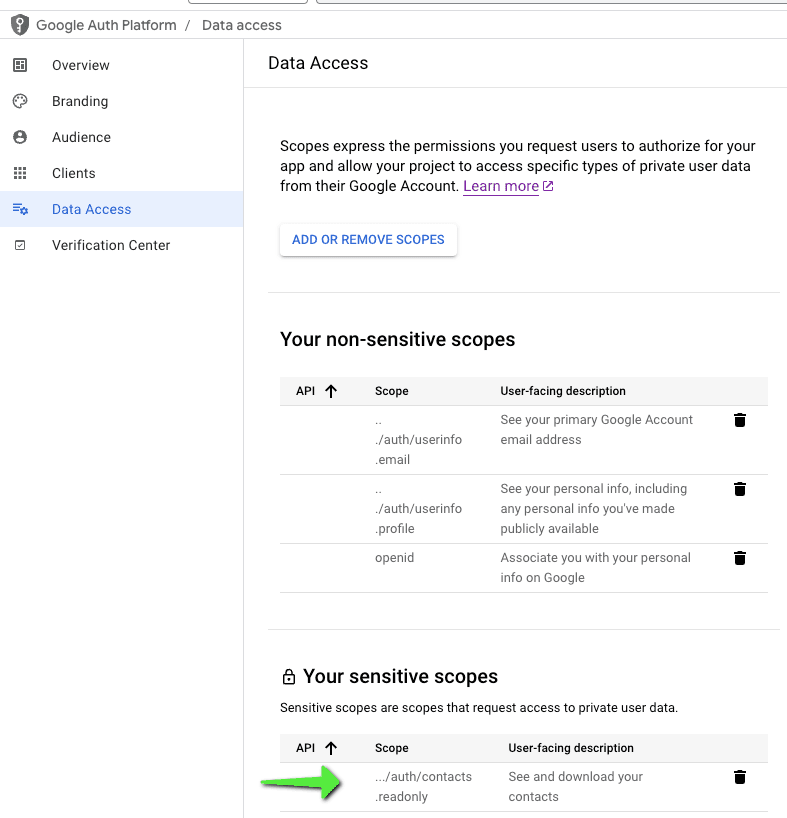
For example, Google Contacts defaults to full access (https://www.googleapis.com/auth/contacts), but you can configure read-only access (https://www.googleapis.com/auth/contacts.readonly) instead:

Note
You must also configure the same scopes in your OAuth provider's application settings (e.g., Google Cloud Console) for them to be available.
Additional Settings
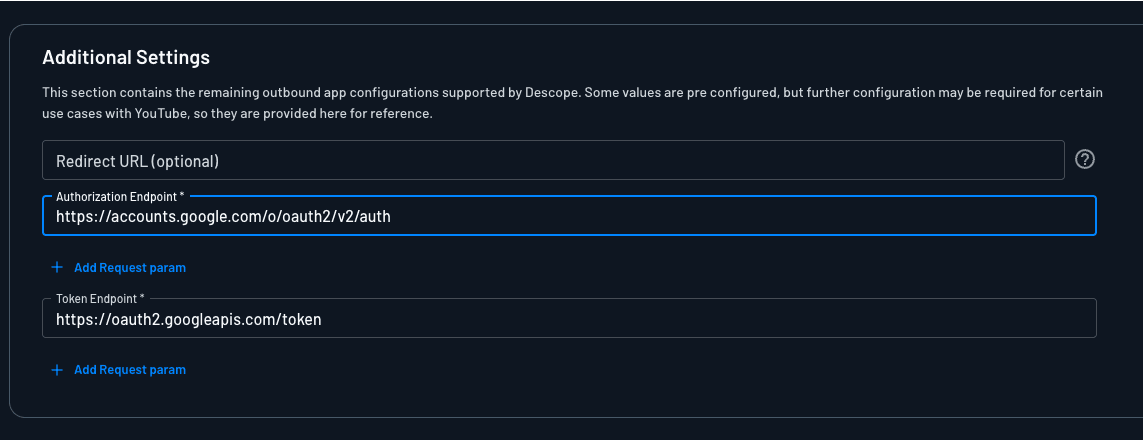
Additional Settings covers where users land after a successful connection, which OAuth endpoints Descope calls, and optional query parameters on the authorize request.
Note
When using a predefined connection from the connections library, the authorization and token endpoints are prepopulated.
- Redirect URL (Optional): The default redirect URL after a successful connection. This value will be overridden when using flows or specifying the redirect URL in the API/SDK call.
- Authorization Endpoint (Required): The endpoint to request authorization from the user.
- Token Endpoint (Required): The endpoint to exchange the authorization code for an access token.
- Authorize request params: Use + Add request param to attach extra query parameters to the provider's
/authorizerequest when a user connects. Set fixed key/value pairs for provider-specific parameters such asresource,audience, or other OAuth query params this Connection always needs on the initial connect.
Once created, you can read how you can connect to your OAuth provider, and fetch the OAuth tokens with our SDKs.
API Key Connections
This is ideal for integrating with external services that do not support OAuth, and use static tokens instead for authentication.
In addition to storing OAuth tokens, Descope can also store static API keys with API Key-based Connections.
A few templates use API keys, such as Jenkins and OpenAI, or you can create your own Custom API key Connection.
Connection Details
Note
The connection ID cannot be shared with any other connection.
These fields configure the connection:
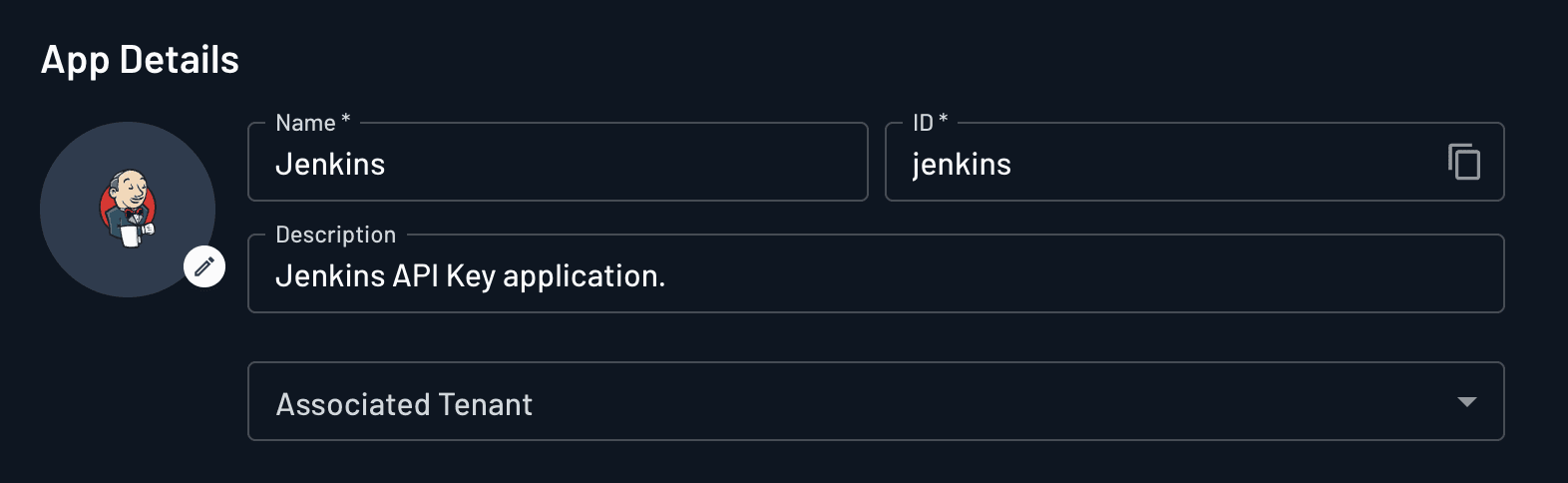
- Logo (Optional): Upload a logo by clicking the edit button on the logo. The "Connect To" consent button in your flows uses this logo automatically.
- Connection Name (Required): The display name for the connection. You can edit it later.
- Description (Optional): An optional description of the connection. You can edit it later.
- Connection ID (Required): Set this only when you create the connection. It cannot be changed afterward.
API key based connections don't have any additional settings besides the details above, and no scopes. To use an API key Connection from an MCP server, map an MCP server scope to the Connection under MCP Server Scopes. The mapping grants access to the whole Connection rather than to specific scopes. Which stored key a token carrying that MCP scope can get depends on whether the key belongs to a user, to a user within a tenant, or to a tenant, and on whether your policies allow the request. See MCP scopes to Connection scopes for how each case is matched.
Once the Connection is created, you can store API keys via Flows, the connect API, or Add Tenant Token in the Console for tenant-level keys, then fetch them with our SDKs.
Managing Connections
You can create, update, delete, and load connections programmatically using a Descope SDK directly via the REST API.
Create a Connection
// Create a connection
const { id } = await descopeClient.management.outboundApplication.createApplication({
  name: 'my new connection',
  description: 'my desc',
  // ...other fields (see [Connection Schema](#connection-schema) below)
});
Update a Connection
// Update a connection (overrides all fields)
await descopeClient.management.outboundApplication.updateApplication({
  id: 'my-connection-id',
  name: 'my updated connection',
  // ...other fields (see [Connection Schema](#connection-schema))
});
Delete a Connection
// Delete a connection by id
await descopeClient.management.outboundApplication.deleteApplication('my-connection-id');
Load a Connection
// Load a connection by id
const connection = await descopeClient.management.outboundApplication.loadApplication('my-connection-id');
Load All Connections
// Load all connections
const connectionsRes = await descopeClient.management.outboundApplication.loadAllApplications();
connectionsRes.data.forEach((connection) => {
  // do something
});
Connection Schema
When creating or updating a connection, you can configure the following fields:
Connection Fields
| Field | Type | Required | Description |
|---|---|---|---|
id | string | Optional (create) | Unique identifier for the connection. Auto-generated if not provided during creation. |
name | string | Required | Display name for the connection. |
description | string | Optional | Human-readable description of the connection. |
logo | string | Optional | URL or path to the connection logo. |
clientId | string | Optional | OAuth client ID from the provider. Required for OAuth connections. |
clientSecret | string | Optional | OAuth client secret from the provider. Required for OAuth connections. |
discoveryUrl | string | Optional | OAuth discovery URL for automatic endpoint configuration. |
authorizationUrl | string | Optional | OAuth authorization endpoint URL. Required if discoveryUrl is not provided. |
authorizationUrlParams | array | Optional | Additional parameters to include in authorization requests. |
tokenUrl | string | Optional | OAuth token endpoint URL. Required if discoveryUrl is not provided. |
tokenUrlParams | array | Optional | Additional parameters to include in token exchange requests. |
revocationUrl | string | Optional | OAuth token revocation endpoint URL. |
defaultScopes | array of strings | Optional | Default OAuth scopes to request for all connections. |
defaultRedirectUrl | string | Optional | Default redirect URL after successful OAuth flow. |
callbackDomain | string | Optional | Domain to use for OAuth callbacks. Defaults to project domain. |
pkce | boolean | Optional | Enable PKCE (Proof Key for Code Exchange) for OAuth flows. |
accessType | string | Optional | OAuth access type (e.g., "offline" for refresh tokens). |
prompt | array of strings | Optional | OAuth prompt parameters (e.g., ["consent", "select_account"]). |
appType | string | Optional | Type of application. Will always be "custom" for manually created connections. |
URL Parameter Structure
The authorizationUrlParams and tokenUrlParams fields accept an array of URL parameter objects with the following structure:
| Field | Type | Required | Description |
|---|---|---|---|
key | string | Required | The parameter name. |
value | string | Required | The parameter value. |
Here's an example of a complete connection object with all available fields:
const connection = {
  name: 'Google Contacts',
  description: 'Access Google Contacts API',
  logo: 'https://example.com/logo.png',
  clientId: 'your-client-id',
  clientSecret: 'your-client-secret',
  authorizationUrl: 'https://accounts.google.com/o/oauth2/v2/auth',
  tokenUrl: 'https://oauth2.googleapis.com/token',
  defaultScopes: ['https://www.googleapis.com/auth/contacts.readonly'],
  defaultRedirectUrl: 'https://app.example.com/callback',
  callbackDomain: 'app.example.com',
  pkce: true,
  accessType: 'offline',
  prompt: ['consent']
};
For more information on how to store tokens and connect to your Connection, see the Storing Connection Tokens documentation.
For more information on how to fetch these tokens see this doc.