Snowflake Connector
This guide covers implementing Descope's Snowflake connector. Snowflake is a cloud-based data warehouse platform for storage, processing, and analytics.
Descope enables you to automatically collect authentication logs and audit events and stream them to your Snowflake data warehouse for centralized analysis and long-term storage.
Configure Snowflake connector
Prerequisites
Before configuring the Descope Snowflake connector, ensure you have:
- A Snowflake account with appropriate permissions
- A warehouse, database, and schema created in Snowflake
- A user account with write permissions for the target database and table
Configuring the Connector
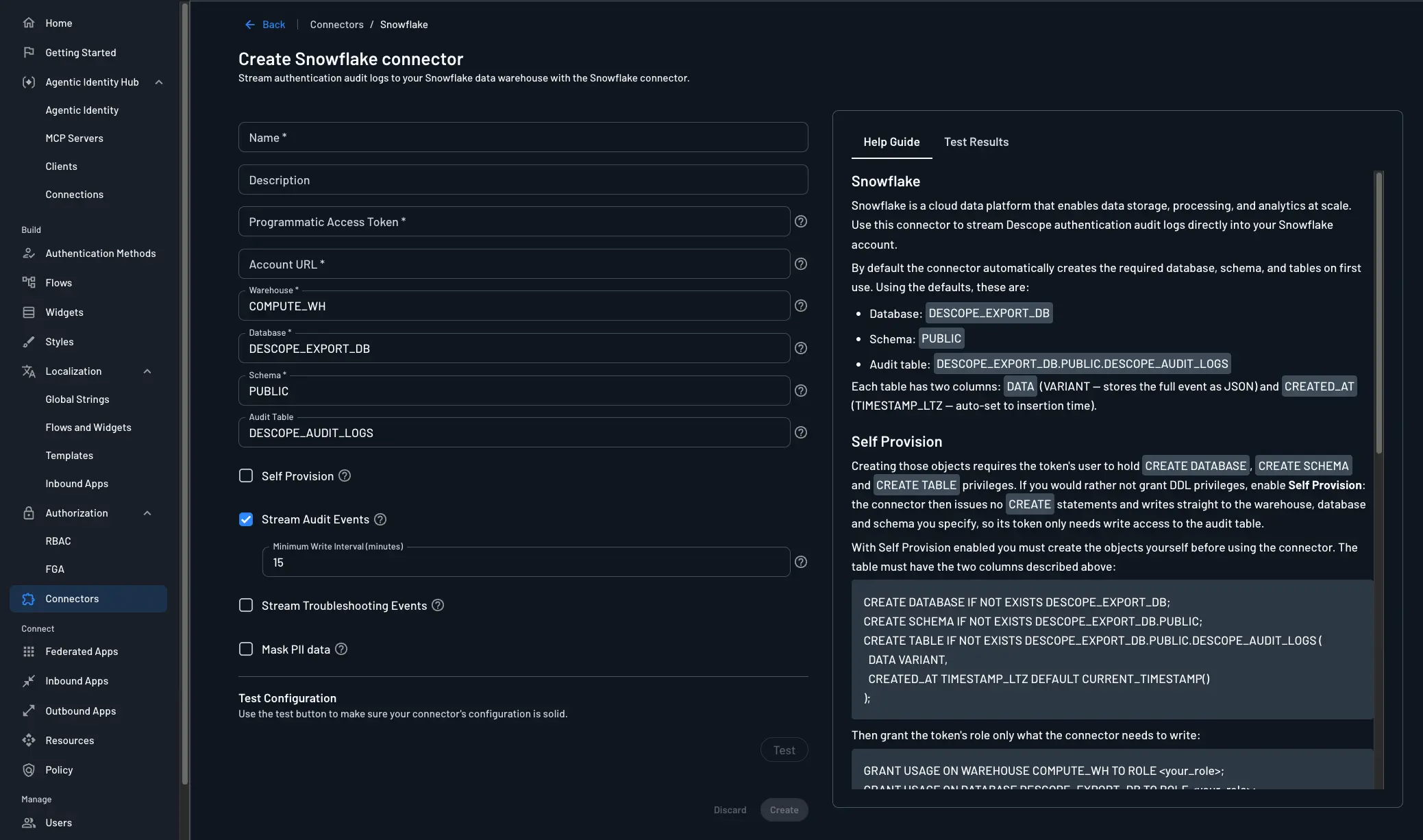
Navigate to the Connectors page in the Descope Console and select Snowflake to create a new Snowflake connector.
The following parameters are required to use it:
- Connector Name: Provide a unique name for your connector. This assists in distinguishing it, especially when multiple connectors are derived from the same template.
- Connector Description (optional): Briefly explain the purpose of this connector.
- Programmatic Access Token: A Snowflake PAT used to authenticate API requests.
- Account URL: The URL of your Snowflake account. e.g.
https://<org>-<account>.snowflakecomputing.com. Found in Snowsight under Admin > Accounts. - Warehouse: The Snowflake warehouse to use for query execution.
- Database: The Snowflake database where audit events will be stored.
- Schema: The schema within the database for organizing audit event tables.
- Audit Table: The table to write audit events to.
- Stream Audit Events: Select this if you want to stream audit events to your Snowflake account.
- Minimum Write Interval (minutes): The minimum time between writes to Snowflake. When set, Descope accumulates events and writes them in a single batch at most once per interval. See Choosing a Write Interval below, for more details.
- Stream Troubleshooting Events: Decide whether troubleshooting events are also sent to Snowflake.
- Mask PII Data: Decide whether to mask PII (personally identifiable information) in the logs.
Choosing a Write Interval
Snowflake bills compute per second with a one-minute minimum per resume, and a running warehouse burns credits even when idle. Frequent small inserts keep it awake.
Batching into one write per interval lets it auto-suspend between writes. Set the auto-suspend timeout shorter than the interval, or it never suspends.
The tradeoff is latency: a 15-minute interval means events land up to 15 minutes late. Descope queues them rather than dropping them.
Use an interval of 0 minutes for alerting. Use a longer interval for dashboards and storage.
Testing
Before creating your connector, verify that the connector's configuration works. Once configured, simply click on "Test" and check the Test Results panel. Confirm, then click "Create."
Configuring the Database, Schema, and Table
Audit events are stored in a single table with two columns:
| Column | Type | Purpose |
|---|---|---|
| DATA | VARIANT | Full event payload as JSON. |
| CREATED_AT | TIMESTAMP_LTZ | Insertion time (set automatically when rows are written). |
Default fully qualified name: DESCOPE_EXPORT_DB.PUBLIC.DESCOPE_AUDIT_LOGS.
If you create the objects yourself in Snowflake, example DDL:
CREATE DATABASE IF NOT EXISTS DESCOPE_EXPORT_DB;

CREATE SCHEMA IF NOT EXISTS DESCOPE_EXPORT_DB.PUBLIC;

CREATE TABLE IF NOT EXISTS DESCOPE_EXPORT_DB.PUBLIC.DESCOPE_AUDIT_LOGS (
    DATA VARIANT,
    CREATED_AT TIMESTAMP_LTZ DEFAULT CURRENT_TIMESTAMP()
);
Note
Match the database, schema, and table names to what you enter in the connector. If you use non-default names, update the connector fields accordingly. The table must include DATA (VARIANT) and CREATED_AT (TIMESTAMP_LTZ) so Descope can write events as expected.
Grant the PAT user (via its role) permission to insert into the table and use the warehouse, for example:
-- Replace MY_ROLE and COMPUTE_WH with your role and warehouse names
GRANT USAGE ON DATABASE DESCOPE_EXPORT_DB TO ROLE MY_ROLE;
GRANT USAGE ON SCHEMA DESCOPE_EXPORT_DB.PUBLIC TO ROLE MY_ROLE;
GRANT INSERT ON TABLE DESCOPE_EXPORT_DB.PUBLIC.DESCOPE_AUDIT_LOGS TO ROLE MY_ROLE;
GRANT USAGE ON WAREHOUSE COMPUTE_WH TO ROLE MY_ROLE;
Adjust grants if your Snowflake admin uses different roles or if the connector uses a warehouse other than COMPUTE_WH.
Viewing Audit Logs
Now the audit logs are viewable in Snowflake.
Query recent rows (default table name DESCOPE_AUDIT_LOGS):
SELECT DATA, CREATED_AT
FROM DESCOPE_EXPORT_DB.PUBLIC.DESCOPE_AUDIT_LOGS
ORDER BY CREATED_AT DESC
LIMIT 100;
Exact keys inside DATA depend on the event type; inspect sample rows or your audit event schema in Descope.
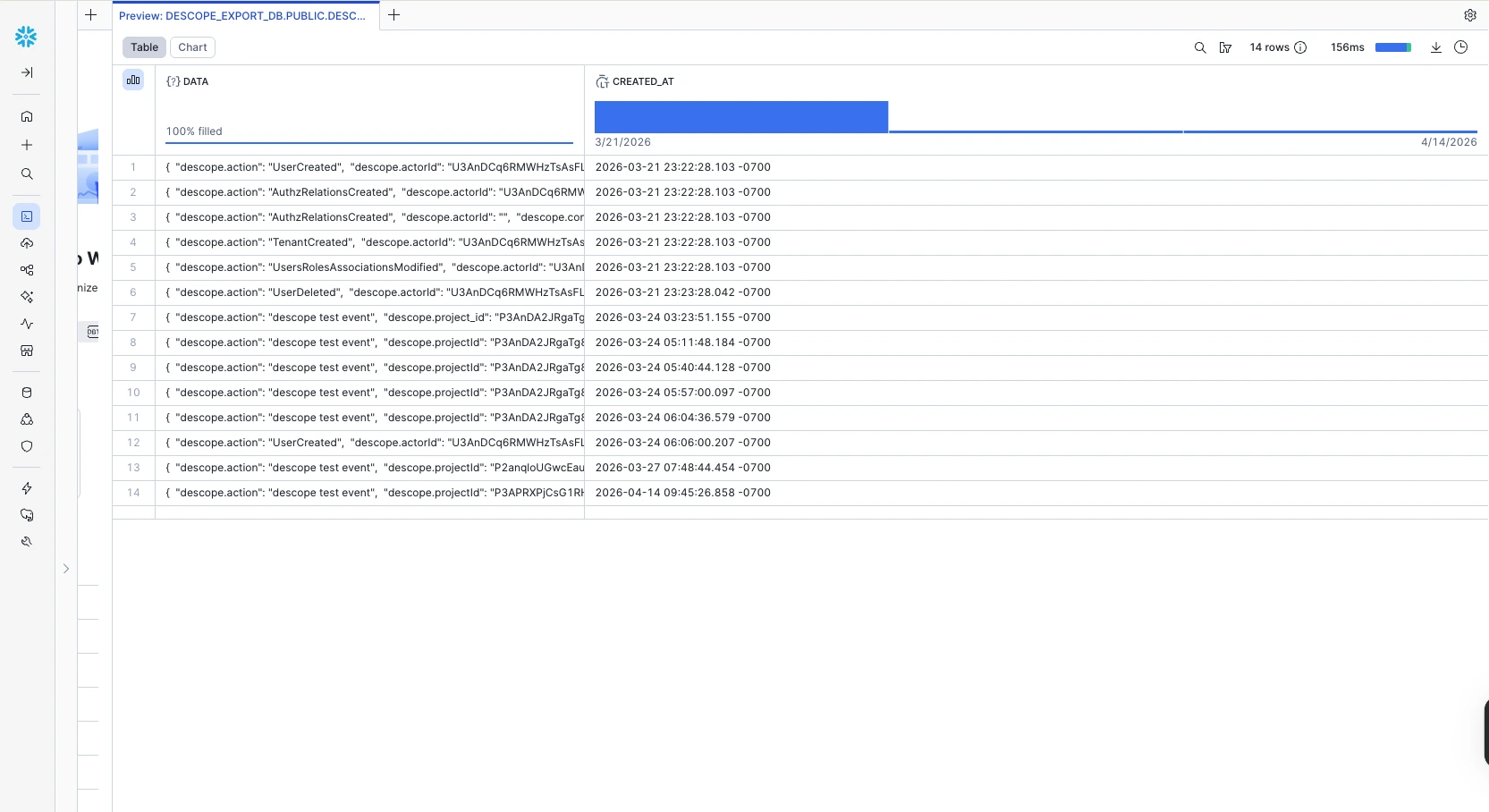
The logs can still be viewed in Descope under the Audit and Troubleshoot section of the Descope Console. For more information on audit trail streaming, see Audit Trail Streaming.