Generate JWT
Note
For flows where you can federate with OIDC or SAML, use custom OAuth providers or tenant-based SSO instead.
The Generate JWT actions provision a user in Descope and return a session token as if the user had signed in with a standard Descope auth action.
Use these actions when you have a homegrown or third-party IdP that cannot use OIDC or SAML.
In your flow, validate the user (e.g. via a Generic HTTP Connector or an existing cookie), then add a Generate JWT action to create or match the user and issue a Descope JWT for the rest of your app or downstream flows.
Also, if you're trying to use this action to use an existing auth provider with Descope as your MCP auth provider, see our bring your own auth for MCP doc.
Available Flow Actions
There are three Generate JWT actions available. Each action determines how the user is provisioned when no matching Descope user exists:
| Action | Behavior |
|---|---|
| Generate JWT / Sign In with 3rd Party IdP | Provisions a user only if they already exist in Descope (e.g., matched by login ID). Use when the user must have been created beforehand. |
| Generate JWT / Sign Up with 3rd Party IdP | Always creates a new user in Descope. Use when this path is exclusively for new sign-ups. |
| Generate JWT / Sign Up or In with 3rd Party IdP | If a user exists (e.g., matched by email or external ID), signs them in; otherwise creates a new user. Use for a single path that handles both new and returning users. |
How It Works
-
Previous step must set identity - A prior screen or step in the flow must set
form.emailorform.externalIdso the action knows what login ID to create or match a user with. For example, collect email in a form, or set it from the response of a Generic HTTP Connector that validated the user with your auth API. -
Use the Generate JWT action - The action creates or signs in an existing user in Descope based on that login ID provided by the previous step.
-
Follow Up Steps (Optional) - After the Generate JWT action runs, you can update the user or the token using:
- Update User / Attributes - to set or change user profile and attributes.
- Custom Claims - to add or change claims on the issued JWT.
-
Token returned - The flow returns a Descope session token (JWT) just as if the user had completed a standard Descope authentication action. Downstream steps and your application can use this token for authorization and API calls.
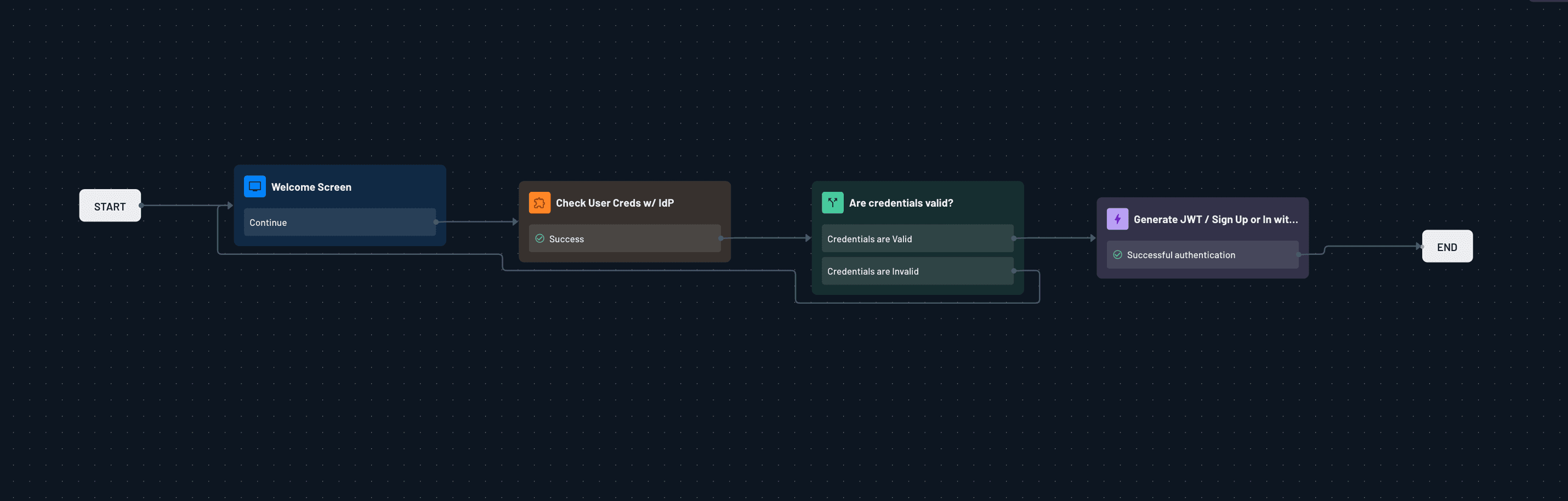
This is a simplified example flow, using the Generate JWT / Sign Up or In with 3rd Party IdP action:
Step-Up Authentication
If a Generate JWT action runs after a Step Up action in the same flow, the token it issues includes the su claim, just like a native sign-in action would. This lets you satisfy a step-up requirement for a user you're authenticating through a homegrown or third-party IdP, instead of signing them in and then challenging them again. See Step-Up Authentication for Third-Party IdP Sign-Ins for a full walkthrough.