mTLS Client Authentication
Mutual TLS (mTLS) client authentication (RFC 8705) lets a client prove its identity with an X.509 certificate during the TLS handshake, instead of with a client secret. Descope supports mTLS for Inbound Apps and Agentic Clients. When a client authenticates this way, Descope can also bind the access token to the certificate, so the token is useless to anyone who doesn't hold the certificate's private key.
This page covers certificate-based client authentication and certificate-bound tokens. If you want to bind tokens to a key pair that the client generates itself, without a certificate, see DPoP Sender-Constrained Tokens instead.
Why Use mTLS
A client secret is a shared value. Descope stores it, the client stores it, and anyone who copies it from a config file or a log can act as the client until you rotate it. An access token has the same weakness, because a normal access token is a bearer token that works for whoever holds it.
mTLS solves both problems with one credential. The client keeps the certificate's private key and never sends it anywhere. Descope checks the certificate during the TLS handshake, so there is no secret to leak at the token endpoint. Descope then writes the certificate's thumbprint into the access token. Your API can compare that thumbprint with the certificate on its own TLS connection, and reject the token when the two don't match.
Many organizations already issue certificates to their services, which makes mTLS a natural fit for backend and partner integrations. The FAPI 2.0 Security Profile also accepts mTLS as one of its sender-constraining methods.
Requirements
mTLS needs a custom domain on your project. The TLS handshake happens at the edge of your custom domain, so a client that calls api.descope.com can't present a certificate to Descope. When you save mTLS credentials on an app, Descope turns on mTLS for your custom domain. When you remove the last mTLS credentials in the project, Descope turns it off again. Descope rejects mTLS credentials on a project that has no custom domain.
mTLS is available by default on projects created on or after September 22, 2026. For an older project, contact Descope Support to turn it on.
Registering Client Certificates
RFC 8705 defines two ways to match a client certificate. With self_signed_tls_client_auth, you register the client certificate itself, and Descope compares the SHA-256 thumbprint of the presented certificate with the registered one. With tls_client_auth, you would register a CA, and Descope would accept any certificate that chains to it.
Descope currently supports self_signed_tls_client_auth only. Checking a chain needs the full client certificate, and the edge of a custom domain forwards only the thumbprint and subject. The certificate doesn't need to be self-signed, though. A certificate that your internal CA issued works too, because Descope matches it by thumbprint.
Thumbprint matching decides how you rotate certificates. Each app can hold more than one certificate, and Descope accepts any of them. To rotate without downtime, you can register the new certificate, move the client to it, and then remove the old one.
Once an app uses mTLS, the certificate is that app's only way to authenticate at the token endpoint. A request that sends a client secret without a valid certificate fails.
Configuring an App
You set up mTLS in the Console, in the Client Authentication section of the Inbound App.
Select the method
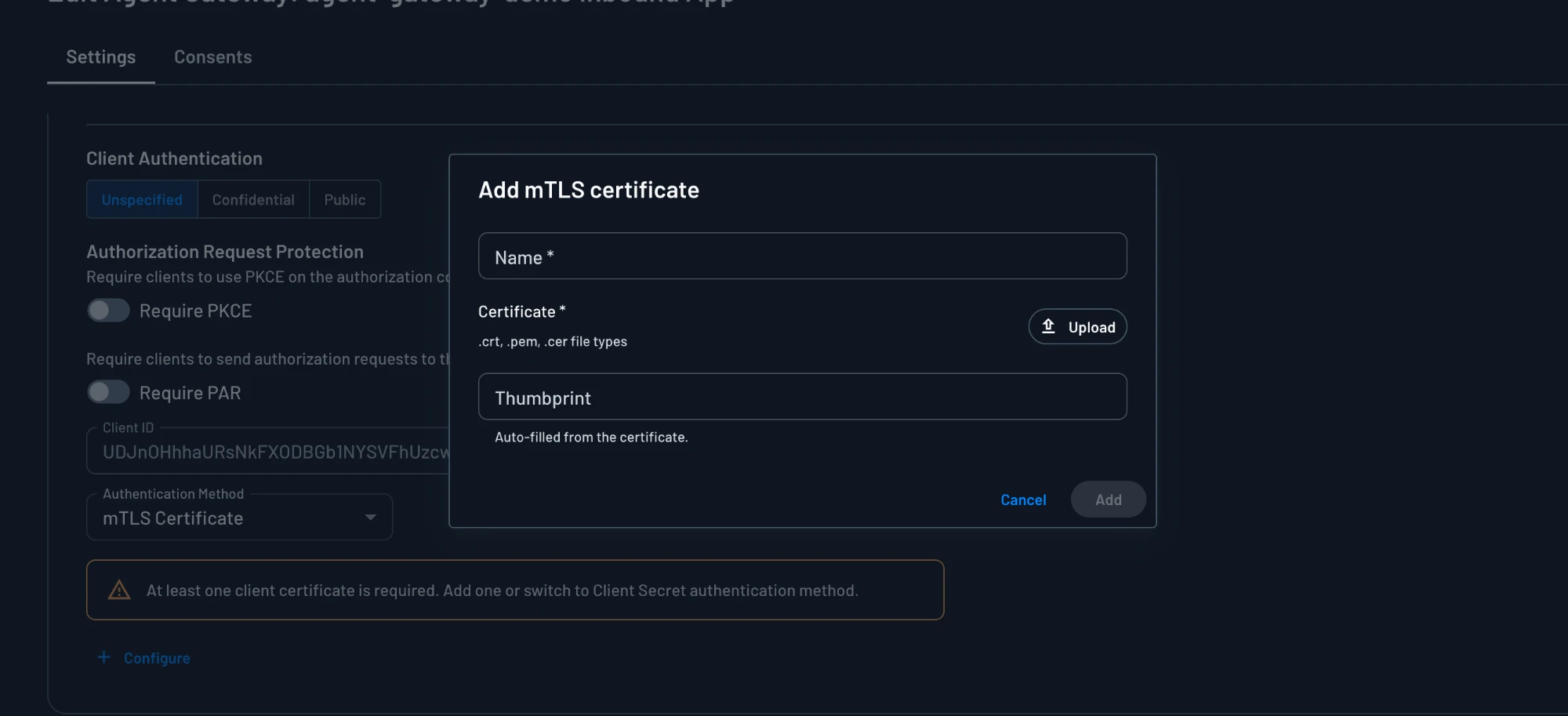
Open the Inbound App in the Console. Under Authentication Method, select mTLS Certificate.
Until you add a certificate, the Console warns that the app needs at least one client certificate.
Add a certificate
Click + Configure to open the Add mTLS certificate dialog. Enter a Name, and click Upload to add the client Certificate as a .crt, .pem, or .cer file.
Check the thumbprint
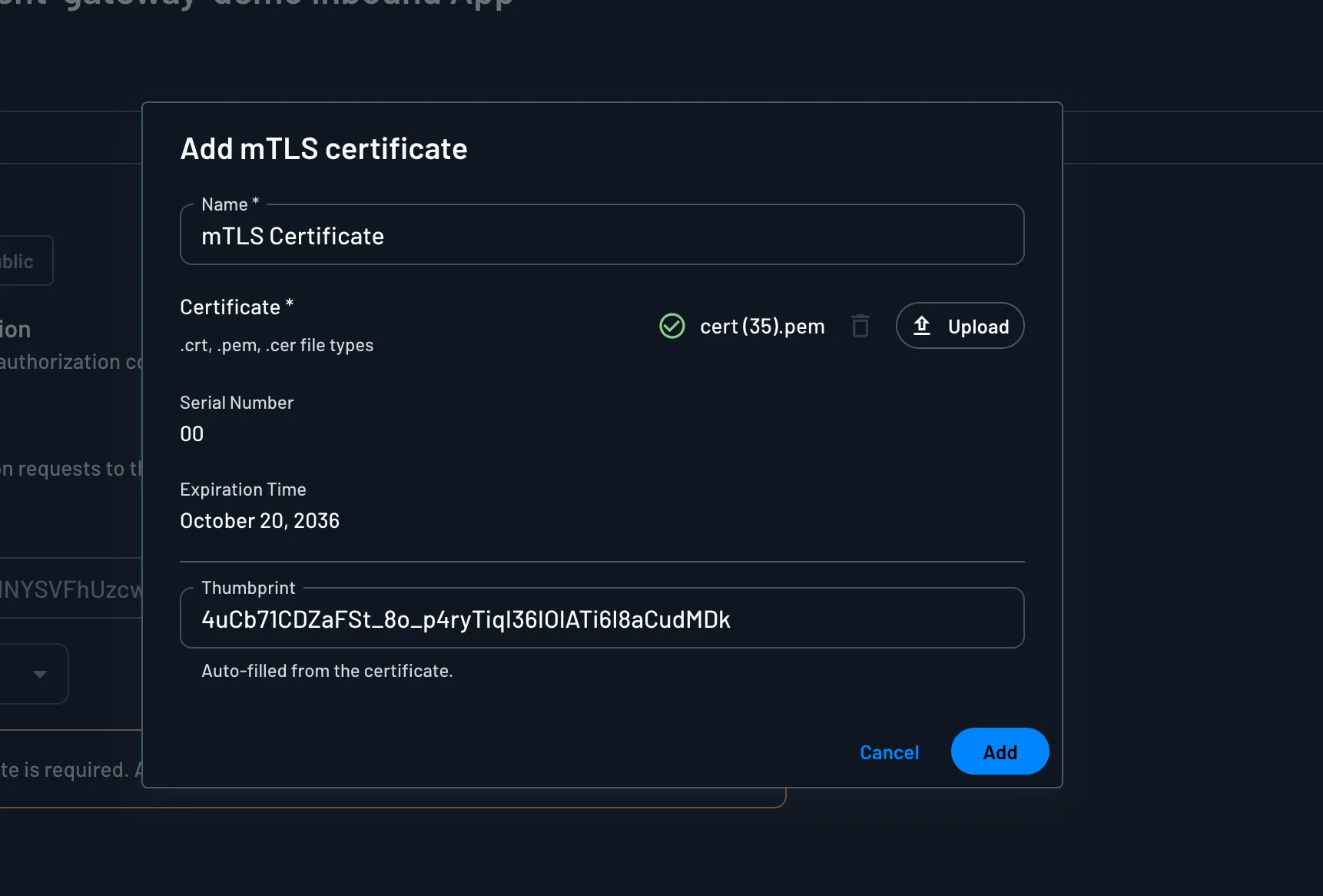
Descope reads the certificate and fills in its Serial Number, Expiration Time, and Thumbprint. The thumbprint is the same base64url SHA-256 value that Descope puts in the token's cnf claim. Compare it with the thumbprint of the certificate your client uses, click Add, and then save the app.
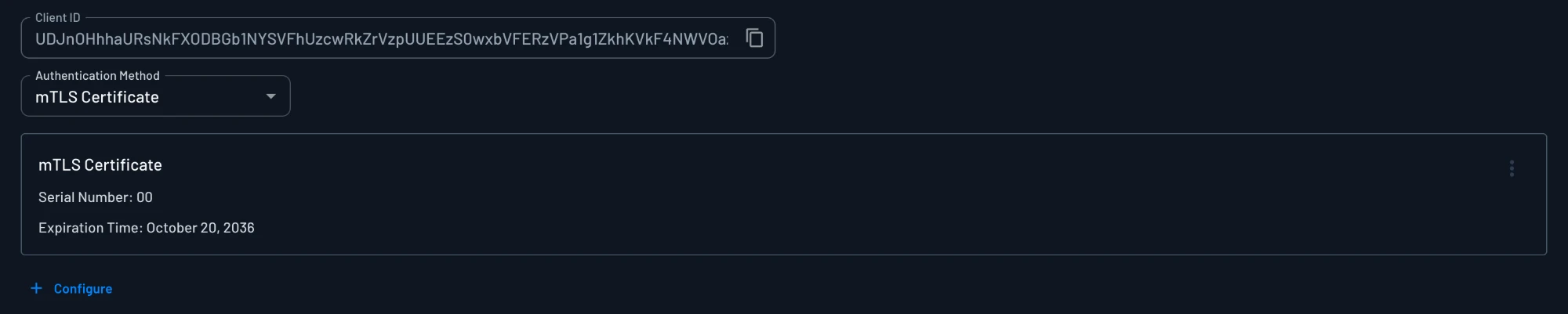
The Console disables the mTLS Certificate option until your project has a custom domain. After you save, the app lists each certificate with its serial number and expiration time, so you can see when a rotation is due. To rotate, click + Configure to add the new certificate, and switch your client to it. After the client gets tokens with the new certificate, remove the old one from the menu next to it.
You can also set mTLS with the Management API when you create or update an Inbound App. Set clientAuthMethod to mtls, and list the certificates in mtlsClientAuthMethods.selfSignedTlsClientAuth.credentials. Each credential has a name and a PEM certificate in pem:
{
  "clientAuthMethod": "mtls",
  "mtlsClientAuthMethods": {
    "selfSignedTlsClientAuth": {
      "credentials": [
        {
          "name": "billing-service-2026",
          "pem": "-----BEGIN CERTIFICATE-----\n...\n-----END CERTIFICATE-----"
        }
      ]
    }
  }
}
Descope computes each certificate's thumbprint from pem when you save it, so you don't send a thumbprint yourself. The descope_inbound_app resource in the Terraform provider doesn't support mTLS yet.
Requesting a Token
The client calls the token endpoint on your custom domain and presents its certificate in the TLS handshake. It sends client_id to name the app, and no client_secret or client_assertion. Any grant works. A backend service with no user, for example, uses client_credentials:
curl -X POST "https://auth.example.com/oauth2/v1/apps/token" \
  --cert client.crt \
  --key client.key \
  -H "Content-Type: application/x-www-form-urlencoded" \
  -d "grant_type=client_credentials" \
  -d "client_id=<CLIENT_ID>"
Replace auth.example.com with your custom domain. Descope checks the certificate against the app's credentials before it handles the grant. When the certificate doesn't match any credential, Descope rejects the request with an HTTP 401 error.
Certificate-Bound Tokens
When the client presents a certificate on the token request, Descope binds the tokens it issues to that certificate. The access token carries a cnf (confirmation) claim with an x5t#S256 member. The value is the base64url-encoded SHA-256 thumbprint of the DER-encoded certificate:
{
  "sub": "<CLIENT_ID>",
  "aud": ["https://api.example.com"],
  "cnf": {
    "x5t#S256": "bwcK0esc3ACC3DB2Y5_lESsXE8o9ltc05O89jdN-dg2"
  }
}
Descope binds the refresh token too. When the client refreshes, it must present the same certificate, or Descope rejects the refresh.
Descope's own UserInfo endpoint checks the binding as well. To call it with a certificate-bound token, the client presents the same certificate on the custom domain.
Requiring Certificate-Bound Tokens
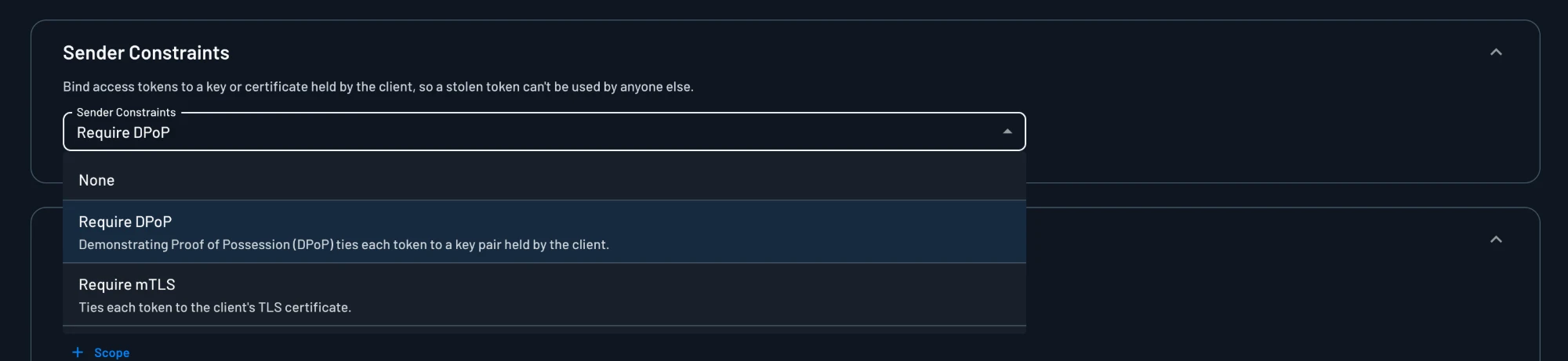
You can require every token from an app to be bound to a certificate. Under Sender Constraints on the app, select Require mTLS. The same card has Require DPoP, and an app can require one of the two but not both. Like the authentication method, Require mTLS needs a custom domain. In the Management API, the same setting is the forceMtls field, which you can set with the patch endpoint. After you set it, load the app and check that forceMtls is true in the response.
Validating the Binding in Your API
A certificate-bound token protects your API only if the API checks the binding. An API that validates the JWT and ignores cnf accepts a stolen token as if it were a bearer token.
Your API needs the client certificate from its own mTLS connection. In most deployments, a load balancer or API gateway terminates TLS and forwards the certificate in a header.
A certificate is public, so the header proves nothing unless your gateway set it. An attacker with a stolen token and the victim's certificate could otherwise send that certificate in the header and pass the check without the private key. Your gateway must check the certificate during the TLS handshake, and it must strip or overwrite any copy of the header that the client sent. Your API must accept requests only from the gateway.
With a certificate it can trust, your API checks the request in three steps:
- Validate the access token as usual. See Session validation.
- Compute the SHA-256 hash of the client certificate in DER form, and base64url-encode it without padding.
- Compare the result with
cnf["x5t#S256"]in the token, and reject the request when they differ.
The following Node.js example runs the comparison, assuming your gateway forwards the PEM certificate in an x-client-cert header:
import crypto from "crypto";

function certificateMatchesToken(pemCert, claims) {
  const der = new crypto.X509Certificate(pemCert).raw;
  const thumbprint = crypto.createHash("sha256").update(der).digest("base64url");
  return claims.cnf?.["x5t#S256"] === thumbprint;
}
Discovery Metadata
RFC 8705 defines discovery fields that tell a client which mTLS features an authorization server supports. When your project advertises mTLS, the discovery document includes these fields:
tls_client_certificate_bound_access_tokens:truewhen Descope issues certificate-bound tokens.mtls_endpoint_aliases: Thetoken_endpointandrevocation_endpointthat a client calls with its certificate.token_endpoint_auth_methods_supported: Includesself_signed_tls_client_auth.
mTLS in the discovery document
Descope doesn't advertise these fields by default. mTLS still works for every app that has mTLS credentials. If your clients choose their authentication method from discovery metadata, contact Descope Support to have mTLS advertised for your project.
Agentic Clients and MCP
Agentic Clients use the same authorization server as Inbound Apps. An agent or MCP client that presents a registered certificate at the token endpoint gets a certificate-bound token. An MCP server can then check the cnf claim the same way as any other API. The binding is useful for agents because an agent's tokens pass through many tools and logs, and a bound token can't be replayed from any of them.
Related
- DPoP Sender-Constrained Tokens
- Pushed Authorization Requests
- Authorization Server Endpoints
- Custom domain
DPoP Sender-Constrained Tokens
Bind Inbound App access tokens to a client-held key with DPoP (RFC 9449), so a stolen token can't be used by anyone else.
Using Inbound Apps
Learn how to integrate inbound apps with Descope to streamline OAuth authentication, manage user consent, and securely connect third-party applications.