Managing Resources
Create and maintain Resources in the Resources section of the Descope Console.
This page covers creating Resources, linking them to OAuth clients, and removing them.
Creating a Resource
- Open Resources in the Descope Console.
- Click + Resource and choose API or MCP Server.
- Complete the resource details and define scopes (and role or Connection mappings per type).
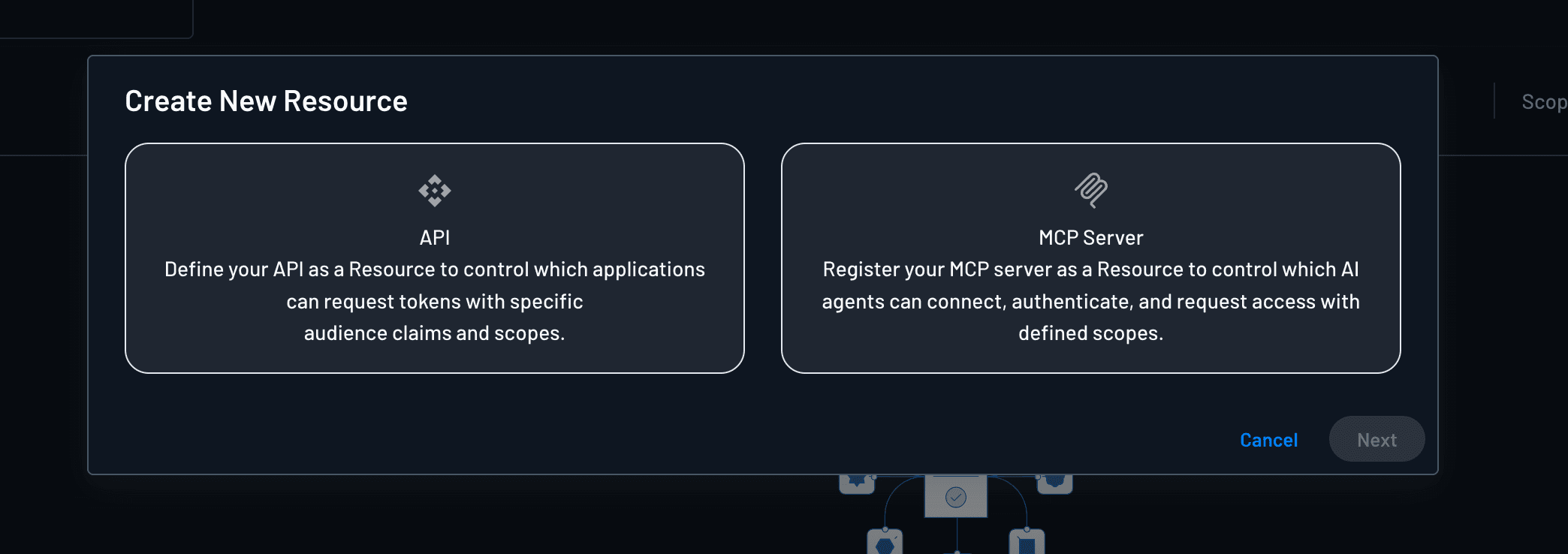
API Resources
For an API Resource, configure:
- Resource identifier — Used in token
audand discovery metadata so clients target the correct server. - OAuth scopes — Permission strings your API enforces (for example
shipments.read,admin:reports). - Role association — Map each scope to Descope RBAC roles so only eligible users can consent to or receive that scope.
See Scopes and roles — API Resources for the full scope model.
MCP Server Resources
For an MCP Server Resource, configure:
- MCP Server URL — Base URL of your MCP endpoint (typically ending in
/mcp). Included in theaudclaim on issued tokens. - MCP Server Scopes — Permissions your server enforces per tool (for example
mcp:calendar.read). - Connection Scope Mapping — When tools call third-party services, map each MCP scope to Connection scopes.
The same MCP Server Resource also appears under Agentic Identity Hub → MCP Servers. See Scopes — MCP Server Resources and MCP server settings.
Management API
Management API support for Resources follows the same project APIs used for Inbound Apps and MCP server management, depending on resource type.
Associating Resources with Applications
Scopes are defined once on the Resource. OAuth clients do not own the scope catalog—they reference the Resource and select which of its scopes they may request at authorization time.
Descope supports Resource association for:
| Client type | Where to configure | Typical use |
|---|---|---|
| Inbound Apps | Inbound Apps → App → Scopes | Third-party applications and API integrations |
| Agentic Clients | Clients → Client → Scope / MCP server settings | MCP clients and autonomous agents |
Federated Apps are not supported
Federated Applications (SSO IdP connections for SAML/OIDC apps) do not support association with Resources. Use Inbound Apps or Agentic Clients when you need OAuth tokens scoped to a Resource.
Inbound Apps
Inbound Apps are typically only associated with API Resources. After you create an API Resource:
- Create or open an Inbound App.
- On the Inbound App, link the API Resource and choose which of its scopes the app may request.
- Configure grant types, redirect URIs, and consent as needed.
The Inbound App references scopes from the Resource; you do not redefine the permission catalog on the app. The console may show scope configuration on the Inbound App for the linked Resource—those entries reflect the Resource's scope definitions.
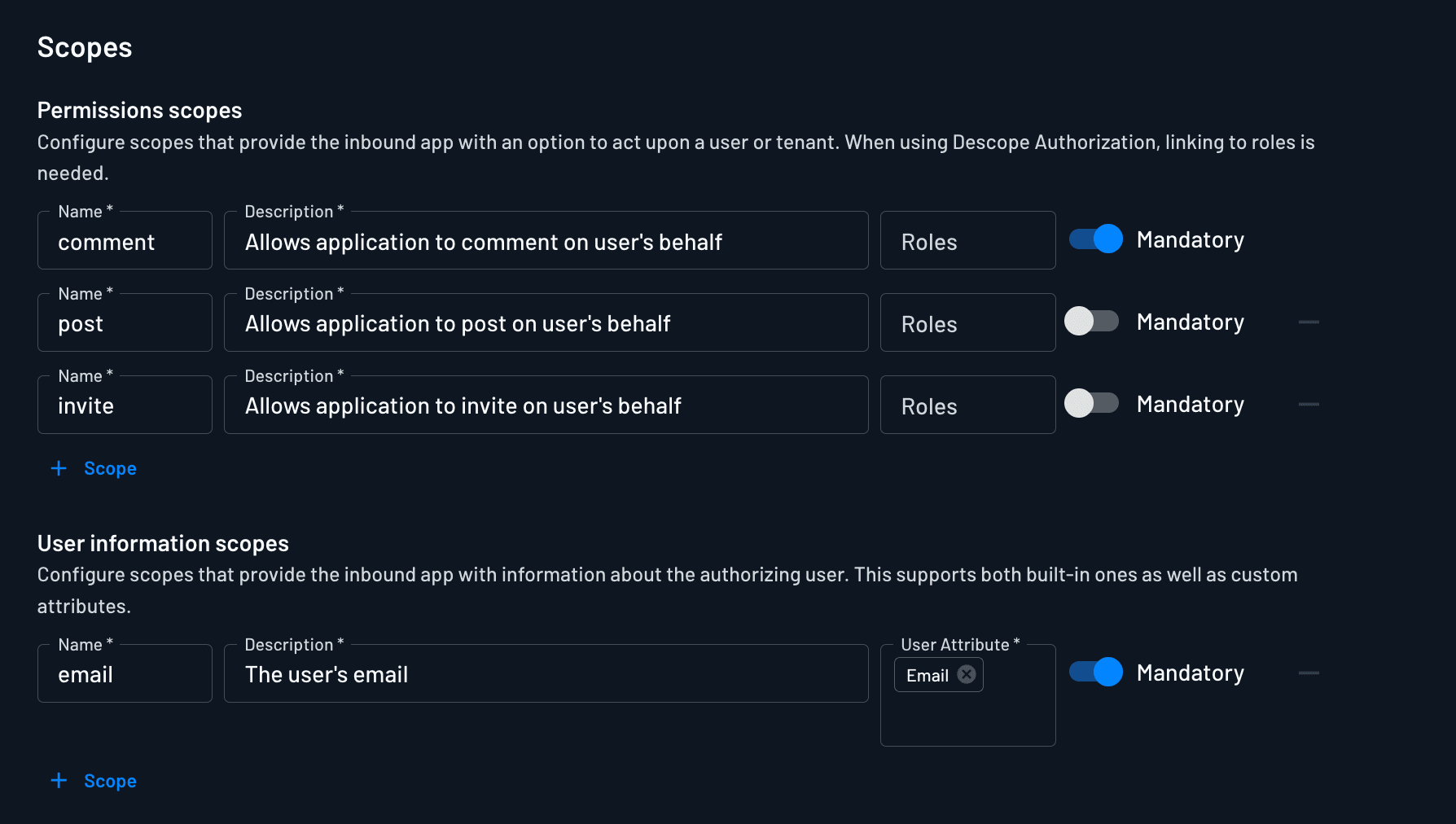
When a user or M2M client authorizes, the token includes scopes from the intersection of what the Inbound App allows, what RBAC permits for the user, and what was granted at consent.
Agentic Clients
Agentic clients can be associated with both API Resources and MCP Server Resources. After you create an API Resource or MCP Server Resource:
- Create or open a Client in the Agentic Identity Hub (or register one via DCR/CIMD).
- Associate the client with the MCP Server Resource and configure which MCP scopes the client may request.
- Enable the grant types the client will use (for example authorization code or client credentials).
For interactive MCP clients, pair the client with Policies so Descope filters which tool scopes users can consent to and receive. For client_credentials agents, scope grants follow client configuration and policies—not per-user consent.
When targeting a specific MCP Server Resource in OAuth requests, include the resource parameter (RFC 8707) on authorize and token calls.
Deleting a Resource
To delete a Resource:
- Open Resources.
- Select the Resource and choose Delete (or use the row action menu).
Deletion is permanent
Deleting a Resource is immediate and cannot be undone. Any Inbound Apps or Clients linked to that Resource will lose their scope association. Tokens already issued may remain valid until they expire, but new authorizations against that Resource will fail until you recreate it and re-associate clients.
Before deleting:
- Confirm no production Inbound Apps or agentic Clients still depend on the Resource.
- Update or remove Policies that reference the Resource.
- Plan to rotate or revoke outstanding tokens if your resource server still accepts them.
Related documentation
- Resources overview — why Resources matter and how they fit into Identity Federation
- Scopes and roles — API RBAC mapping and MCP Connection mapping
- Inbound Apps — OAuth clients for API Resources
- Clients — OAuth clients for MCP Server Resources
- Policies — govern agent access to MCP scopes at token issuance
Resources
Define API and MCP Server Resources in Descope with OAuth scopes, RBAC role mapping, and connection scope mapping for agent and client access.
Scopes and Roles
Map OAuth scopes on API Resources to Descope RBAC roles, and map MCP Server Resource scopes to Connection scopes for third-party tool access.