Anonymous Users
Anonymous users allow you to treat visitors as first-class identities before they provide a verified email, phone number, or username.
You can reduce registration friction while still using Descope as your customer identity layer: issue session tokens, attach custom data, and later convert the same anonymous user to a standard user while retaining information you collected during the anonymous phase.
How Anonymous Users Work
Descope represents an anonymous user by issuing a dedicated anonymous session JWT (not a standard user record with login IDs). That token:
- Is signed by Descope and behaves like other session tokens for your app (e.g. API authorization).
- Has a lifetime tied to the JWT (and refresh behavior you configure)—when the session expires, that anonymous identity ends unless you refresh or convert the user.
- Carries a
danuclaim (true) in the payload so your backend can tell this is an anonymous session. - Can include custom claims (for example user preferences, unverified email addresses, or app-specific flags) for use in your product.
When you are ready, you can convert the anonymous user to a regular user, without losing any data you've already gathered on the user.
See our blog on Boosting conversions with anonymous users and guest checkout.
Creating Anonymous Users
With Flows
The Create Anonymous user - Add Information To JWT flow template provides a starting point. Upon completion, Descope issues an anonymous identity token.
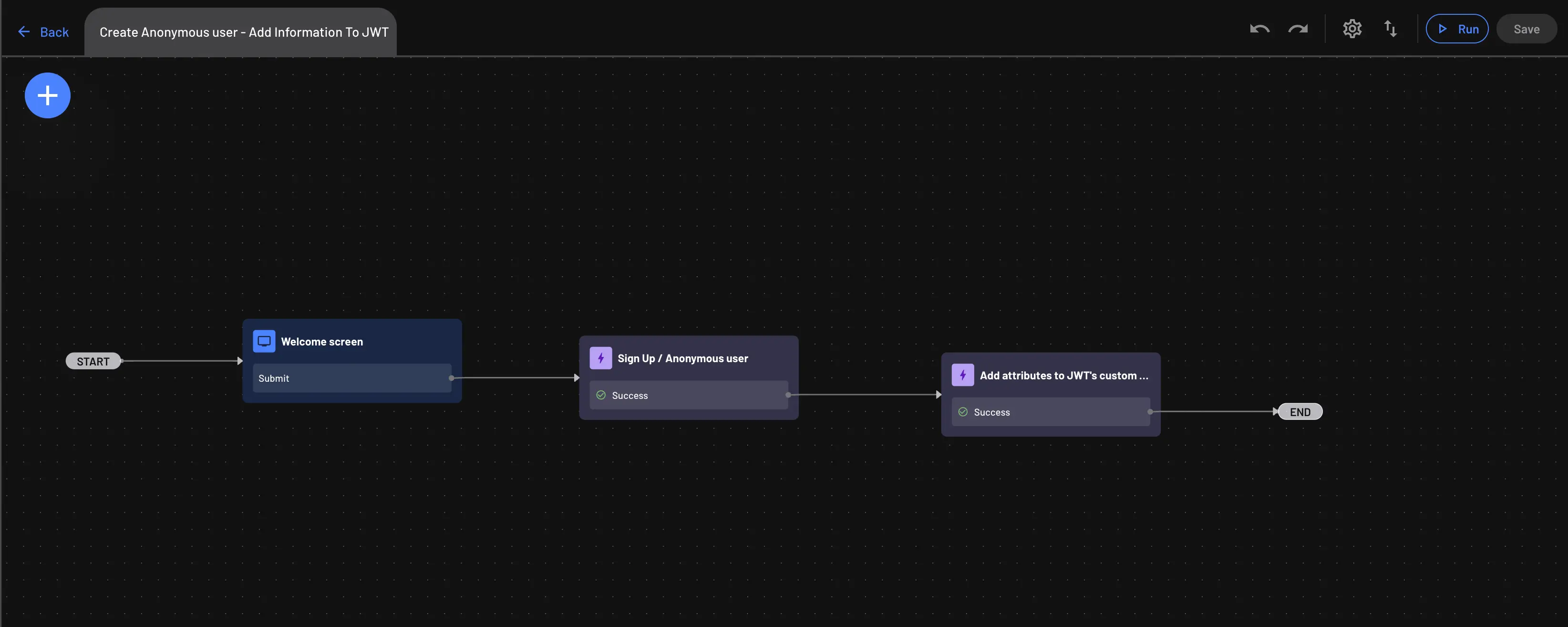
The following example illustrates a typical JWT payload and header after the flow runs. The danu claim marks the session as anonymous; displayName (or any claims you configure) represents optional custom data for your application:
// Payload:
{
  "danu": true,
  "displayName": "xxxxx",
  "drn": "DS",
  "exp": 1731843388,
  "iat": 1731842788,
  "iss": "xxxxxxxxx",
  "rexp": "2024-12-15T11:26:28Z",
  "sub": "xxxxxxxxx"
}

// Header:
{
  "alg": "RS256",
  "kid": "xxxxxxxxxxxxxxxx",
  "typ": "JWT"
}
With SDKs
You can use the Descope Management SDK to mint an anonymous session JWT programmatically. A management key is required. For broader SDK setup, see User management SDKs.
Backend SDK
Install SDK
npm i --save @descope/node-sdkImport and initialize SDK
import DescopeClient from '@descope/node-sdk';
try{
    //  baseUrl="<URL>" // When initializing the Descope client, you can also configure the baseUrl ex: https://auth.company.com  - this is useful when you utilize a custom domain within your Descope project.
    const descopeClient = DescopeClient({ projectId: '__ProjectID__' });
} catch (error) {
    // handle the error
    console.log("failed to initialize: " + error)
}
Create an Anonymous User
This operation creates an anonymous user within the project with the details provided.
Note
You can also perform this operation through the Anonymous User Management API.
 // Args:
//  customClaims (Record<string, any>, optional): A dictionary of custom claims to include in the JWT.
//     These claims can be used to store additional user information.
//  selectedTenant (string, optional): The ID of the tenant to associate with the JWT.
//     This is useful for multi-tenant applications.
//  refreshDuration (number, optional): Duration in seconds for which the new JWT will be valid.

const customClaims = {
    role: "guest",
    permissions: ["read"]
};

const selectedTenant = "tenant_123";
const refreshDuration = 3600;

const resp = await descopeClient.management.jwt.anonymous(customClaims, selectedTenant, refreshDuration);
if (!resp.ok) {
    console.log("Failed to generate JWT for anonymous user.");
    console.log("Status Code: " + resp.code);
    console.log("Error Code: " + resp.error.errorCode);
    console.log("Error Description: " + resp.error.errorDescription);
    console.log("Error Message: " + resp.error.errorMessage);
} else {
    console.log("Successfully generated JWT for anonymous user.");
    console.log(resp.data);
}
Converting Anonymous Users to Regular Users
With Flows
To move from an anonymous session to a regular user, use a flow such as Anonymous User Conversion. This flow authenticates the user and links a verified login ID while preserving context from the anonymous phase.
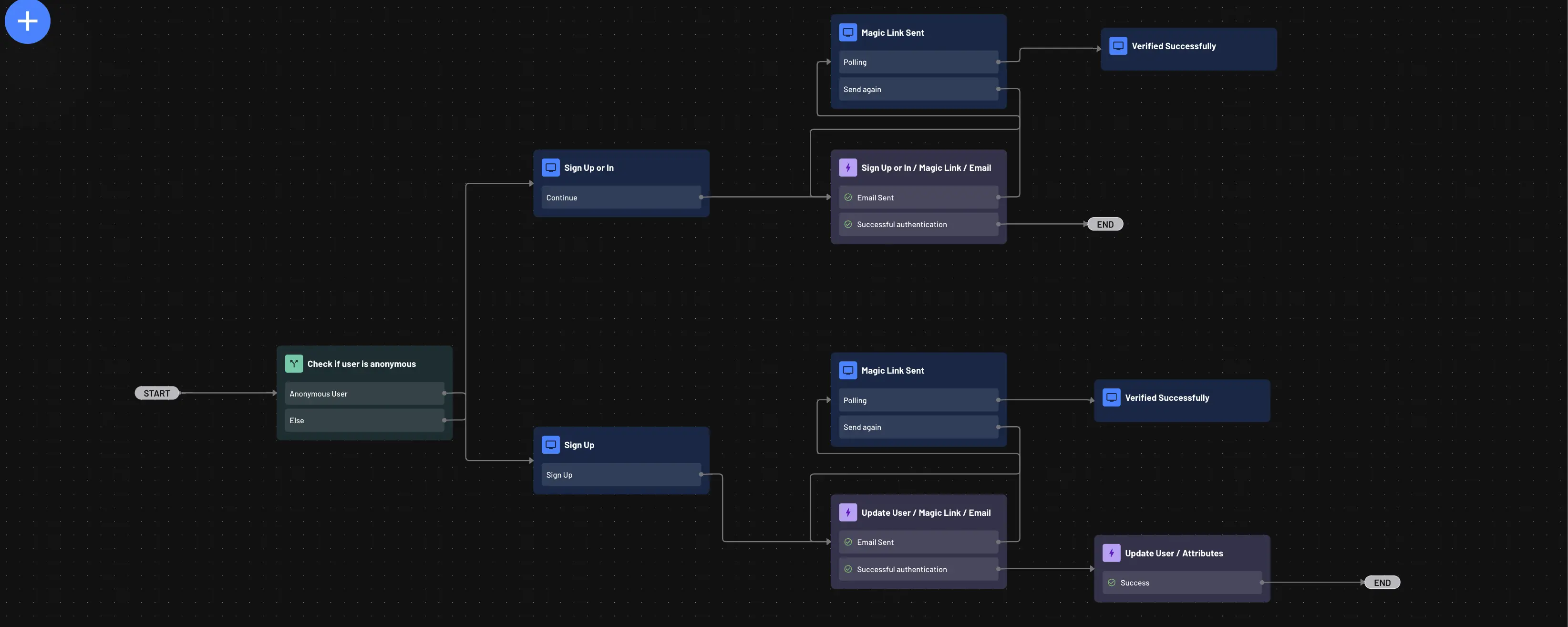
- The template demonstrates one authentication pattern; you can adapt the same approach to other factors your product supports.
- Verify ownership of the login ID (for example via magic link or OTP) before completing conversion. Doing so prevents users from attaching an email or phone number that already belongs to another account.
With SDKs
Note
You may not have access to the refresh token of the anonymous user from your backend, depending on your token management settings.
If this is the case, you will need to use Flows instead, to convert the anonymous user.
You can convert an anonymous user in your backend by calling any update-user auth method while sending the anonymous user's refresh JWT.
Descope detects that there is no real user row for that subject and that the JWT is anonymous (danu: true), then creates a regular user that reuses the anonymous user's ID. Anything you keyed off that ID stays attached.
After you verify the OTP (or magic link / phone update), you receive a real session. On a successful conversion, the auth response includes firstSeen: true.
Convert with OTP Update Email
Start conversion by updating the anonymous user's email via OTP, then verify the code to complete conversion and issue a regular session.
Note
You must verify ownership of the login ID (for example via an OTP or magic link) before completing conversion.
This is to prevent users from attaching an email or phone number, to the newly created user, that already belongs to another account.
// Args:
//  loginId (string): The new email — becomes the login ID for the converted user.
//  email (string): The email address to verify and attach.
//  refreshToken (string): The anonymous user's refresh JWT.
//  updateOptions (object): Use addToLoginIDs and onMergeUseExisting when attaching the new login ID.
//  code (string): The OTP code the user received by email.

const loginId = "user@example.com";
const email = "user@example.com";
const refreshToken = "xxxxx"; // anonymous refresh JWT
const updateOptions = {
    addToLoginIDs: true,
    onMergeUseExisting: true,
};

const updateResp = await descopeClient.otp.update.email(loginId, email, refreshToken, updateOptions);
if (!updateResp.ok) {
    console.log("Failed to start anonymous user conversion.");
    console.log("Status Code: " + updateResp.code);
    console.log("Error Code: " + updateResp.error.errorCode);
    console.log("Error Description: " + updateResp.error.errorDescription);
    console.log("Error Message: " + updateResp.error.errorMessage);
} else {
    console.log("Successfully started OTP email update.");
    console.log(updateResp.data);
}

// After the user enters the OTP code:
const code = "xxxxxx";
const verifyResp = await descopeClient.otp.verify.email(loginId, code);
if (!verifyResp.ok) {
    console.log("Failed to verify OTP code.");
    console.log("Status Code: " + verifyResp.code);
    console.log("Error Code: " + verifyResp.error.errorCode);
    console.log("Error Description: " + verifyResp.error.errorDescription);
    console.log("Error Message: " + verifyResp.error.errorMessage);
} else {
    console.log("Successfully converted anonymous user.");
    console.log("First seen: " + verifyResp.data.firstSeen);
    console.log(verifyResp.data);
}