Multi-Tenant MCP Server
For a high level overview of how MCP servers work with Descope, see the MCP Server docs.
The Python + FastMCP reference implementation is in the Descope AI repo: examples/multi-tenant-mcp.
If your customers are individuals rather than companies, see the Travel Booking MCP Server example instead.
This example shows how to run one MCP server for many tenants. Each tenant gets a different toolset, but the server itself stays tenant-agnostic: you assign one scope per tool, use Descope access policies to decide which scopes each tenant grants at consent, and let the SDK expose only the tools whose scope is in the token. You don't maintain a tenant-to-tools map in code; onboarding a new tenant is a policy change in Descope, not a redeploy.
How It Works
The access token carries dct (active tenant) and the scopes that tenant's policy granted. The server never hardcodes tenants; it keys off scopes.
- Sign-in: One consent flow, one MCP URL. The user picks a tenant (or gets one automatically if they only belong to one). The token is issued with
dctand that tenant's scopes. - Toolset: Every tool is registered with a scope. The SDK filters
tools/listand rejects calls when the scope is missing. - Tenant data: Tools that read or write tenant-specific data pull the tenant id from
dct. Scopes control what the user can do;dctcontrols where. - Multiple tenants: A user can belong to several tenants but is signed into one at a time. Changing tenants means getting a new token; see Step 5.
Example Flow Diagram
Every tenant uses the same MCP URL and consent flow. The user picks a tenant, and that tenant's access policy decides which scopes go into the token alongside dct.
Step 1: Configure the MCP Server
-
Create an MCP Server in Descope:
- Go to MCP Servers and create a server.
- Enable Dynamic Client Registration (DCR) (or CIMD) so clients can register automatically.
- Copy the Well-Known / discovery URL; you'll pass it to the server as
DESCOPE_CONFIG_URL.
-
Enable the
dctclaim in the server's JWT template authorization claims. -
Define one scope per tool (for example
mcp:inventory.read,mcp:metrics.read,mcp:db.write). Use access policies to grant scopes per tenant. A scope the policy doesn't allow won't appear in the token. New tenant = new policy, not new server code.
Step 2: Add Tenant Selection to the Consent Flow
Use one MCP URL and one flow, with no per-tenant connection URLs. Configure this in the User Consent Flow on your server's Dynamic Registration Template. It runs during /authorize.
After authentication, add the Tenant Select component. It lists the user's tenants; the selection sets dct on the issued token. The tenant's access policy adds that tenant's scopes in the same pass. Skip the screen when the user has only one tenant.
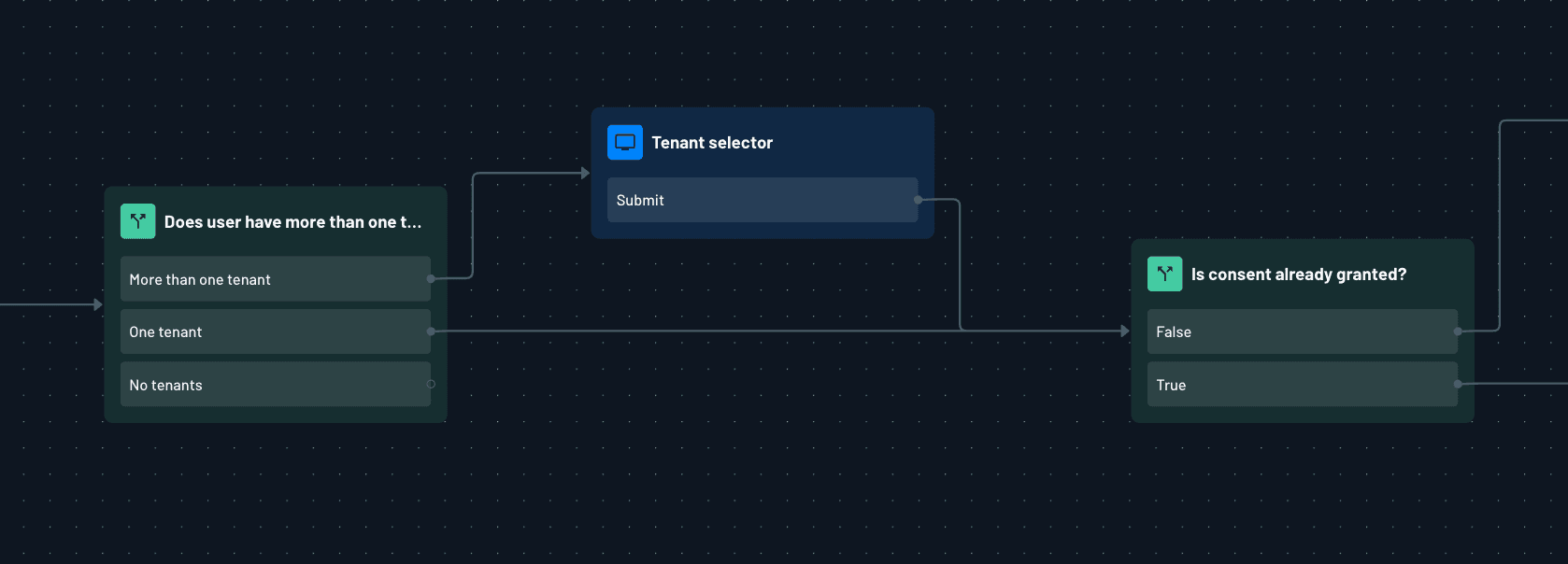
Note
The screenshot is one possible layout. Swap in your own flow once you've built it.
Step 3: Read the Active Tenant from the Token
Tools that operate on tenant data read dct from the verified access token. Bearer middleware validates the token before your handler runs, so this is just a claim lookup, with no extra round trip.
def get_current_tenant() -> tuple[str | None, str | None]:
    """Read the active tenant from the verified token's `dct` claim.

    Returns (current_tenant, error_message).
    """
    access = get_access_token()
    if not access:
        return None, "Authentication required: no bearer token on this request."
    dct = (access.claims or {}).get("dct")
    return (str(dct) if dct else None), None
Step 4: Drive the Toolset from Scopes
Register a single tool catalog. Attach a scope to each tool; the SDK lists and executes only what the token allows.
Both FastMCP and the Express SDK will automatically return a 401 error if the token lacks the required scope.
from fastmcp import FastMCP
from fastmcp.server.auth import require_scopes

mcp = FastMCP("multi-tenant")

@mcp.tool(auth=require_scopes("mcp:inventory.read"))
async def inventory_snapshot() -> str:
    """Inventory for the active tenant."""
    tenant, err = get_current_tenant()
    if err:
        return err
    return f"[{tenant}] inventory snapshot OK."


@mcp.tool(auth=require_scopes("mcp:metrics.read"))
async def metrics_ping() -> str:
    """Metrics for the active tenant."""
    tenant, err = get_current_tenant()
    if err:
        return err
    return f"[{tenant}] pong."
Scope enforcement vs. tools/list
Enforcement is the scope check at call time. Policies decide which scopes land in the token at consent; the SDK rejects any tool whose scope is missing. That holds even if the client cached an old tools/list.
Visibility is what the client shows in tools/list. Filtering the list to the token's scopes keeps clients like Claude from offering tools the user can't run. FastMCP's AuthMiddleware does this from require_scopes. On Express, the shared StreamableHTTPServerTransport returns one global list; rely on the call-time scope check, and optionally filter the list handler yourself if you want the UI to match.
Because scopes are tenant-specific via policy, filtering by scope gives you per-tenant toolsets without a tenant registry in the server.
Step 5: Users in More Than One Tenant
If a user belongs to one tenant, you're done after Step 4. This section is for users who need to move between tenants.
They're signed into whichever tenant they picked at consent (dct). Both dct and the scopes are signed into the token, so working in another organization means getting a new token.
The easiest way to switch tenants is to disconnect and sign in again, picking the other tenant in consent. The user comes back with a new token and tool list, and you don't need to build anything in the server for this. The consent flow from Step 2 handles tenant selection every time the user signs in.
Some servers also offer a switch_tenant tool. But if the other tenant requires SSO, most agents and clients still make the user sign in again, which means disconnecting and starting a new session.
If your server lets users pick a working context inside the same identity, such as a project or environment, that's a tool in your server rather than a tenant switch, and doesn't need a new token. The Descope MCP Server works this way, letting you switch between Descope projects with a tool.