Enabling OAuth Sign-In for Pre-Created Users
Some Descope projects disable self-service sign-ups and instead pre-create users manually, for example, through the Management API or a bulk import. This is common when a company wants full control over who gets an account, rather than letting anyone create one at sign-up time.
The complication comes when you also want these pre-created users to sign in with OAuth (social login) rather
than a password or OTP. The first time a pre-created user authenticates with an OAuth provider, Descope has no
existing login ID that matches the identifier returned by that provider, since the user has never logged in
with it before. Because sign-ups are disabled, Descope cannot fall back to creating a new user, and the
Sign In / OAuth action resolves to its User does not exist outcome instead of Successful authentication.
This guide covers how to handle that outcome in a flow: verify the email address returned by the OAuth provider with an OTP code, then use that verified email to associate the OAuth identity with the user's existing, pre-created account, instead of blocking them or creating a duplicate.
The flow described below is available as a ready-to-use template in the Flow Library, so you can add it to your project and adjust it to fit your needs rather than building it from scratch.
Why verify the email first
The email claim returned by an OAuth identity provider isn't always trustworthy for account linking (some providers allow the email claim to be changed by the account holder). Verifying it with an OTP before attaching the OAuth login ID to an existing user prevents account takeover. Read more in Securely Merging OAuth Identities.
How the Flow Works
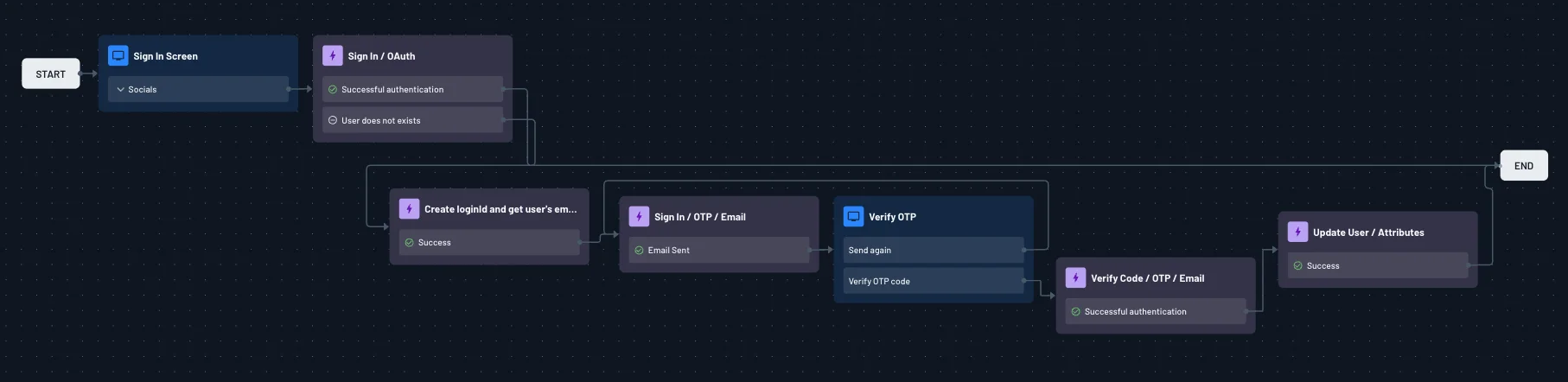
-
Sign In Screen - Presents the user with a social login button (
Socials). -
Sign In / OAuth - Runs the OAuth exchange with the provider.
Successful authentication: the returned identifier already matches an existing login ID (the user has signed in with this provider before), so the flow can go straight toEND.User does not exist: this is the first time this OAuth identity has been seen. Continue to the next step instead of ending the flow.
-
Create login ID and get user's email - Extracts the email address from the OAuth provider's claims and prepares it as the login ID to verify, without creating a new user (sign-ups remain disabled).
-
Sign In / OTP / Email - Sends a one-time passcode to that email address.
-
Verify OTP - Screen that captures the code from the user, with a
Send againoption, and routes toVerify OTP code. -
Verify Code / OTP / Email - Confirms the OTP is correct. On
Successful authentication, the flow now knows the person behind the OAuth login also owns the email address on the pre-created account. -
Update User / Attributes - Attaches the OAuth login ID to the existing user record that matches the verified email, rather than creating a new one. This is the step that actually links the OAuth identity to the pre-created account. Enable Add to login IDs on this action so the OAuth identifier is saved against the existing user going forward. See Link User Identities Across Different Auth Methods for more detail on this option and the merge behavior it controls.
-
End - On success, the user is now signed in, and future sign-ins with this same OAuth provider will resolve directly through the
Successful authenticationpath in step 2, since the login ID has been saved.
Key Points
- Sign-ups stay disabled throughout: no new user is ever created by this flow. The OTP/email step only confirms the OAuth email belongs to an account that already exists.
- If no existing user matches the verified email, decide how you want the flow to behave (for example, show
an error screen and end the flow) rather than falling through to
Update User / Attributes, which expects a matching user to update. - This pattern works for any OAuth provider configured in Social Login (OAuth), since the email claim from the provider is what's used to find the matching pre-created user.
- For providers that return unverified emails (which changes how
Sign In / OAuthbehaves), see Handling OAuth Providers with Unverified Emails.