AWS EventBridge Connector
Amazon EventBridge is a serverless event bus with routing rules to targets like AWS Lambda, Amazon SQS, or Amazon Kinesis Data Firehose.
Descope's AWS EventBridge connector allows you to publish audit events and troubleshooting logs directly to an event bus in your AWS account, so you can route them into your existing event-driven pipelines.
Setting Up the AWS EventBridge Connector
To integrate the connector, follow the steps below:
1. Navigate to Connector
- Visit the Connectors page in the Descope Console.
- Select AWS EventBridge from the list of connectors.
2. Connector Setup
Enter the following information to configure the connector:
- Connector name: Custom name for your connector. This will come in handy when creating multiple connectors from the same connector template.
- Connector description (Optional): Describe what your connector is used for.
- Authentication: Choose between the following authentication options:
Use AWS Credentials
Use your AWS credentials to authenticate. You will need to provide:
- Access Key ID: The AWS access key ID.
- Secret Access Key: The AWS secret access key.
The IAM user associated with these credentials must have the events:PutEvents permission on your event bus. You can attach a policy like this:
{
  "Version": "2012-10-17",
  "Statement": [
    {
      "Effect": "Allow",
      "Action": ["events:PutEvents"],
      "Resource": "arn:aws:events:us-east-1:123456789012:event-bus/your-event-bus-name"
    }
  ]
}
Use Role Based Permissions
Use role-based permissions to authenticate instead of long-lived credentials. You will need to provide:
- Role ARN: The Amazon Resource Name (ARN) of the role that has permissions to call
events:PutEventson your event bus. - External ID: The external ID used to assume the role.
Important
When creating the IAM role for this connector, you must include a trust policy that allows Descope to assume the role:
Trust Policy Requirements:
- Principal:
arn:aws:iam::312892722078:role/prod-external-role-us-east-1 - External ID: The external ID provided by Descope during connector configuration
- Action:
sts:AssumeRole
Your trust policy should look like this:
{
  "Version": "2012-10-17",
  "Statement": [
    {
      "Effect": "Allow",
      "Principal": {
        "AWS": "arn:aws:iam::312892722078:role/prod-external-role-us-east-1"
      },
      "Action": "sts:AssumeRole",
      "Condition": {
        "StringEquals": {
          "sts:ExternalId": "your-external-id-from-descope"
        }
      }
    }
  ]
}
Without this trust policy configuration, you'll receive an is not authorized to perform: sts:AssumeRole error when testing the connector.
- Region: The AWS region your event bus is located in, e.g.
us-east-1. - Event Bus: The name or ARN of the event bus that logs and audit events will be sent to. This can be your account's default event bus or a custom event bus.
- Stream Audit Events: Select this if you want to stream audit events to your AWS EventBridge event bus.
- Stream Troubleshooting Events: Decide whether troubleshooting events are also sent to AWS EventBridge.
- Mask PII data: Decide whether to mask PII (personally identifiable information) in the logs.
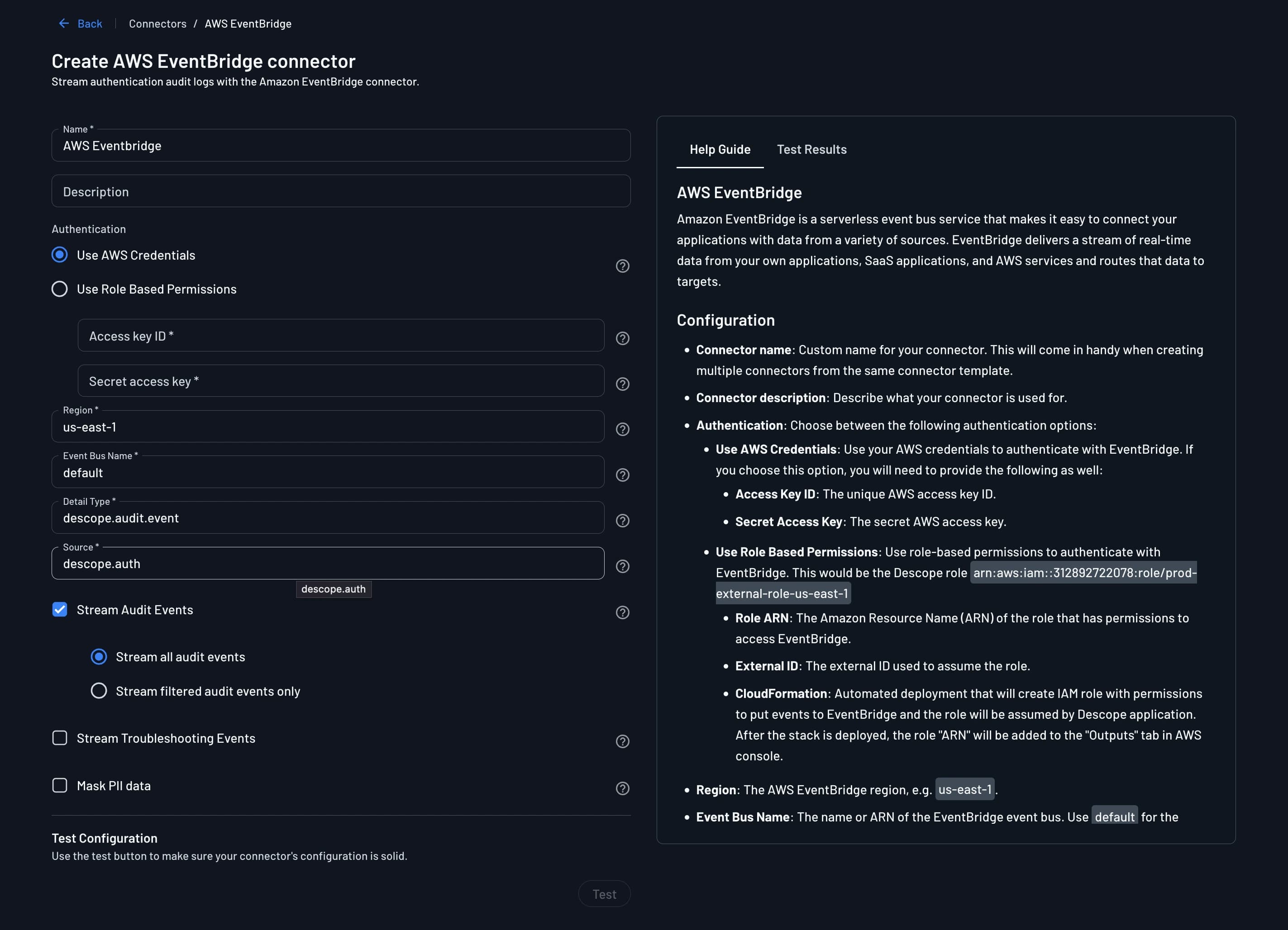
3. Test & Save
- Use the Test option to verify that events can be published to your event bus.
- Review the results in the
Test Resultspanel. - Once successful, click
Createto save the connector.
Viewing Audit Logs
Once configured, audit and troubleshooting logs are published to your AWS EventBridge event bus as events. Each event includes a Source and Detail-Type identifying it as originating from Descope, along with a Detail payload containing the event data as JSON.
The logs can still be viewed in Descope under the Audit and Troubleshoot section of the Descope Console. For more information on audit trail and log streaming see Audit Trail Streaming.
From your event bus, you can attach rules and targets to route Descope events to destinations such as AWS Lambda, Amazon SQS, or Amazon Kinesis Data Firehose for further processing and storage.