Authentication Methods
Descope supports a wide range of authentication methods, and each one can be added to a flow as an Action step. This page gives an overview of the authentication method actions available in the flow builder. For method-specific setup (like connectors, templates, or provider configuration), see each method's dedicated Auth Methods guide.
The Sign Up / Sign In Action Pattern
Most authentication methods expose the same four actions in the flow builder, differing only in how they handle whether the user already exists:
- Sign Up /
<Method>: Signs the user up. Fails if the user already exists. - Sign Up or In /
<Method>: Signs the user in if they exist, and automatically signs them up if they don't. This is the most commonly used action for login/signup flows. - Sign In /
<Method>: Signs the user in. Fails if the user doesn't exist. - Update User /
<Method>: Merges the method (for example a verified email or phone number) into an existing, already-authenticated user.
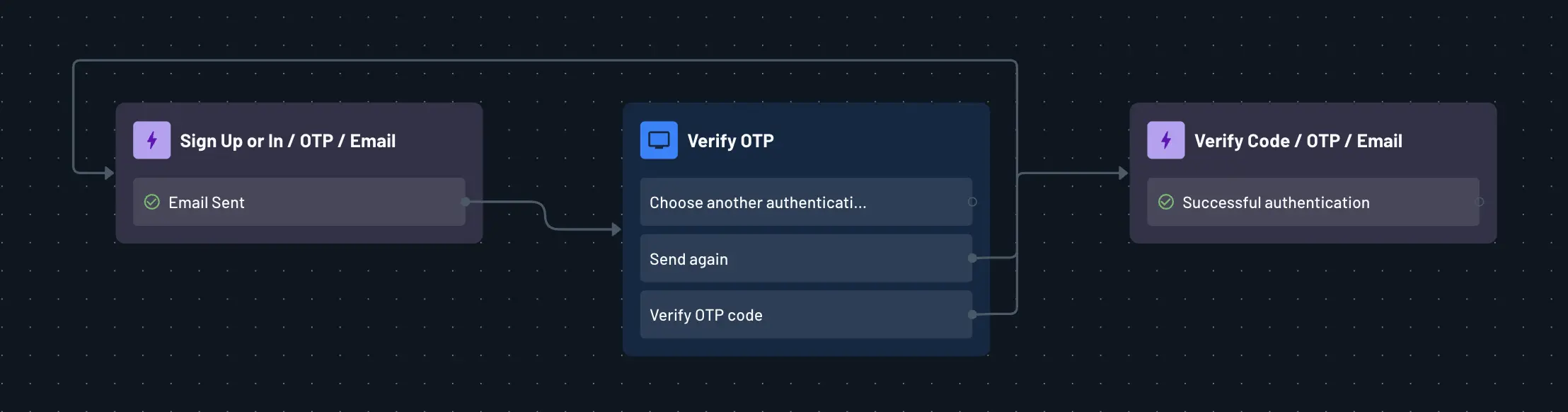
To add any of these, click the blue + in the flow builder, select Action, then search for the method by name. See Adding Actions to Flows for the general steps.
Available Methods
- OTP: One-time codes sent via email or SMS.
- Magic Link: A clickable link sent via email or SMS that verifies the user.
- Enchanted Link: A cross-device link flow where the user approves the request from another device or tab.
- Passkeys (WebAuthn): Biometric or device-based authentication using the WebAuthn standard.
- Social Login (OAuth): Sign in via third-party identity providers like Google, Facebook, Apple, and more.
- Passwords: Traditional password-based authentication, including reset flows.
- Authenticator Apps (TOTP): Time-based one-time codes from apps like Google Authenticator.
- SSO: Redirects the user to their tenant's configured identity provider (SAML or OIDC).
- SSO / Authenticate Only: Verifies identity at the tenant's identity provider without creating a user or issuing a session.
- nOTP: Number matching-based one-time authentication.
- Device Authentication: Authenticates a device directly, commonly used for headless or IoT scenarios.
- Embedded Link: A short-lived, single-use link your backend generates and delivers outside of Descope's messaging (for example your own email templates).
- Recovery Codes: Backup codes users can redeem if they lose access to their primary method.
- Security Questions: Knowledge-based verification as a secondary or fallback method.
- External Authentication: Delegates authentication entirely to your own existing login system, then resumes the Descope flow.
Note
SSO exposes SSO (sign the user in) and SSO / Authenticate Only (verify identity without a user or session). There are no separate Sign Up / Sign In / Update User variants, since the identity provider handles authentication.
Combining Methods
Note
Descope doesn't distinguish between "first factor" and "MFA" authentication methods, and any auth method can serve as either. This means you can mix and match any combination of methods to build the exact multi-factor experience you want.
See Multi-Factor Authentication (MFA), for more details.
Because each method is its own action, you can offer multiple authentication options on a single screen (for example, buttons for Continue with Google, Continue with Passkey, and a Sign Up or In / OTP action triggered by an email form) and route users to different next steps based on which action completes.
Error Handling
Like any flow action, authentication method actions can fail (such as an incorrect OTP code). You can configure how the flow responds under each action's error handling settings.
See Handling Action Errors in Flows for the available options.