SCIM Management
Descope supports SCIM 2.0 (System for Cross-domain Identity Management), enabling identity providers (IdPs) such as Okta, Azure, Ping Identity, and others to automatically provision, update, and deprovision users and groups in your Descope project.
Once SCIM provisioning is configured, updates made in the IdP—such as user creation, profile edits, group assignments, or deactivation—are automatically pushed to Descope. These updates are applied to user sessions the next time the user logs in or refreshes their session token (JWT).
SCIM enables centralized identity lifecycle management and ensures that Descope remains consistent with your IdP's directory.
SSO is not required
SCIM provisioning does not require SSO to be enabled for the tenant. Access key creation, the IdP's connection test, and user and group sync all work even when SSO was never set up. Group mapping is configured in the Roles & Groups tab of the tenant's authentication settings, and attribute mapping is configured in the SSO tab. Both can be configured even when SSO is disabled. See Group and Attribute Mapping below. Users created via SCIM while SSO is disabled are marked as SCIM-provisioned users only, not as SSO users.
Who Gets Provisioned: Assignment in the IdP
A common misconception is that enabling SCIM means "every user in the IdP can now log in". That is not how SCIM works. Provisioning is driven entirely by the IdP — a user only appears in Descope after the IdP decides to push them, which happens when the user is assigned to the application on the IdP side representing Descope (directly, or by being a member of a group that is assigned to the app). Different IdPs name this differently — Azure calls it an Enterprise Application, Okta calls it an app integration — but the concept is the same.
This means:
- Descope cannot provision a user on its own: Descope is the SCIM service provider; it only receives what the IdP sends.
- A new employee joining your customer's organization is not automatically provisioned to your app: Their IT admin must assign that employee to the application on the IdP side (in Azure, Okta, etc.).
- If a user is missing in Descope when JIT is disabled, the cause is almost always that the user was not assigned to the app in the IdP: In most setups this blocks login entirely — the IdP rejects authentication for unassigned users before Descope is reached. In setups where SSO and SCIM use different IdP applications, authentication can succeed via the SSO app and Descope will then report the user as unknown because no SCIM record exists.
See the SCIM Best Practices guide for the recommended onboarding pattern using group-based assignment, and the SSO troubleshooting guide for diagnosing provisioning failures.
Group Mapping vs. Provisioning
These two concepts are often confused but are completely separate:
| Mechanism | Where it lives | What it does |
|---|---|---|
| Provisioning (who exists) | IdP | Decides which users get pushed to Descope, based on who is assigned to the application on the IdP side. |
| Group → Role Mapping (what they can do) | Descope (Roles & Groups tab) | Once a user is provisioned, maps the groups the IdP sent to Descope Roles included in the user's JWT. |
A user mapped to a role via group mapping does not get provisioned because of the mapping. The IdP must first assign the user to the app and push them. Only then does Descope apply role mapping to the groups the IdP sent.
SCIM vs. JIT Provisioning
Important
You can disable JIT provisioning if you would rather rely on just SCIM for user management. However, you can still use JIT provisioning to create users as they log in simultaneously with SCIM, which can be useful for certain use cases.
Descope supports both SCIM and Just-In-Time (JIT) provisioning via SSO.
| Provisioning Method | Recommended Use Case |
|---|---|
| SCIM | When your IdP supports full user lifecycle management (create, update, deactivate). |
| JIT | When you only need to create/update users as they log in using SSO. |
What SCIM Can Do
SCIM provisioning in Descope allows your IdP to:
- Create and update user profiles
- Deactivate users and remove their access
- Create, update, and delete groups
- Assign users to groups
These are implemented in accordance with the SCIM 2.0 protocol and validated during IdP setup (e.g., via Okta's or Azure's provisioning tests).
SCIM groups are automatically mapped to Descope Roles. Read more about Group and Attribute Mapping below.
Group and Attribute Mapping
When groups are pushed to Descope via SCIM, they are interpreted as Roles. These roles are:
- Included in the user's JWT (
rolesclaim, under the associated tenant) - Are resolved using the same group mapping rules that apply to SSO logins, ensuring consistency between SCIM and SSO
Similarly, SCIM-pushed user attributes (e.g., name, email, phone number, department) are stored in the Descope user profile and available in flows and session data.
Group mapping is configured once, in the Roles & Groups tab of the tenant's authentication settings in the Descope Console, and applies to both SSO logins and SCIM provisioning. That tab holds group-to-role mapping, default roles, and FGA group mapping.
Attribute mapping stays in the SSO tab and remains per SSO method, so precedence still matters for it: within the bound SSO configuration, the attribute mapping of an enabled SSO method (SAML or OIDC) takes precedence. When neither method is enabled, the configured attribute mapping still applies, which is what lets a SCIM-only tenant rely on it.
Group mapping does not depend on which SSO method the tenant uses. It is kept in step across the tenant's SAML and OIDC settings, so switching the tenant between SAML, OIDC, and no SSO at all does not lose or change it, and SCIM-only tenants can rely on it as well. The mapping belongs to the SSO configuration the SCIM access key is bound to (keys created without an sso_id use the tenant's default SSO configuration; see Multi-Tenant and Multi-SSO Architecture).
Tenant admins can also configure the mappings themselves through the SCIM setup guides in the SSO Setup Suite, which include the mapping steps.
Group-to-Role Mapping
Group mappings are configured in the Roles & Groups tab and apply to both SCIM and JIT flows. For example:
- Group
engineering→ Roledeveloper - Group
finance→ Roleauditor
If a SCIM or SSO login provides one of these groups, the mapped role will be assigned.
By default, Descope adds mapped roles to whatever roles the user already has on the tenant, so a role assigned manually in the Console stays in place after a SCIM sync. To have SCIM/SSO group mapping replace the user's existing tenant roles on every sync or login instead of adding to them, turn on Override roles in Project-Level SSO Settings.
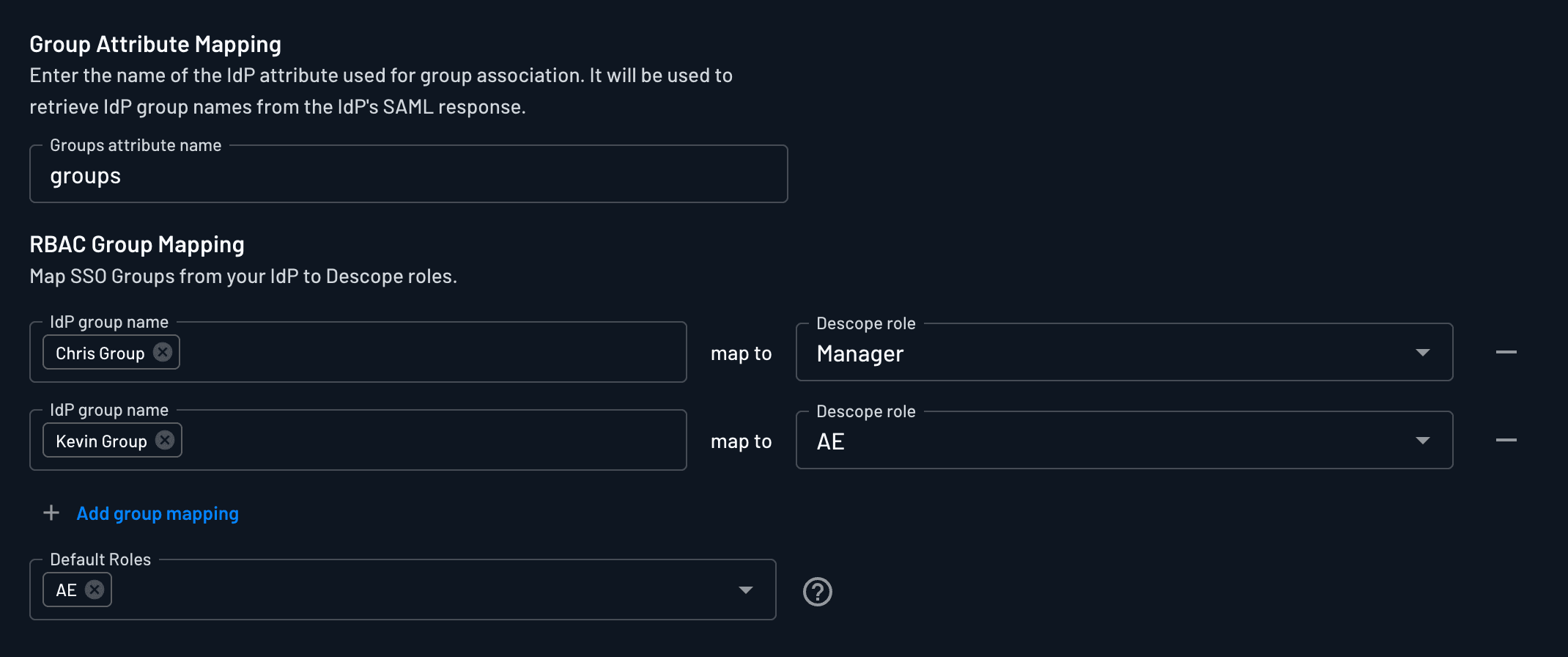
Default Roles
If no mapped roles are found from the user's groups, Descope assigns Default Roles, as defined in the same Roles & Groups tab.
- These apply to both SCIM and JIT flows
- Useful for assigning fallback access (e.g.,
read-only) when group data is missing
Creating SCIM Access Keys
To authorize SCIM requests from your IdP to Descope, a bearer token is required in the following format:
Authorization: Bearer __ProjectID__:<AccessKey>Use one of the three methods below. Each produces a correctly-shaped key and hands you the complete bearer token, project ID already prefixed.
Do not hand-build a SCIM key
A SCIM key is an access key with specific scoping, roles and custom claims, and a bearer token that joins it to your project ID. Assembling one yourself through the generic access key API is the single most common cause of a failed IdP connection test — the resulting 401 reports a missing project ID, not a missing claim, so it sends people looking in the wrong place.
Option 1: The SCIM Access Key API
The fastest path if you are automating tenant onboarding. One call returns the bearer token to paste into the IdP.
curl -X POST "https://api.descope.com/v1/mgmt/scim/key/create" \
  -H "Authorization: Bearer $DESCOPE_PROJECT_ID:$DESCOPE_MANAGEMENT_KEY" \
  -H "Content-Type: application/json" \
  -d '{"tenantId": "<TENANT_ID>"}'
The response carries the cleartext to configure in the IdP and the scimUrl to point it at. On a tenant with more than one SSO configuration, pass ssoId to bind the key to the right one. See Managing SCIM Access Keys Programmatically below for the full set of operations.
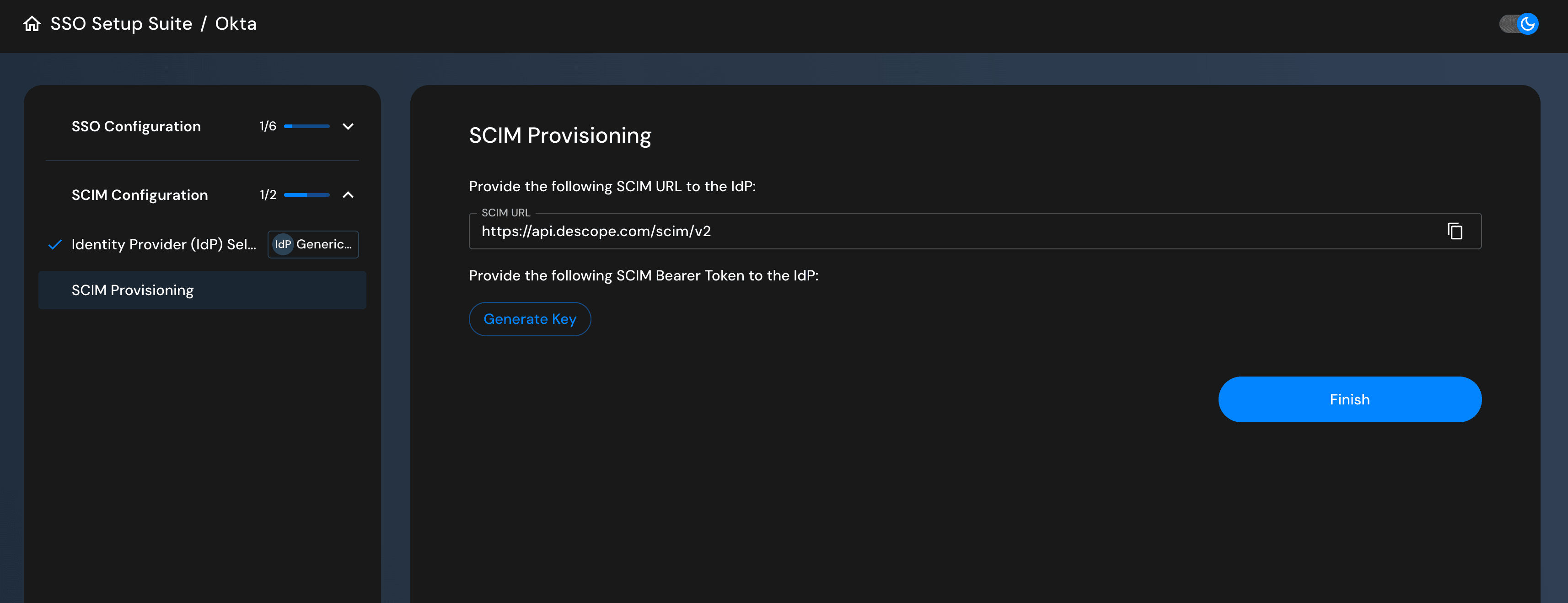
Option 2: SSO Setup Suite
The Descope SSO Setup Suite includes a built-in option for tenants to configure SCIM themselves. This requires no access key handling at all and is the right choice for enterprise self-service onboarding.
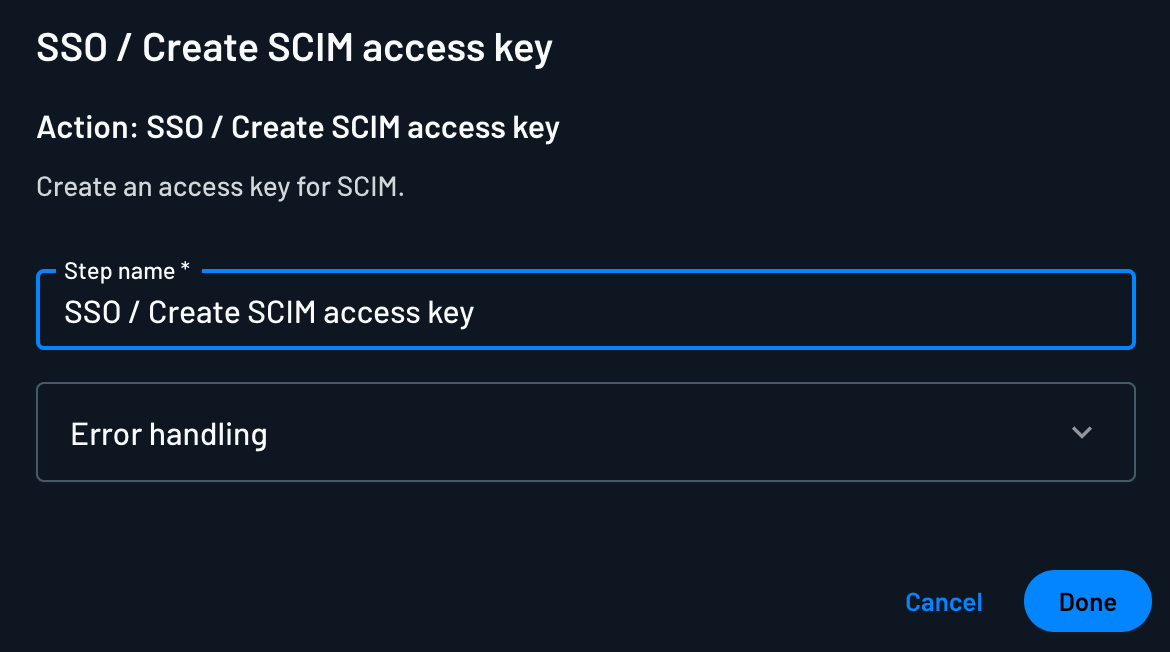
Option 3: Create SCIM Access Key Flow Action
You can build custom onboarding flows that generate SCIM access keys using the Create SCIM Access Key action, for automation during tenant provisioning. The action exposes the key as the scimKey output variable and the SCIM URL as scimUrl.
Bind scimKey on the very next screen
The cleartext is deliberately not persisted across flow steps. It is available only on the screen immediately following the action, and only if a component on that screen references scimKey. A screen further along the flow will not have it.
What a SCIM key contains
You should not need this to create a key, but it is useful when auditing or debugging one that already exists. A SCIM access key:
- Is scoped to exactly one tenant. A key associated with more than one tenant is rejected.
- Carries a role on that tenant granting both the
SSO AdminandUser Adminpermissions. TheSCIMrole Descope creates automatically grants exactly these two and nothing else. The built-inTenant Adminrole also satisfies the check, but additionally grantsImpersonate, so it is the wrong choice for a credential you hand to an IdP. - Carries the custom claim
{"scim": true}, plus{"ssoid": "<ssoId>"}when the tenant has more than one SSO configuration. The claim key isssoid, with no underscore, unlike thesso_idparameter used elsewhere in this documentation. - Is valid: not expired, not deactivated, and not deleted.
A key predating the {"scim": true} claim still works, but Descope records it as a deprecated SCIM key and it will stop working once the claim becomes mandatory. Every method above sets it. If a key is failing and it has the claim, the claim is not your cause.
Managing SCIM Tokens
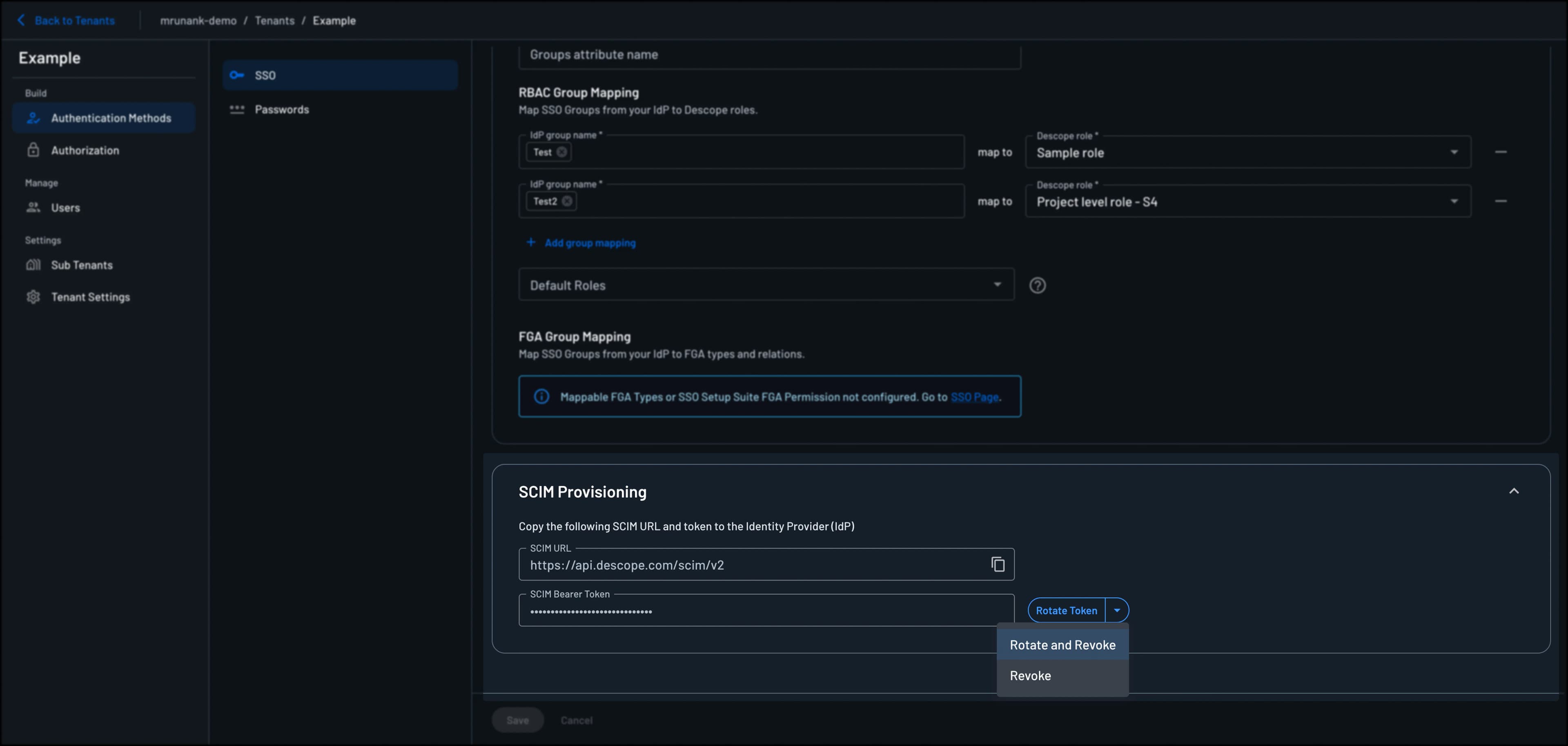
SCIM tokens can be rotated or revoked to maintain security and control over your SCIM integration. You can either Rotate token, Revoke token, or Rotate and Revoke token. You can also change a SCIM token's expiration without rotating the token.
You can manage SCIM tokens in the Descope console in the Tenants page -> Authentication Methods -> SSO -> SCIM Provisioning or in the SSO Setup Suite. All three operations are also available on the Management API — see Managing SCIM Access Keys Programmatically, and note that the API verb names do not match these Console labels.
Important
When you rotate and revoke or just revoke a SCIM token, all pre-existing SCIM tokens that may have been rotated will suddenly become invalidated. This means any IdP configurations still using old tokens will stop working immediately.
Rotate
This operation creates a new SCIM token while keeping existing tokens active. To start using the new token, update your IdP's SCIM configuration. The old token remains valid until manually revoked.
Use this when:
- You want to test a new token before fully switching
- You need zero-downtime token rotation
- You're planning a gradual migration to a new token
Revoke
This operation revokes the current SCIM token without creating a new one. This effectively disables SCIM provisioning for the tenant.
Use this when:
- You want to disable SCIM provisioning entirely
- You're switching to JIT (Just-In-Time) provisioning instead
Rotate and Revoke
Note
After rotating and revoking, update your IdP's SCIM configuration with the new bearer token. Until then, SCIM provisioning will not work.
This operation creates a new SCIM token and immediately revokes the old one. Your IdP will need to be updated with the new token to continue SCIM provisioning.
Use this when:
- You suspect a token may have been compromised
- You're conducting regular security maintenance
- You need to invalidate the old token immediately
Change Expiration
To change the expiration of an existing SCIM token, edit the SCIM access key on the Access Keys page in the Descope Console. The SCIM token stays the same, so the IdP's SCIM configuration does not need to be updated. For the steps, see Changing an Access Key's Expiration.
Use this when:
- A SCIM token is about to expire and you want to keep the same token
- A SCIM token has expired and you want SCIM provisioning to resume without updating the IdP
- You want to add an expiration to a SCIM token, or remove the expiration
SCIM Session Behavior
SCIM updates do not immediately revoke existing user sessions. Instead:
- Changes are applied on the next login or token refresh
- Role changes, deactivations, and profile updates take effect without requiring user input
To enforce stricter security policies, consider shortening session durations or logging a user out (revoking their session) when group membership or access levels change.
Managing SCIM Access Keys Programmatically
Everything the Console does to a SCIM token is also available on the Management API, authenticated with a management key. Use it to automate tenant onboarding, rotate keys on a schedule, or cut off a tenant's provisioning without opening the Console.
| Endpoint | What it does |
|---|---|
POST /v1/mgmt/scim/key/create | Creates a key. Existing keys stay valid. |
POST /v1/mgmt/scim/key/rotate | Creates a key and revokes the previous ones. |
POST /v1/mgmt/scim/key/revoke | Revokes every SCIM key for the SSO configuration. |
POST /v1/mgmt/scim/key/activate | Restores keys revoked with revokeMode: SCIM_KEY_REVOKE_MODE_DEACTIVATE. |
GET /v1/mgmt/scim/key | Lists a tenant's SCIM keys. Metadata only. |
`create` is the zero-downtime option, not `rotate`
The API verbs do not line up with the Console labels. POST /v1/mgmt/scim/key/create is the API equivalent of the Console's Rotate — it issues a new key and leaves the existing ones working, which is what you want for a gradual cutover. POST /v1/mgmt/scim/key/rotate is the equivalent of Rotate and Revoke: the old secret stops working the moment the call returns, so the tenant stops provisioning until you update the IdP with the new token.
| Console | API |
|---|---|
| Rotate (zero-downtime) | POST /v1/mgmt/scim/key/create |
| Revoke | POST /v1/mgmt/scim/key/revoke |
| Rotate and Revoke | POST /v1/mgmt/scim/key/rotate |
Delete or deactivate
revoke and rotate both accept a revokeMode:
SCIM_KEY_REVOKE_MODE_DELETE(the default, and what the Console does) removes the keys permanently.SCIM_KEY_REVOKE_MODE_DEACTIVATEdisables them reversibly. The key rows and their audit trail survive, and you can bring them back withPOST /v1/mgmt/scim/key/activate.
Activation takes explicit key ids, which you get from GET /v1/mgmt/scim/key. This is deliberate: activating a whole SSO configuration at once would silently restore a key that was deactivated because its secret leaked.
Targeting the right SSO configuration
ssoId selects which SSO configuration the call applies to. Omitting it targets the tenant's default configuration — it does not mean "every configuration". On a tenant with several SSO configurations, a revoke sent with only a tenantId returns success while the other configurations keep provisioning. Call GET /v1/mgmt/scim/key first to see which configurations hold keys; that endpoint is the one place where omitting ssoId does mean "all of them".
Expiring keys
create and rotate accept an expireTime in epoch seconds. It defaults to 0, which means the key never expires — the same as every key the SSO Setup Suite makes.
Think twice before setting an expiry
When a SCIM key lapses, the IdP's SCIM calls start failing and provisioning and deprovisioning stop until someone extends the key's expiration or rotates the key. Nothing warns you first. If you set an expiry, own the rotation that goes with it.
To change the expiration of an existing SCIM key, including a SCIM key that has already expired, edit the key on the Access Keys page in the Descope Console. The bearer token configured in the IdP stays the same, so SCIM provisioning resumes without rotating the key. See Changing an Access Key's Expiration.
SCIM functionality is not available via the Descope SDKs and must be accessed through the HTTP API.
The SCIM 2.0 API
Separately from key management, Descope exposes the SCIM 2.0 protocol endpoints themselves — Users, Groups, ServiceProviderConfig and ResourceTypes. These are the endpoints your IdP calls, and they authenticate with a SCIM access key rather than a management key. You can call them yourself to inspect what the IdP has pushed or to reproduce a failing request.
Multi-Tenant and Multi-SSO Architecture
Descope is designed for multi-tenant SaaS environments and supports multiple SSO configurations per tenant. SCIM provisioning is tied to each SSO configuration, not just the tenant.
This allows:
- One tenant to support multiple IdPs (e.g., Okta and Azure)
- Each SSO configuration to have its own SCIM integration
- Fine-grained, isolated identity management for each IdP under the same tenant
A SCIM access key is bound to the SSO configuration (sso_id) it was created for. If that sso_id no longer resolves to any SSO configuration in the tenant (for example, because the configuration was deleted), SCIM requests using that key are rejected with a 400 error. To restore provisioning, create a new SCIM access key tied to a valid SSO configuration.
SCIM Configuration Guides
Descope offers detailed setup guides for configuring SCIM provisioning with popular identity providers:
| Identity Provider | Guide |
|---|---|
| Okta | SCIM Provisioning with Okta → |
| Azure (Entra ID) | SCIM Provisioning with Azure → |
Each guide provides:
- Step-by-step setup instructions
- Attribute and group mapping guidance
- Troubleshooting and validation steps
For day-to-day operational guidance — how customers should onboard new users so they are automatically provisioned, why group mapping is not the same as provisioning, and how to debug "user can't log in" reports — see SCIM Best Practices.
Migrating an existing SCIM setup?
If a tenant already has SCIM provisioning configured with a different provider, you don't need to have their IT admin reconfigure the IdP. See SSO & SCIM Migration for how to proxy their existing SCIM traffic to Descope seamlessly.